

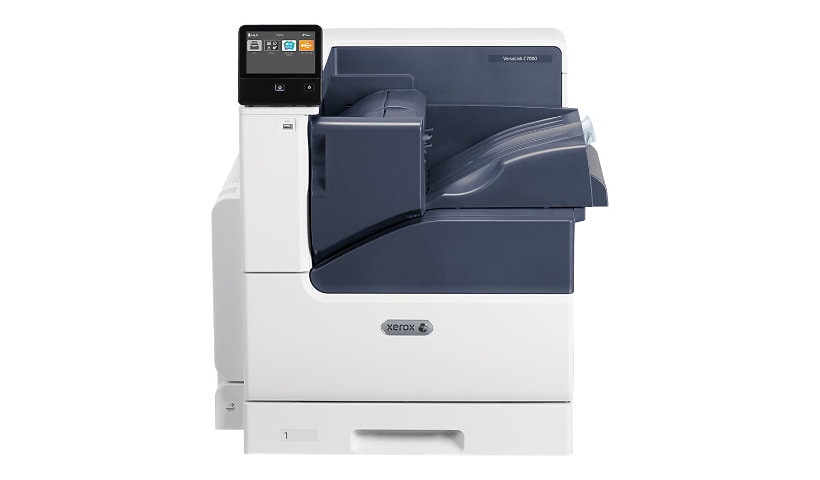
Xerox VersaLink C7000/DN - printer - color - LED
$2,520.00
$1,999.00
Sign in for your price
Mfg # C7000/DN
CDW # 4636421
| UNSPSC 43212105
Quick tech specs
- Printer
- Duplex
- A3/Ledger
- up to 35 ppm (mono) / up to 35 ppm (color)
- Gigabit LAN, NFC, USB 3.0
- color
- LED
- 1200 x 2400 dpi
- capacity: 620 sheets

Know your gear
When you need your work to stand out from the rest, count on the VersaLink C7000 Color Printer-featuring Xerox ConnectKey Technology. Ready for the way you want to work, the C7000 is mobile-ready, app-enabled and ready to customize. Meet your challenges head-on with the VersaLink C7000-your modern workplace assistant.

Xerox VersaLink C7000/DN - printer - color - LED is rated
3.70 out of
5 by
46.
Rated 5 out of
5 by
kking127 from
Excellent Machine
I've been extremely happy with the quality and quickness of the prints from this printer. With a minor up front investment, I've been able to speed up our processes and provide a higher quality deliverable to our clients.
Date published: 2026-07-15T00:00:00-04:00
Rated 5 out of
5 by
Missionary Flights from
Why we chose the C7000
The C7000 is a great color laser printer and is winning over our leadership. After having to rush a copy job at Staples and having to explain the ridiculous cost of printing a 12 page document x 40, I knew we needed to buy a CLP. At another firm, I championed a Xerox Phaser and choosing the C7000 was a no brainer. It will prove to be the first of many. We're replacing Epson inkjets and even though ours all have large ink reservoirs, they can't touch quality and speed of our Versalink.
Date published: 2026-09-24T00:00:00-04:00
Rated 5 out of
5 by
a perfect companion from
a perfect partner for the XEROX C70 MFP
as an architectural office we often publish small very high quality portfolios of our work in reponses to an invitation to present our qualifications for a prospective commission. The fact that the Versalink C7000 uses the same print engine and ink makes them ideal companions, offering reducency and additional print capacity for our office.
Date published: 2023-07-14T00:00:00-04:00
Rated 5 out of
5 by
Xerox sux from
Piece of crap
Print quality is poor Difficult to use Jams all the time Call xerox…. No help at all
Date published: 2023-06-07T00:00:00-04:00
Rated 5 out of
5 by
LeCorbusier from
a perfect companion for our Xerox c70
As an architecture and design office, we have many occasions where in with tight deadlines we are required to print "in house" small published portfolios in response to Requests for Information from prospective clients and organizations. Our workhorse MFP C70 is the ususal choice for all the services it provides, and the VersaLink C7000, a perfect "back-up" for such work in the event of a problem with the C7000 and they both utilize the same consumables.
Date published: 2023-07-07T00:00:00-04:00
Rated 5 out of
5 by
aesthetics from
Exceeds Expectations
We have a Color Versalink C7130 and Black and White B7130 at our company. They perform well and the tech support has been great!
Date published: 2024-01-16T00:00:00-05:00
Rated 5 out of
5 by
Mcfly from
Great reliable machine
purchased this last year but needed an option to print wirelessly. Xerox had the right product to fix my issue. I'm able to use my reliable wireless function from all over the office.
Date published: 2024-02-05T00:00:00-05:00
Rated 5 out of
5 by
ForeverDesign from
Worst printer
Hello, We’ve had 4 other large printers (for years) and now have a Versalink c7000, it is by far the worst printer we’ve ever had! Wish we never got it! It was suppose to be easy and it is defiantly NOT. It has to be set up for each printing at the printer (stupid idea by the way) and it MIGHT print a page, but probably not. We spent at least 4 hrs one day getting it to print one page (and before you ask, the graphic was clean and printed several times earlier in the day (unlike your software). It finally printed the other 150 pcs we needed (after hours). Then we were going to print the outside covers and it will only print the stupid cover sheet (which it was turned off, but it prints with very job anyway.) Then we tried to print the guts of the book and now there are link problems (website inks) which we have never had before and it doesn’t make any since! It also has stopped doing any packaging/printing (which WE NEED). We are about to put it in the parking lot and set it a blaze, at least it would be fun to look at for a while. The book we are working on, is mostly a repeat, but it won’t print!. We’ve been working on this project for a couple of months, we are tired and fed up!!!!!! Our 10hour day has given us NO results, just a crappy printer! We are very aggravated that all this time and money was spent and the project is due this SATURDAY (060323)! UGH!!!! And before you ask, yes, we used different flyers and other software(s), NO LUCK PRINTING ANYTHING!! Wish we would have never bought this stupid machine!! We finally had to use a different printer!! A Evers ??
Date published: 2023-06-22T00:00:00-04:00
Rated 5 out of
5 by
Pookey from
Great printer
I bought for work about 6 months ago and I'm so happy with it
Date published: 2023-09-24T00:00:00-04:00
Rated 5 out of
5 by
FooDog from
Great 11x17 printer
I am a small architectural firm that was seeking an 11x17 laser printer for checksets, presentation/graphics documents and field note drawings (didn't need drawings bleeding to illegibility in the field when it rained). Use is light and this printer fits the bill both budget and production wise. Output speed is perfect, and the printer has performed flawlessly since I received it. Price point was great. I couldn't be happier and would highly recommend it.
Date published: 2019-05-12T00:00:00-04:00
Rated 5 out of
5 by
Sandy from
Great Quality prints
Terrific prints & easy to use. Love the large format printing option.
Date published: 2018-06-26T00:00:00-04:00
Rated 5 out of
5 by
MadPow from
Easy install, cost effective, large format
The VersaLink C7000 was easy to install and configure at a great price. The print quality is wonderful and meets all of the needs for our small business.
Date published: 2019-03-12T00:00:00-04:00
Rated 5 out of
5 by
EA72 from
Great quality
This printer has fantastic printing quality. I do not need massive amounts of printing at one time but high quality of printing is needed. I own a cabinet shop and require detailed 3D renderings to present to my clients. This printer serves all of my needs more than adequate.
Date published: 2019-04-15T00:00:00-04:00
Rated 5 out of
5 by
Red from
This product has great features but it seems slow. Also the print quality is not as good as I expected.
This product seems great but over all it takes too long to warm up. It is slower than the very old one we had before.
Date published: 2019-01-21T00:00:00-05:00
Rated 5 out of
5 by
Paul from
its a nice printer, funtctions well, prints fairly slow
nice full featured printer. 11 x 17 tray is great. print speed is not very fast. thats the only downside.
Date published: 2019-04-08T00:00:00-04:00
Rated 5 out of
5 by
Frustrated88 from
Could be better
I bought this at the end of May 2025, and it arrived in non-working condition. It took weeks to figure out what the problem was after several chats and calls and them finally sending a technician out to fix it. For the price of the printer, I wouldn't think all this would be necessary for a brand-new printer. The color quality of the prints isn't the greatest compared to other xerox machines I've used.
Date published: 2025-07-16T00:00:00-04:00
Rated 5 out of
5 by
Terri48 from
This product has issues
Our office Versalink C7025 is slow and the functions are not quick to change. If you open a drawer or have a feed problem it is not easy to fix. I have used many different brands in the past and this is not my favorite by far. Seems to be technically a dinosaur for our office needs.
Date published: 2018-10-05T00:00:00-04:00
Rated 5 out of
5 by
Mark from
Quality print and fast
Very nice unit for the office, quality at a very nice price I will be getting another one soon!
The large 11 x 17 is the fastest and best scan I have seen along with large paper reservoirs.
Thanks!!
Date published: 2018-10-29T00:00:00-04:00
Rated 5 out of
5 by
Eng mgr from
Good print, not high volume, and toner expensive.
Print quality is good, features are good, but is not real fast for high volumes.
The biggest negative is that the toner cartridges are very expensive.
Date published: 2019-01-14T00:00:00-05:00
Rated 5 out of
5 by
PPerl from
Lemon
I have had the machine for 30 days. There was no where to demo the machine so I had to take a leap of faith. The machine overheats, makes the paper curl terribly and goes through a ton of expensive toner. I'm very unsatisfied with it. I do not recommend it at all
Date published: 2019-05-03T00:00:00-04:00
Rated 5 out of
5 by
Bill from
Great Printer But.........
The VersaLink C7000 is a great printer. However it does not duplex. For a printer at this price point, we should be able to print on both sides of the paper. The biggest draw back, and the only reason I would not recommend this printer, is the toner price. The toner cartridges are over $300 each!!! We go through a set every 6 months. That is over $2400 a year in toner. We can buy an extra monitor every month at those costs.
Date published: 2018-11-21T00:00:00-05:00
Rated 5 out of
5 by
mtnmike33 from
durable color printer
Printer is fast after warm up. Does a good duplex print but a bit slow for commercial multi-user. Toner is a bit pricey.
Relatively quiet. Few jams and clearing is easy.
Does large size prints very well.
Date published: 2019-04-25T00:00:00-04:00
Rated 5 out of
5 by
susan from
great features but need more support
the machine is the most up to date and has all features. Seems simpler to use than it is and when 1 or 2 jobs are in the queue it gives a message that there are too many jobs please delete. Obviously something not right! then it takes 10 minutes to clear! need more support to learn this supposedly simple up-to-date machine! especially for the price.
Date published: 2019-04-29T00:00:00-04:00
Rated 5 out of
5 by
Emilio2000 from
Good price for tabloid printer
High quality color prints on tabloid size paper. What's there not to like? The printer is a bit heavier and bulkier than it seems in the pictures. It worked well out of the box on regular letter sized paper.
But changing the paper type or size is not very intuitive. I first wanted to change it in the Settings on the control panel, but the settings only shows you what has been selected and it doesn't allow you to change it. Strange. I had to call tech support to find out that the printer asks you to confirm or change settings each time you open and close the paper tray.
On the positive side, the printer allows you to specify the color of the paper you are printing on (such as yellow, or ivory, or many other colors) and then it automatically subtly adjusts the print colors to adjust to the different backgrounds.
On the negative side, everything has to be just perfect or it won't print. If there is even the slightest mismatch in the color or type of paper, or if you forget to set for an envelope in both the paper type and paper size, the printer refuses to print and there is no way to manually over-ride it. I wish I could tell the printer: "Yes, I am aware of the mismatch, but I want to print it anyway." But there is no way to do that. The printer has a mind of its own and it won't allow you to trick it or work around it.
This may be good for the best quality print, but it can be very frustrating when you would prefer to over-ride it. I guess that's one of the potential perils of future technology where robots (and printers) will just be too smart for us and will refuse to follow your command. This printer is a good example of that. You have to play by its rules. It won't play by yours.
Still, overall, it's a good printer, once you learn to play by its rules.
Date published: 2017-08-03T00:00:00-04:00
Rated 5 out of
5 by
CasaCristiana from
I like the product
The first toner will empty too soon, but Xerox is Xerox
Date published: 2017-10-25T00:00:00-04:00
Rated 5 out of
5 by
Marc Levy from
Xerox can't get it to work.
Mine was delivered 19 days ago. It still doesn't work. A tech guy has been here twice and couldn't get it to work. And now he's not responding to my calls, even though he said he would come back to get it to function. I've paid thousands and have been abandoned.
Date published: 2023-06-12T00:00:00-04:00
Rated 5 out of
5 by
Steve Dave from
Consistency, yeah right
This printer has a mind of it's own. It just never works right. It's just too hard to find the right settings and have it print. I bought it new some years ago but it's been a battle since day one. I'm just giving up and buying another printer elsewhere.
Date published: 2023-03-31T00:00:00-04:00
Rated 5 out of
5 by
JBWol from
Excellent print quality.
I've finally got it up and running; but getting it to connect to my computer was a nightmare compared to my cheap brother printer. Works great now though.
Date published: 2023-03-31T00:00:00-04:00
Rated 5 out of
5 by
Ihatethisprinter from
We've been duped.
This printer can barely print. It won't connect to anything, it only accepts print requests from the app on MY phone. If you forget to tell it which paper size you want, then it just fails. This printer is a complete and utter failure and I wish I had returned it. I kept telling myself, it must be me, I'm the idiot, this is Xerox. Well, more often than not, I am identified as that idiot, but stood next this piece of plastic garbage, I'm Einstein! Heed our words. DO NOT BUY
Date published: 2023-02-20T00:00:00-05:00
Rated 5 out of
5 by
Henry from
unbelievable quality and reliability.
after first owning other brands of multifunction printers I've settled on the Xerox Brand and have two XEROX MFP's operating in our architectural office - the more sophisticated for everyday use and the second for redundancy that uses the same media.
Date published: 2025-01-07T00:00:00-05:00
Rated 5 out of
5 by
unhappyXeroxCustomer from
Nice print quality, but horrid experience
I bought the printer two years ago and I have in that time never been able to print from a Windows machine without going into the print dialog every time and selecting the appropriate tray manually. This is something I didn't need to do 40 years ago when I started working in tech. It should be a simple fix, I spent a few hours onlne trying suggestions I could find via search, then went to the Xerox site to try and get support, which seems impossible.
Date published: 2024-11-17T00:00:00-05:00
Rated 5 out of
5 by
GregB from
Great printer, less great setup
We recently purchased the C7000 to replace individual ink jets printers for much of our staff. The printer performa amazingly aside from some initial setup quirks regarding paper size auto selection. I would give setup 3.5 stars, but I give the printer 5 stars once you clear any hurdles involved.
Date published: 2024-04-02T00:00:00-04:00
Rated 5 out of
5 by
mike388 from
The right printer for the job
We needed a serious printer for handling a wide variety of collateral material, labels, tags, instructions, etc. I haven't had a Xerox brand machine in over 25 years. This one had better specs for a better price. After a month, it is proving itself very well. My staff is happy.
Date published: 2024-09-17T00:00:00-04:00
Rated 5 out of
5 by
AVEJP from
Reliable printer
Not used consistently, rather in frequently for large jobs. works well
Date published: 2024-06-14T00:00:00-04:00
Rated 5 out of
5 by
CR Beauty from
excellent printer for the price
it does it all, could not be happier , had to interface with support, that turned out to be pleasant
Date published: 2024-05-10T00:00:00-04:00
Rated 5 out of
5 by
IanClapham from
Reluctant to print
I have had this printer 2 years. I have not previously had a printer like this that regularly refuses to print. The paper settings seem to be temperamental, and it is laborious to work out where to change the settings when the control panel reports the paper settings need to change, though I only ever use normal A4 portrait. The company does not want to help on the telephone when I call for assistance.
Date published: 2023-05-15T00:00:00-04:00
Rated 5 out of
5 by
pmemp from
not quite
The printer has nice features, it prints relatively fast, and it can accommodate 11x17 paper size, which is rare for the price point. Printouts are quite nice, toner is expensive but per page it's not as bad as others out there at this price point.
There are some issues that makes it not optimal.
The printer is slow on startup. It takes about 2 minutes before it can start up and take jobs.
It has all sorts of issues with InDesign. They've fixed it with a firmware that's not publicly available, but it took us a lot of frustrated hours to have that resolved.
The printer is very sensitive to paper size and paper type. If it's off, it will give you an error or the paper jams.
This thing is also huge and very heavy.
Overall it's an ok printer if you absolutely need 11x17 and good quality printouts and relatively cheap cost per page.
Date published: 2018-10-04T00:00:00-04:00
Rated 5 out of
5 by
Davidp from
Super slow control panel
The control panel is very slow on this machine. Touch screen but you have to wait between selections. The other feature that is really annoying is you have to tell it what the paper is every time you open a drawer or use the bypass - even if you are loading the exact same papers. The machine "works" fine. The copies are clear. But it is very frustrating machine to operate.
Date published: 2018-12-10T00:00:00-05:00
Rated 5 out of
5 by
Emilio2000 from
A glimpse into the future: A printer with a mind of its own.
High quality color prints on tabloid size paper. What's there not to like? The printer is a bit heavier and bulkier than it seems in the pictures. It worked well out of the box on regular letter sized paper.
But changing the paper type or size is not very intuitive. I first wanted to change it in the Settings on the control panel, but the settings only shows you what has been selected before and it doesn't allow you to change it. Strange. I had to call tech support to find out that the printer asks you to confirm or change settings each time you open and close the paper tray. I would rather set the paper sizes in the Settings (on the printer's control panel), and not have to set it again (or confirm the settings) every time I reload the tray.
On the positive side, the printer allows you to specify the color of the paper you are printing on (such as yellow, or ivory, or many other colors) and then it automatically subtly adjusts the print colors to adjust to the different backgrounds.
On the negative side, everything has to be just perfect or it won't print. If there is even the slightest mismatch in the color or type of paper, or if you forget to set for an envelope in both the paper type and paper size, the printer refuses to print and there is no way to manually over-ride it. I wish I could tell the printer: "Yes, I am aware of the mismatch, but I want to print it anyway." But there is no way to do that. The printer has a mind of its own and it won't allow you to trick it or work around it.
This may be good for the best quality print, but it can be very frustrating when you would prefer to over-ride it. I guess that's one of the potential perils of future technology where robots (and printers) will be too smart for us and will refuse to follow our commands. The printer knows best. Humans can be ignored. This printer is a good example of that. You have to play by its rules. It won't play by yours. Sooner or later, if you want to print on something other than letter sized paper, you will probably find yourself in an endless loop where no matter what you do, the printer keeps repeating the same error message that the settings don't match.
Still, overall, it's a good printer, once you learn to play by its rules.
Date published: 2017-08-17T00:00:00-04:00
Rated 5 out of
5 by
Jer from
This product is a work horse
Use our printer 5 days a week, 8 hrs. a day and it handles everything we throw at it.
Date published: 2018-11-01T00:00:00-04:00
Rated 5 out of
5 by
Anderson3250 from
A great printer with finishing capabilities
We purchased this printer for the range of print sizes and for its ability to staple. The print quality is great, but make sure you have your media type selected as there is no wiggle room on media selection. The cost per print is higher than that of other printers in the same pricerange, but that is the trade-off for the wider selection of paper size and finishing.
Date published: 2019-03-20T00:00:00-04:00
Rated 5 out of
5 by
Miz_M from
WOW
What a difference this printer makes for our home office, compared to any HP or Brother printer. Set up was quick, and simple. We were a bit intimidated by it's size, and have found it better suited to sit on the floor than on a counter top, but our printed projects are beautiful and the full tabloid options make running a freelance graphic design business SO much easier. We are going to invest in a few other trays, at some point, but for now it's a wonderful piece of equipment!
Date published: 2019-05-14T00:00:00-04:00
Rated 5 out of
5 by
Josh32 from
Great printer, but the cost per print is high
We purchased this printer for our marketing department because of the good range in media sizes and the fact that it can staple. It prints great and it is a pretty fast printer, but if you are on a budget you may want to steer clear of this one. The cost per print is significantly higher than most other printers of its class.
Date published: 2019-06-18T00:00:00-04:00
Rated 5 out of
5 by
racerbob from
Great product, but Xerox admin is horrible.
Xerox makes great products, as always, and Michael at CDW did a great job selling the machine. The administrative team at Xerox dropped the ball again though, as always. I am still struggling to get the promised rebate on my new equipment, have NO idea where I am in the process, and am pretty certain I will never receive it.
Date published: 2018-02-21T00:00:00-05:00
Rated 5 out of
5 by
DCBROWN from
GOOD PRODUCT BUT STILL TRYING TO GET TRAY 2 TO WORK.
I'VE BEEN VERY HAPPY WITH THE PRODUCT. THERE ARE VERY FEW PRODUCTS OUT THERE THAT MEET OUR NEEDS [11x17, COLOR, WIFI CAPABLE LASER PRINTER]. MY RESEARCH FOUND THE XEROX C7000 TO BE THE BEST VALUE FOR THE MONEY. BUT I STILL CAN'T GET THE TRAY TWO [8-1/2x11] PAPER TO WORK. I HAVE TO USE THE BYPASS TRAY. I'M WAITING FOR TECH SUPPORT TO EMAIL BACK. IT'S A BUMMER THERE'S NO CHAT OPTION FOR TECH SUPPORT ESPECIALLY CONSIDERING HOW MUCH I PAID FOR THE MACHINE.
Date published: 2018-03-29T00:00:00-04:00
Rated 5 out of
5 by
PasserPat from
This play high-quality machine.
Purchased it a month ago and do not regret it at all. I am able to produce print shop quality documents at high volume with this machine.
Date published: 2026-05-16T00:00:00-04:00