

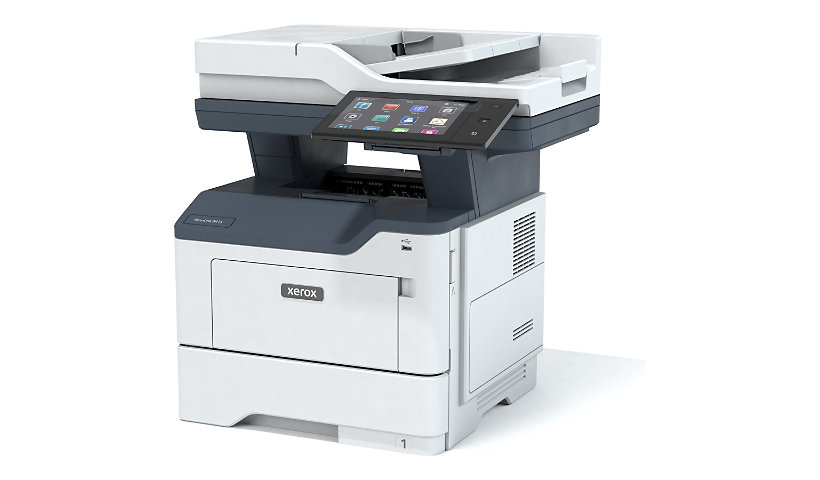
Xerox VersaLink B415/DN - multifunction printer - B/W
$1,865.00
$1,399.00
Sign in for your price
Mfg # B415/DN
CDW # 7512101
| UNSPSC 43212110
Quick tech specs
- Multifunction Printer
- B/W
- Up to 42 ppm
- USB 2.0
- Quad Core 1.2GHz
- Laser
- 250 sheets
- A4/Letter
- Single-pass Duplex Automatic Document Feeder (DADF)
- 2 GB system memory

Know your gear
Uncompromising Productivity, Reliability and Security: Your work continues to demand more, that’s why the Xerox® VersaLink® B415 MFP provides next-level capabilities. Powered by Xerox® ConnectKey® Technology, this multifunction printer is ready for anything you throw at it. The Xerox® Easy Assist App simplifies installation, monitoring and management of your MFP from your mobile phone. Even security is simpler, built-in features that work hard to keep data and documents safe.

Xerox VersaLink B415/DN - multifunction printer - B/W is rated
3.60 out of
5 by
12.
Rated 5 out of
5 by
Natsc from
Can't get anything to work right
I have had this for months and still cannot get the scanner set up and it glitches a lot. I guess I will have to pay $200 for a tech to come out and see if they can set it up. I have redone it several time. Frustrating
Date published: 2025-03-04T00:00:00-05:00
Rated 5 out of
5 by
MMMZ from
New but defective fuser
We have had the printer for 2 months and we are now having trouble printing due to a defective fuser. The customer service was helpful in scheduling a technician to come out as we are now waiting for the fuser to be replaced - this is covered by the 1 yr warranty.
Date published: 2025-10-31T00:00:00-04:00
Rated 5 out of
5 by
csg0521 from
XEROX B415 Printer
This copier is the best I am satisfied I strongly recommend to others
Date published: 2024-06-25T00:00:00-04:00
Rated 5 out of
5 by
PM LLC from
Expensive printer to own and maintain
Purchased this printer in December -and have not been thrilled with it. The ink for the printed is extremely expensive and does not last as advertised. The printer is also very noisy after adding paper when it is out.
The menu is not well designed and still have not figured out how to set up for scanning.
Date published: 2024-05-01T00:00:00-04:00
Rated 5 out of
5 by
jfmtnbiker from
High Quality Multifunction Printer
I recently purchased the Xerox VersaLink B415 to replace an older WorkCentre 3345. The footprint of the machine is the only similarity. The VersaLink has an impressive print speed and scan speed. Unlike the WorkCentre 3345, it does not "flip" pages over to scan a double-sided document. Instead, it contains and optic reader that scans both sides of the paper simultaneously. Additionally, the paper tray will hold an entire ream of paper. This is super convenient. The 7 inch touchscreen is awesome! There is nothing worse than looking at a small screen when you are trying to scan or make copies.
If you are even remotely considering this printer for your office, buy one! You will not be disappointed. While the smaller printers have their place, this is a professional duty printer that is ready to work!
Date published: 2025-07-01T00:00:00-04:00
Rated 5 out of
5 by
CATHY from
NON STOP ISSUES WITH B415
I HAVE CONSTANT PROBLEMS. "THE JOB DELETED DUE TO SYSTEM IMAGE ERROR" SHUTDOWN CONSTANTLY TO TRY TO CORRECT THIS...TEMPORARY FIX.
THEN AN NEW ONE TODAY, XEROX ip V6 ISSUES! CHANGE CABLE..WORKS FOR NOW BUT I DO NOT TRUST THE PRINTER AT ALL
Date published: 2026-03-03T00:00:00-05:00
Rated 5 out of
5 by
NLRooster from
VersaLink B415
The paper set up has been a little problematic and difficult to understand; however it prints well and is fairly fast.
Date published: 2023-09-25T00:00:00-04:00
Rated 5 out of
5 by
Pod2460 from
VersaLink B415
We just purchased this printer for our office, set up was extremely easy, connected immediately to our Wi-Fi and computers. We have been using the printer, fax and scanning all afternoon and it seems to be working extremely well.
Date published: 2024-04-15T00:00:00-04:00
Rated 5 out of
5 by
elbee from
null
Beautiful print and fabulous color better the expected
Date published: 2025-04-28T00:00:00-04:00
Rated 5 out of
5 by
scrittiwolf from
Excellent Printer with Plenty of Technical Hurdles
After researching several printers for our small law office, I pulled the trigger on the Xerox Versalink. It was definitely the right move for our space. This machine hits that elusive "sweet spot"—it avoids the flimsy feel of low-end models without the unnecessary overkill of the ultra-high-end stuff. The speed is impressive, the copies are crisp, and that large touchscreen is a genuine lifesaver.
The biggest selling point for me was the maintenance. You can swap out the toner or the drum without any "funny business," and I’m happy to report it actually fulfills that promise.
Now, let’s talk about the quirks...
The Setup Struggle
There’s no way to sugarcoat this: initial setup is a bit of a nightmare. Even as an "IT guy," I found the included instructions borderline useless. I ended up ditching the box materials entirely and hunting down the drivers and software online. Xerox, you can definitely do better here.
Connectivity & Hardware
You should know that this isn't a "plug and play" home printer; you’re going to need some technical chops.
No Onboard Wi-Fi: It doesn't come standard. I had to shell out an extra $50 for a separate adapter, plug it into the back, and then dive into the settings panel to activate it.
Configuration: Switching from wired to wireless wasn't exactly intuitive. I actually had to consult an AI to figure out the menu logic.
Sleep Mode & Paper Waste
The "Peaceful Slumber": Out of the box, the printer falls asleep way too fast and occasionally refuses to wake up when a job is sent. I eventually dug through the settings to fix the timeout—problem solved, but it took some effort.
The Cover Sheet Curse: By default, the machine prints a "banner page" for every single job. It’s a massive waste of paper. Disabling this is a whole ordeal—you have to create an admin login, find the printer’s IP address, and configure it via a web browser. It’s unnecessarily technical, and Xerox really should have disabled this "feature" by default.
The Verdict
Despite the setup headaches and the software annoyances, the pros still outweigh the cons. I really do like this printer—it’s a workhorse. Just go into it knowing that it’s a professional piece of kit, not a consumer device you can just unbox and start using in five minutes.
Date published: 2026-03-16T00:00:00-04:00
Rated 5 out of
5 by
JRP1 from
Great print quality
Have used this printer for almost 2 years and the printer act just like new when it was first installed
Date published: 2025-10-05T00:00:00-04:00
Rated 5 out of
5 by
kk27 from
second one
it's a great product. been using for almost 2 years now!
Date published: 2026-04-09T00:00:00-04:00