

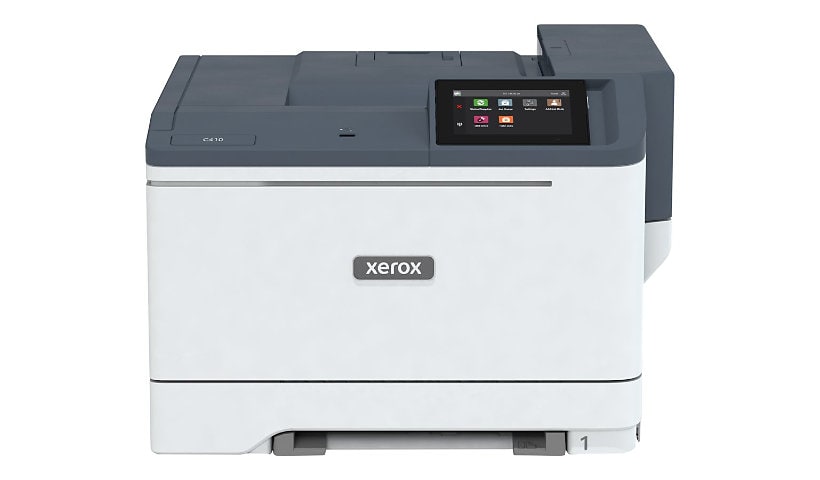
Xerox C410/DN - printer - color - laser
$1,092.00
$799.00
Sign in for your price
Mfg # C410/DN
CDW # 7487700
| UNSPSC 43212105
Quick tech specs
- Printer
- Duplex
- A4/Legal
- up to 42 ppm (mono) / up to 42 ppm (color)
- USB, Gigabit LAN, USB 2.0 host
- color
- laser
- 1200 x 1200 dpi
- capacity: 250 sheets
- Green World Alliance return program

Know your gear
The Xerox C410 Printer is ideal for small to mid-size office workgroups in SMBs and enterprises. This color printer with support for letter/legal paper sizes, has 42 ppm print speed. It has a 4.3-inch user-friendly interface and comprehensive security is built in. Mobile ready features including Apple AirPrint and Mopria make it easy to connect and print from any device.

Xerox C410/DN - printer - color - laser is rated
4.20 out of
5 by
21.
Rated 5 out of
5 by
BuleBetawi from
Excellent Unit!
The experience leading to this purchase was rough and i was about to give up on Xerox but Xerox Sales persisted and I am glad they did. This unit replaced an old worn out but excellent Xerox Phaser unit.
Date published: 2026-07-20T00:00:00-04:00
Rated 5 out of
5 by
mer16 from
Great color printer!
I bought this printer about a month ago for color separations for artwork that is in illustrator or pdf files and the color is great! It is not the fastest printer but it's perfect for what we need in our office.
Date published: 2024-08-21T00:00:00-04:00
Rated 5 out of
5 by
Bubbles from
Dell and Xerox: A Customer Service Nightmare
I bought a Xerox WorkCentre 6515 Magenta Toner from Dell on Dec 11, 2024, and installed it on Dec 13. After less than 220 pages in 40 days, it ran out. Dell claims a 90-day warranty, but after endless calls, they said it’s only 30 days and directed me to Xerox. After 20+ calls to Xerox, no help! Both companies pass the buck with zero accountability. I’m done with Dell and Xerox—HP seems like a better option! Avoid these brands!
Date published: 2025-01-23T00:00:00-05:00
Rated 5 out of
5 by
judyk from
Clear, sharp images
I bought this printer to replace one I'd had over 16 years. The footprint is smaller than my previous printer and the print quality is great. I hope to keep this for many years.
Date published: 2024-04-26T00:00:00-04:00
Rated 5 out of
5 by
Sandyg500 from
Fair printer - but not if you need the manual tray
This is a decent printer for jobs on regular paper, but a bit slow and it takes forever to wake up after it goes to sleep! Also, if you have to use the manual tray, it is AWFUL! I set the tray as manual in my document, and then also tried it on the print settings, but it doesn't work either way; it can't recognize my paper in there. It keeps telling me to load Tray 1, but it's an odd size, and just one sheet, so when I put it into tray 1, the printer thinks the tray is empty! So, now I can't print on the cardstock I specifically bought for certain purposes. So frustrating!
Date published: 2025-11-14T00:00:00-05:00
Rated 5 out of
5 by
cat_rescue from
Already running out of yellow toner, no wifi
They really hide the fact that you need to buy a network adaptor. Just put it in large print in the description. I think most people assume everything is internet enabled now.
I have printed 200 color pages and already getting the message that the yellow toner is low.
Date published: 2025-06-01T00:00:00-04:00
Rated 5 out of
5 by
Lab Printer from
Overall Good Printer
Printer gets the job done! We have not had any issues thus far.
Date published: 2026-03-03T00:00:00-05:00
Rated 5 out of
5 by
Sandyg500 from
Worst printer I have had for business in 30 years
I bought this printer because it says it's for business. But it can't handle alternating types of manual paper; it is slow printing (and waking up!); it's pulling in my letter-sized card stock crooked; even when you can get it to print on different types of paper, it is so convoluted to press a bunch of buttons, even the tech got confused!; and the final insult is that all my supplies are OK, but I just tried to print 5 copies of a workbook in color and 4 copies came out almost in black-and-white! I just tried to print the last two pages of the first workbook (after that) and it prints fine, so it's just that the printer can't handle printing 50 sheets at once or it messes up. It also offsets my page borders occasionally, forcing me to check every single page and then reprint the ones that don't print properly. Xerox has been here twice to try to fix the initial paper type problems, but now this is too much. This is NOT a good printer for business. If you have only a few personal things to print, it's good, but I can't even count on it to print my jobs right or quickly... and now, after spending all this time and money on the printer and $1,200 worth of toner, I have to buy a new printer because I can't get my work done. So frustrated! You can see in the attached photos how one set of pages is in color and one is in black and white (from the same print job), and I ripped up the pages with the offset border, but you can see what it did in the piece I photographed. So frustrated!!
Date published: 2026-04-04T00:00:00-04:00
Rated 5 out of
5 by
C410 from
Great product
I bought this a few weeks ago and it is working very well. It is fast and takes card stock consistently.
Date published: 2024-02-08T00:00:00-05:00
Rated 5 out of
5 by
tracie12 from
Nice printer
Very nice, durable printer. Trusted brand that has been around for a while and is very reliable. I do wish that it had scanning and copying capabilities.
Date published: 2024-06-28T00:00:00-04:00
Rated 5 out of
5 by
kevinw64_4249 from
Great printer!
This color laser printer is amazing! It prints beautifully. Looks like a professional print job. It was easy to hook up. Works great with wifi. It is very heavy so you will want to put it in it's place and leave it there. Love that you can print right from a USB drive.
Date published: 2025-08-03T00:00:00-04:00
Rated 5 out of
5 by
mrscrompton09 from
Great Printer
This is a great printer. While it’s a bit heavy, the appearance of it is sleek and efficient. It’s easy to understand how to look at its different parts and open trays/ink cartridges — everything is quite self-explanatory. I would have to say this applies to the initial set up of the printer as well! The touch screen allows for a quick sequence of steps to guide you through connecting to your wifi and selecting your account settings. There is also an app that comes with the printer, all you have to do is scan the QR code on the manual and your phone will assist in this process while allowing you to pair your phone as well as other devices to the printer. It prints beautifully and unlike a lot of other printers I’ve tried, there is no headache when printing your first sheet after the test sheet. All in all, this printer has excellent quality and I’m excited to put it to good use and be able to print high quality photos for all kinds of projects.
Date published: 2024-07-02T00:00:00-04:00
Rated 5 out of
5 by
jamiem34d4_2668 from
Wonderful printer for a home office!
The Xerox C410…what a printer! Once fired up, the printer connects flawlessly to my computer or my phone. I was able to easily print a shipping label from this single-purpose printer. I then test-printed a picture from my phone - instant connection and 3 second printing on a full page. I am impressed! Both the color and the black ink are strong. This would be a great home office option for back-to-school needs. The toner cartridges are easily removed and replaced when needed. I highly recommend this printer; it has replaced the previous one I had in my home office.
Date published: 2025-08-20T00:00:00-04:00
Rated 5 out of
5 by
jenniferd578_2553 from
This machine is a workhorse!
This machine is a workhorse. The sound is what I would expect if a machine is going to turn out 100 pages in 2 minutes, which it did. For the price, I am missing the scanner and copier options on my old machine. This machine was heavy during the unboxing but surprisingly sleek once set up. The unit measures about 17” x 16” x 12.5”. I used my phone to download the Xerox app, to set up the device, and to send an installation link to my laptop. I’m not a tech savvy person and had zero problems with the set up and installation. Super user friendly! I checked the xerox website for toner replacement and learned that each toner runs about $124-$130 per color for a cartridge that will yield 2000 pages. If you’re looking for a machine to work hard on high quality print jobs with expedient production, the Xerox C410 is sure to meet your needs.
Date published: 2025-07-25T00:00:00-04:00
Rated 5 out of
5 by
jenniferj6_5400 from
Office just got upgraded.
Upon first glance I thought, wow I finally have a printer that I can finally print larger documents and batches with. The setup was easy once all the drivers were installed. The printer automatically connected to my internet and it is so quiet. I mean it doesn't shake the table when printing and again it is quiet. The ink cartridges are big as well which means it will be some time before I run out of ink. I am so glad I got this if you have an office that needs a good quality printer, even a jome office, this is the product to get, it comes fully loaded with ink and a wireless adapter. I Love it!!!!!
Date published: 2025-07-20T00:00:00-04:00
Rated 5 out of
5 by
lexacarina from
Couldnt ask for a better printer!
This is an EXCELLENT printer. While it’s a bit heavy, the appearance of it is sleek and efficient. It’s easy to understand how to look at its different parts and open trays/ink cartridges — everything is quite self-explanatory. I would have to say this applies to the initial set up of the printer as well! The touch screen allows for a quick sequence of steps to guide you through connecting to your wifi and selecting your account settings. There is also an app that comes with the printer, all you have to do is scan the QR code on the manual and your phone will assist in this process while allowing you to pair your phone as well as other devices to the printer. It prints beautifully and unlike a lot of other printers I’ve tried, there is no headache when printing your first sheet after the test sheet. All in all, this printer has excellent quality and I’m excited to put it to good use and be able to print high quality photos for all kinds of projects.
Date published: 2024-06-17T00:00:00-04:00
Rated 5 out of
5 by
rogues20_9433 from
Great Quality
Once you get this printer set up it works great. The setup took a bit longer than I anticipated with the wifi connection (ended up having to do it through the printer itself and not the mobile app). But all-in-all it was still under 20 minutes from unboxing to printing. Thia thing is a beast! Quite heavy and well made. The ink cartridges are nice and large and should last a while and easy to get to. The wifi dongle is easy to install as it is in the ink area as well. The printer is super fast and can blow through big files with ease. The first image I printed (pictured) is a photo my daughter took on a picnic. The colors are stunning and true to life. Now that setup is complete mobile printing is simple. There is also the option to print right from a USB drive with easy access to the port right in the front of the printer. Aside from the early headache/inconvenience, this is a fantastic printer.
Date published: 2025-07-28T00:00:00-04:00
Rated 5 out of
5 by
ginagiselle_9147 from
Impressive
Wonderful color printer! My husband and I both use the printer constantly. I was so happy to receive this highly efficient and modern printer. It comes with all the bells and whistles. Setup is a breeze with the simple instructions they include! I don’t think we will need to be replacing a printer for years. I feel the price is fair for the quality you are getting with this xerox. Well worth it.
Date published: 2025-08-18T00:00:00-04:00
Rated 5 out of
5 by
nikip37_2748 from
This printer deserves recognition
This printer is so easy to set up it took me less than 5 minutes. If you have a lot of things to print off for a job or your kiddos needs stuff printed off for school this is a printer that works I printed off 105 pages in less than 2 minutes. If you are close to it it's a little loud but if your on the other side of the room it's quiet. Worth investing in.
Date published: 2025-07-24T00:00:00-04:00
Rated 5 out of
5 by
melissaf428 from
Works great, pictures come out clear.
This printer works great. The color of the pictures come out really nice. It’s easy to use. Easy to set up. Great product. It’s sturdy. Fits perfectly on my desk. If I need to move it to a different location I can. You can also print in black only as well. This is a great printer and I would recommend for your color pictures.
Date published: 2024-07-01T00:00:00-04:00
Rated 5 out of
5 by
juliec629_1150 from
Really great printer!
This is a really nice printer! The box is huge, but the printer is a lot smaller than I thought it would be. It was a little difficult to set up, but if you're pretty tech smart, it should be pretty easy. It took my husband about 45 minutes to get it up and going. There's an app you can use to print from your phone, which is great. I haven't had it long enough to know if the ink lasts, but we'll see!
Date published: 2025-08-16T00:00:00-04:00