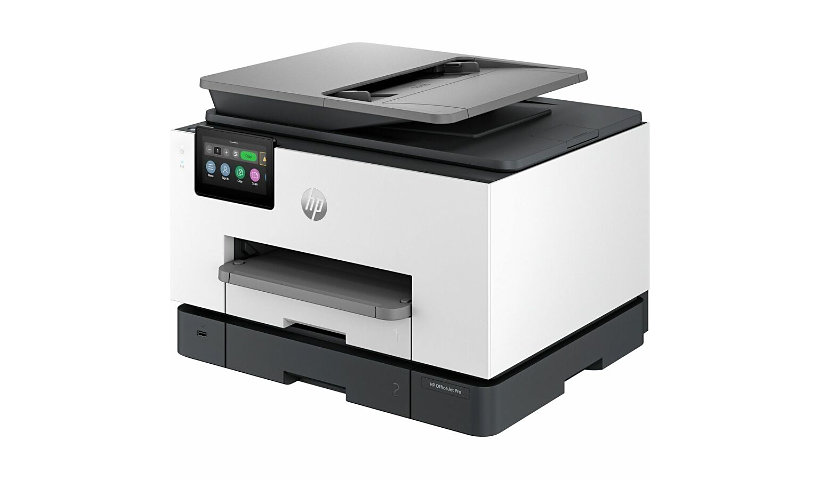
HP OfficeJet Pro 9130b All-in-One Printer is rated
3.90 out of
5 by
108.
Rated 5 out of
5 by
Unhappy Elite Desk Custom from
9135E
The product works fine. The only down side is the paper catcher is not long enough. So papers can fall off.
Date published: 2026-07-18T00:00:00-04:00
Rated 5 out of
5 by
KRN Houston from
Scanning Difficulties
Set up instructions for scanning are weak. Assumed using control panel to scan is the best practice, but after over an hour with HP helpdesk I learned you have to scan from your computer if you want to ensure best results.
Date published: 2026-07-23T00:00:00-04:00
Rated 5 out of
5 by
TCO-PRO from
Doesn't work
My printer doesnt work. Doesn't update, and when I try to use the app to update drivers, it locks up. Sending it back for replacement.
Date published: 2026-07-29T00:00:00-04:00
Rated 5 out of
5 by
K.P. Reviewer from
Great Upgrade So Far
After one month of use, the HP OfficeJet Pro 9135e has performed very well. I upgraded from the HP 8600 and 8620, and I appreciate the smaller footprint and faster print speeds. Print quality has been excellent, and setup was easy. I'm still comparing some features and evaluating long-term efficiency, which is why I'm giving it 4 stars for now, but overall I'm very happy with the printer.
Date published: 2026-06-24T00:00:00-04:00
Rated 5 out of
5 by
Stuart from
Downgrade from 8600n - Too much dependence on web connection
I bought this printer to replace an HP 8600n premium that had a failed print head. Spec wise, the 9135e seemed like a current replacement. On initial unboxing, this printer feels cheaply made compared to my old 8600n. The initial setup process to register was painful and required multiple steps, contacting HP support, and performing several factory resets on the printer. Please make sure you opt out of HP+ during setup because you can't go back. HP+ requires internet access at all times to print. HP is really pushing their instant ink subscription service. I opted out. I have noticed that the 936 ink cartridges are not widely available. The printer is fast and quality is okay. I haven't printed photos yet to compare against my old printer. Overall, not a bad deal if you can get it on sale. I wouldn't have paid full price for this.
Date published: 2026-08-28T00:00:00-04:00
Rated 5 out of
5 by
Costas from
I like HP printer. I have been using HP printer for over 20 years.
HP OfficeJet Pro 9135e printer is a very good quality hardware. I have been using HP printers for over 20 yrs. My previous HP9015e printer lasted only three years... Just until after the warranty was expired.
There is also an incompatibility in communication between the HP 9135e printer and the Computer. After an extensive trials with HP technical service they could NOT make work the "Scan to my Computer" or "Scan to my email" from the printer. The printer cannot find the computer. I face the same issue with my previous HP9015e and I was hoping the new.one will not have this problem. The diagnostics do not say anything and I donot know who created that problem. Microsoft Windows 11 updates or the HP drivers.
Date published: 2026-08-29T00:00:00-04:00
Rated 5 out of
5 by
James from
Frustrating
Your India engineering that finally after 3 frustrating days of being past from technician to technician. I also paid a 145 fee for your computer technical support that was not required. The problem was the Microsoft driver was not available until the day of the 3 day attempts by technician who tried fixes that weren't required.
Date published: 2026-08-30T00:00:00-04:00
Rated 5 out of
5 by
SantiL from
Great customer service
We had to have a replacement printer sent to us first printer failed . Replacement working fine so far , instant ink plan is great. Great customer service , they took xade of my problem right away and replacement arribed right on schedule.
Date published: 2026-08-27T00:00:00-04:00
Rated 5 out of
5 by
DavidM. from
Will not recommend the product based on initial use and unacceptable customer service.
The printer’s weight is a major improvement which I am happy about. In the short period of time, less than two months since my purchase, it seems ok. Getting help from HP support is a challenge as the wait times and the level of support is unacceptable.
Date published: 2026-08-05T00:00:00-04:00
Rated 5 out of
5 by
Virginia from
Nightmare Set-up
After 1 and half hours of setting it up, the scanner would not connect to my computer. I used chat support to solve the problem which took another 2 hours. Currently, it is still not working correctly. The computer is constantly telling me my printer is offline and then after a minute or two, it connects and prints. As I am using this in a retail environment, I need the printer to print quickly. The scanner does not preview and I can't easily save them as PDFs. I am afraid to even try the fax function now.
Date published: 2026-09-28T00:00:00-04:00
Rated 5 out of
5 by
Petey A. from
Good purchase
Pretty good overall. Some features harder to navigate than others such as scanning vs printing.
Date published: 2026-09-28T00:00:00-04:00
Rated 5 out of
5 by
Tee from
Good Printer, but Setup and Photo Printing Can Be Frustrating
I’ve had HP All-in-One printers from the beginning, so when it came time for a new printer, I stayed with HP. I did not set this printer up myself—I hired someone to do it. For me, it was money well spent and saved a lot of headaches.
Recently, I started using the printer more for printing photos, and that’s when I ran into problems. I was having difficulty getting the photo sizes right and figuring out the printer trays. The printer defaulted to Tray 2, but I needed to use Tray 1. After hours of frustration trying to solve the problem myself, I finally contacted HP.
The HP technician who helped me was a lifesaver. I have to give him a lot of credit because this was NOT an easy fix. He spent more than two hours working on the problem before he finally figured it out. Once he did, everything ran smoothly.
I will say that I’m not particularly impressed with the photo quality. My pictures tend to print darker than I would like. However, I’m not sure whether that is entirely the printer’s fault—it may have something to do with the photos coming from my phone.
Another negative is the noise. This printer is noisy! I keep looking for a way to turn the sound down, but so far I haven’t found one. Maybe you simply can’t.
My biggest disappointment involved the ink promotion. When I purchased the printer, I was under the impression that I would receive one year of free ink cartridges. What I did not realize—or apparently missed in the fine print—was that I had to register the printer and contact HP Instant Ink within a week of purchasing it. By the time I contacted them, I was told that I was no longer eligible for the full year and would receive only three months.
I’ll take responsibility for not catching that requirement, but I do wish the deadline had been made much more obvious at the time of purchase.
Overall, the printer works well now that the tray issue has been resolved, and I was extremely pleased with the patience and determination of the HP technician who helped me. However, the complicated photo-printing setup, darker-than-expected photos, noisy operation, and my experience with the ink promotion keep me from being completely satisfied.
Date published: 2026-09-29T00:00:00-04:00
Rated 5 out of
5 by
Paul Oldridge from
Great printer
I like the printer
Date published: 2026-09-29T00:00:00-04:00
Rated 5 out of
5 by
Silverhulk from
Awesome
Ease of use and versatility.
Date published: 2026-10-01T00:00:00-04:00
Rated 5 out of
5 by
Esther from
Instant ink is awesome. The printer is way too slow and I don’t like it
Printer is very slow in printing- way too slow
Date published: 2026-10-03T00:00:00-04:00
Rated 5 out of
5 by
vegascat from
Not A Fan
I had a difficult time time setting up this printer, and it has been frustrating to use. The printer is slow to print. It is temperamental and often requires me to completely restart my computer before it will print properly. Because of these ongoing issues I would not recommend this printer. Additionally, the instant ink program did not fit my printing needs or expectations.
Date published: 2026-05-12T00:00:00-04:00
Rated 5 out of
5 by
Donna23 from
non functional printer/scanner
I bought 9135e last year, it worked after 10 months and the ink cartridge was stuck, cannot be fixed. After a tremendous long procedure, talked to many agents, finally got to the department which arranged a replacement. However, the replacement printer is just as temperamental as the first one, sometimes I could print, sometimes I cannot scan. went through the "procedures" many times, and still acting up. Very disappointed with HP and am decided to replace it with something else.
Date published: 2026-05-09T00:00:00-04:00
Rated 5 out of
5 by
Myron Trafananko from
Economical to use
Easy to set up. Economical to use. Hope this HP is better than the last one.
Date published: 2026-05-11T00:00:00-04:00
Rated 5 out of
5 by
MBro from
Very happy!
I was never really happy with my old printer in the 9010 series because it was just flimsy and after five years it wore out. I love this new printer and it’s able to do the volume and speed and double siding that I need.
Date published: 2026-01-06T00:00:00-05:00
Rated 5 out of
5 by
GrizzlyStiks from
Certified Refurbished HP OfficeJet Pro 9135e
I couldn't see paying full price for a brand-new office jet printer when you can get it for less simply buying the certified refurbished one. There is a better QC check and whatever was wrong has been fixed. Also you still get a warranty on that printer as well. So if your ever in doubt about buying a certified refurbished printer don't be.
Date published: 2025-08-02T00:00:00-04:00
Rated 5 out of
5 by
jordantdo from
Disappointed and dissatisfied in this product
Product constantly requires to be reconnected to the home Wi-Fi; require powering down and up and reconnecting through settings mode. Disappointed and dissatisfied in this product.
Date published: 2025-09-10T00:00:00-04:00
Rated 5 out of
5 by
Jeff R C from
Nice printer
Enjoy my printer still learning how to use it but works great.
Date published: 2025-10-31T00:00:00-04:00
Rated 5 out of
5 by
Joe Wilson from
THE most complete printer package.
Love the versatility, print, scan, and fax. Double sided printing from feed tray scans both sides at once. Super fast printing. 2 trays add to versatility of a designative tray for photo paper or envelopes.
Date published: 2026-04-04T00:00:00-04:00
Rated 5 out of
5 by
NotJean from
Nuisances with this printer
1. Multiple alerts to "paper jam", the #1 tray does not hold the paper securely. #2 I treid to print a large document (45 pages) the information transferred to the printer, was listed in the cheque but would not print or cancel. Turned off/unplugged for 15" still would not print or cancel. off and unplugged for 1 hour then the cheque cleared. I printed the document in smaller batches
Date published: 2026-03-15T00:00:00-04:00
Rated 5 out of
5 by
Sal D'Allura from
Quality Printer for Home Business
This typical HP quality printer does the job necessary for a small home-based business, at a great cost. You will not be letdown.
Date published: 2026-03-15T00:00:00-04:00
Rated 5 out of
5 by
null from
null
Really enjoyed working with the CDW representative, they found the right product to fit our needs.
Date published: 2024-09-25T16:25:02-04:00
Rated 5 out of
5 by
Hugh2569 from
Excellent printer
Prints well I like that it prints double sided and copies double side.
Date published: 2026-03-11T00:00:00-04:00
Rated 5 out of
5 by
rhinos from
NOISY
NOT AS QUIET AND SMOOTH AND FAST AS MY DESKJET 8620 THAT LASTED 11 YEARS.
Date published: 2026-02-16T00:00:00-05:00
Rated 5 out of
5 by
Nock kanellis from
Performance
I purchased an HP Officejet Pro 9135e Printer to make my life a little easier.
However, after spending hours on the phone with support from someone in a 3rd-world country barely speaking English, getting it to work, it now wants to control me.
I am not happy with this product, do you have a product that does not require to be babysat to the job?
Date published: 2026-04-15T00:00:00-04:00
Rated 5 out of
5 by
David I. from
Perfect fit
Perfect replacement for an older HP printer
Date published: 2026-02-23T00:00:00-05:00
Rated 5 out of
5 by
Neil E.R. Chamandy from
Great value for the performance and features.
Easy setup, fast, good quality, noisier than my 8600 and 8620.
Date published: 2026-04-26T00:00:00-04:00
Rated 5 out of
5 by
Lord Dick from
High hopes.
I had problems from the The start first off the printer was what I would call filthy second off the installation program for the drivers demanded. Let me resay that demanded that it would not install unless I provided in my location. It's just a printer. It's not a piece of gold so I had to go on the Internet and find drivers for it that didn't require me bowing to. Hp Corp. Corporation.
Date published: 2026-04-25T00:00:00-04:00
Rated 5 out of
5 by
Snapp Industries, Inc. from
Good Overall, But Can’t Print Attachments Directly
The printer is very good overall and works really well. However, when it comes to printing a document that is attached to an email, there’s no way to print it directly. You have to download the attachment first before printing, which is inconvenient. It would be great if this could be improved.
Date published: 2026-04-24T00:00:00-04:00
Rated 5 out of
5 by
Plane Wayne from
Resize copy
Resizing is a real downgrade from previous models. It is a feature we use every day and now we have to drill down several layers until we find scale. Why did you change the name. Resizing is much better understood by the vast majority of users than scale. Resizing should be a button on the main screen.
Date published: 2026-04-17T00:00:00-04:00
Rated 5 out of
5 by
Marty Young from
HP OJ Pro 9135e
Printer install and setup was easy. Connected wirelessly to my home network without issues. This printer replaced a 5 tear old HP printer I had previously had.
Date published: 2026-03-13T00:00:00-04:00
Rated 5 out of
5 by
Eli1412 from
Magenta start up ink leaking, Replacement ink never arrived, Need to call again.
Poor service
Date published: 2026-04-21T00:00:00-04:00
Rated 5 out of
5 by
J.N. Smith from
Still Very Disappointed
Identical issues to my last review. HP was good enough to send a replacement but all of the features I spoke about in my first review apply to this model as well.
Date published: 2026-04-29T00:00:00-04:00
Rated 5 out of
5 by
Al Ci from
Great Products
HP products have always met expectations
Date published: 2026-04-29T00:00:00-04:00
Rated 5 out of
5 by
Practico from
Delta HP 9135e
While shipping time was not as foretold, it was easy to set up and it prints well.
Date published: 2026-05-02T00:00:00-04:00
Rated 5 out of
5 by
Skilled Nursing Facility from
Great office printer
This is a great printer in B&W and Color , fast i can scan, super easy to install with USB cable or Wifi. Really like it and doesn't take for ever to print so big plus. i use it when i dont have to walk all the way to the office industrial printer
Date published: 2026-03-18T00:00:00-04:00
Rated 5 out of
5 by
Gdawg from
Reliable
Great printer, we have two of them in the office
Date published: 2026-03-26T00:00:00-04:00
Rated 5 out of
5 by
DN from
New HP Printer
Easy to set up, easy to use. Better user screen.
Date published: 2026-10-06T00:00:00-04:00
Rated 5 out of
5 by
Tonya from
Love my new HP printer
What i love most about this printer is it holds ALOT more paper than my previous printer I had and that i can print from my phone and not even be right next to it.
Date published: 2026-10-06T00:00:00-04:00
Rated 5 out of
5 by
Suzie Stitchez from
Great Printer
I love this printer. It has a little learning curve but once you master the device it is well worth the purchase
Date published: 2026-06-06T00:00:00-04:00
Rated 5 out of
5 by
Ed printer from
Difficult to use
Most time consuming HP printer I've ever had. Have had 6 others.
Date published: 2026-06-08T00:00:00-04:00
Rated 5 out of
5 by
James Gray from
A high quality printer at an great price that produces exceptional quality prints within a minute
Great Printer
Date published: 2026-06-11T00:00:00-04:00
Rated 5 out of
5 by
Private from
It gets stuck & we have to restart very offen
Home business
Date published: 2026-08-26T00:00:00-04:00
Rated 5 out of
5 by
PJPoftx from
Great printer
Great printer
Date published: 2026-09-07T00:00:00-04:00
Rated 5 out of
5 by
Schappie from
Excellent printer…reliable
It is a very good printer. It is easy top rate, set up and has been very reliable.
Date published: 2026-09-07T00:00:00-04:00
Rated 5 out of
5 by
Adam from
The printer is an excellent one.
I love this printer. It is easy to use and the menu options are a piece of cake to navigate through. I am a die hard HP fan, so all of my printers are HP. With that said, if you are already a member of their instant ink program, you will not be able to get any free months when you get a new printer. That is an offer that is reserved for new members.
Date published: 2026-09-07T00:00:00-04:00
Rated 5 out of
5 by
Problem with ink from
Ink problem
Needed a new ink, some color was dry and the rest of them is low
Date published: 2026-09-07T00:00:00-04:00
Rated 5 out of
5 by
Lady Di from
HP OfficeJet Pro 9130e Printer
Although I love my new printer (HP OfficeJet Pro 9130e), it's too loud when printing or performing updates. What I really like about it, is the double-sided printing and the paper and/or ink refill plans.
Date published: 2026-09-07T00:00:00-04:00
Rated 5 out of
5 by
NER from
Good performer
Print documents from multiple sources.
Date published: 2026-09-07T00:00:00-04:00
Rated 5 out of
5 by
LDunlap from
Good experience from setting it up to making copies!
I like the simple, easy to use!
Date published: 2026-09-07T00:00:00-04:00
Rated 5 out of
5 by
TW from
Meeting my needs
It is 100% effective printer for customers' needs
Date published: 2026-09-07T00:00:00-04:00
Rated 5 out of
5 by
Susan from
Best printer ever
I love the printer. It is reasonably priced supplies are easy and quick to get. It does everything scan copy print two sided and more. The quality is very comprble to my old xerox laser printer. I have always owned a xerox multi function device but it was very expensive to maintain. I’m glad I switched
Date published: 2026-09-06T00:00:00-04:00
Rated 5 out of
5 by
Seamus from
Excellent colour & B&W printer.
It is a good replacement for my previous HP printer which lasted 10 years. It does excellent scanning and copying as well. Makes life easy.
Date published: 2026-09-06T00:00:00-04:00
Rated 5 out of
5 by
Roger P from
I’m back!!!
From day 1 of computing I’ve always been a HP customer. During COVID my HP printer died, due to the unavailability of any printers I was forced to go over to the dark side. Now that printer is dead I’m home with HP where I belong. Thank you HP!!
Date published: 2026-09-04T00:00:00-04:00
Rated 5 out of
5 by
RLC from
Great Machine
Fast printing, two paper trays.
Date published: 2026-09-06T00:00:00-04:00
Rated 5 out of
5 by
Rae1973 from
It works however too many error messages
The printer itself works just fine however when it comes to using the HP Smart app I keep getting the message that the printer wants to make changes to your computer. It's a real inconvenience that I have to accept it every time I want to print. The printer also loses contact with the internet every so often which means you have got to unplug it, restart your modem/router, and try again. The document feeder tray is also very tight for normal 8.5 X 11" paper and unless you get it in just right your copy or scan won't go or will jam. My old HP printer did not have these issues. Losing connection to the Internet is also an issue if you use HP Instant Ink. Nonetheless, the biggest issue is having to allow the hp smart app to change my computer every time I want to print. UGH!
Date published: 2026-09-06T00:00:00-04:00
Rated 5 out of
5 by
BB in Tx hill country from
Adequate, not great
Can’t print small things like envelopes, mailing labels, etc.
Date published: 2026-09-04T00:00:00-04:00
Rated 5 out of
5 by
Carl from
Frustrated
Quits at amazingly inopportune times: especially if printing a larger file. Every time it happens, I know the service person will ask me to pull the plug for one minute. That has done me no good. Paper jams are frequent [no matter the brand; printing stoppage with an announcement the there is "paper jam" when there is NO jam are not unusual. Want more. Nowhere near as sturdy plastic as in the past. The PROGRAM itself disrupts the workflow sometimes. Want more??
Date published: 2026-09-04T00:00:00-04:00
Rated 5 out of
5 by
SM from
Reliable and efficient
It’s difficult to navigate to get to all the different settings that you may want. I need bold print on some copies and it comes out too late. I don’t know how to make it darker. I did change the settings.
Date published: 2026-09-06T00:00:00-04:00
Rated 5 out of
5 by
Paulie D from
Nice Printer but Don’t Buy the Ink Plan
Printer works fine and prints fast. Like the dual paper trays. The ink plan is incredibly expensive for the amount of ink I actually use.
Date published: 2026-09-06T00:00:00-04:00
Rated 5 out of
5 by
Bob Dart from
Nightmare
Always something with this printer, just wish I turn it on and use it. And all I really use is the scanner and printer or make copies here and there. Last week 20 minutes to scan two docs.
Date published: 2026-09-04T00:00:00-04:00
Rated 5 out of
5 by
Costas from
I have been using HP printer for over 20 years.
In General I like and I am used to HP Printers. I find the HP software and drivers, very complicated and in many case I find some incompatibility between the printer and Windows 11 operating system. I have requested HP Support, unfortunately they cannot identify the communication issue between the printer and the Desktop running with Windows 11. This communication problem started about 2 years ago with my previous HP printer 9015e and continues with this new HP OfficeJet Pro 9135e printer.
Date published: 2026-09-06T00:00:00-04:00
Rated 5 out of
5 by
A.Cantu from
Amazing customer service
They are easy to communicate with but the HP new printer is giving me scan n fax issues.
Date published: 2026-09-04T00:00:00-04:00
Rated 5 out of
5 by
Call me disappointed... from
Not the workhorse I'm used to
Replaced an HP 8600 Pro, a great printer. The 9135e is flimsy, document placement is reversed and awkward, I have yet to find where I can increase/decrease document size or lighten or darken the copy. I have had to reloaded scanner drivers more than once. I powered off the printer for a long weekend, and when I came back ALL drivers were gone. This will probably be my last hp printer. I do not recommend it.
Date published: 2026-09-04T00:00:00-04:00
Rated 5 out of
5 by
Andrew B. Gilbert from
Upgraded to newer 4 in 1
Slightly smaller unit. Very easy to set up and transfer my instant ink subscription to the new printer. This printer is much noisier than my previous HP 4in1.
Date published: 2026-09-04T00:00:00-04:00
Rated 5 out of
5 by
steve from
I only own HP
I' ve been using HP for many years. I was in the military and we always had HP. I have tried a couple other brands and they never stood up to HP. I just replaced my 10-12 year old printer with the new HP 9135e. The wifi is better and it is always ready when I go to print. My only wish is to change Tray 1. It doesn't hold the paper in place good and the paper comes out of the slot or something and I have to adjust the paper in the tray. Why did you do this. Tray 2 is able to hold the paper in place.
Date published: 2026-09-06T00:00:00-04:00
Rated 5 out of
5 by
Rob C from
Excellent print. Easy to use. Great features.
I spent years using other reputable brands of printers getting sub-par results. I got more features for the same price or less. My consistent experience is that I was always dissatisfied with the quality of print - both black&white and color.
I am so happy to finally have an HP again. I paid for a pretty decent model and I am very happy with the print, the speed, the quality, and the features. I don’t see myself buying another brand again.
Date published: 2026-09-06T00:00:00-04:00
Rated 5 out of
5 by
Paul space L from
Nice printer, but not as good as it’s predecessor HP office jet that was 12 years old.
I like that it is smaller, but it is significantly too noisy when it prints. The skating software is not as user-friendly and does not seem to have all of the options that it could have.
Date published: 2026-09-04T00:00:00-04:00
Rated 5 out of
5 by
SLG from
HP Faithful
I am a HP product fan. A huge part of why I buy HP printers is the customer support as well as the subscription for ink so you never run out. The only thing I noticed on my new printer is that the feed for scanning is not as good as my prior HP printer. It doesn't always fully catch the page and the document ends up being cut off so I have to scan the document again.
Date published: 2026-09-06T00:00:00-04:00
Rated 5 out of
5 by
Janice M from
Love it!
Great all in one series printer. Easy hook up. Prints nicely. No WiFi connection issues. The print menu screen is the the right size and the ink is way to load and unload. I love my new printer!
Date published: 2026-09-04T00:00:00-04:00
Rated 5 out of
5 by
HP Officejet pro 9135e from
HP Officejet pro 9135e
Printer keeps loosing connection. Don't recommend.
Date published: 2026-09-04T00:00:00-04:00
Rated 5 out of
5 by
Chachis from
OfficeJet Pro
I really like the HP OfficeJet Pro because it brings professional office-quality services right into my home. It is convenient, efficient, and helps me stay productive without needing to go to an office.
Date published: 2026-09-06T00:00:00-04:00
Rated 5 out of
5 by
Duke of Earl from
Does it all
Needed a printer that could scan and copy. This one does that and plenty more.
Date published: 2026-09-06T00:00:00-04:00
Rated 5 out of
5 by
Dad of twins printingx2 from
Printer that’s always working
The printer does everything I needed to do it Prince connects easily and I pay a subscription for print cartridges. I hate subscriptions, but the price is low enough compared to the price of a retail cartridge so I’m glad I do it.
Date published: 2026-09-04T00:00:00-04:00
Rated 5 out of
5 by
My BOF from
HP high quality
HP always work good, print fast from my phone or my laptop with high quality. The only problem is setting up scanning directly from the printer. But I still can scan using the HP app from my laptop.
Date published: 2026-09-08T00:00:00-04:00
Rated 5 out of
5 by
richardinthehills from
Best yet
This is my third hp printer and this one is the best so far. The only problem Reliable and easy to use.
Date published: 2026-09-08T00:00:00-04:00
Rated 5 out of
5 by
Dave P. from
Since I purchased my HP printer my usage has been flawless
It has been quiet, fast, and reliable. No problems. No changes to recommend today. I have used the printer at home for personal work.
Date published: 2026-09-09T00:00:00-04:00
Rated 5 out of
5 by
Shayne from
Printer
So far so good
Date published: 2026-09-09T00:00:00-04:00
Rated 5 out of
5 by
Jeremy from
So far we have figured out how to overcome the problems with this printer except making a multipage
The typing keys could be larger to minimize mistakes.
Date published: 2026-09-09T00:00:00-04:00
Rated 5 out of
5 by
WFH from
Home Office Printer
Printer works great for my home office use with medium to light printing. The colors are vibrant and the ink is easy to change.
Date published: 2026-09-10T00:00:00-04:00
Rated 5 out of
5 by
Faith from
Works great!
Just like my HP at home, I like the Instant Ink program so I do not have to go out and purchase ink all the time. Diagnostics are done automatically and I receive the ink when it is needed. The printer seems to be working without any problems.
Date published: 2026-09-11T00:00:00-04:00
Rated 5 out of
5 by
Rich9454a from
Poor
Software is buggy. Does not remember settings. I frequently switch between one-sided and two-sided. I make the change but the printer does not. Paper trays are poorly designed. Software says tray 2 is the letter tray, but the letter holder is in tray 1. Just dumb and careless. Worst printer I have owned
Date published: 2026-09-06T00:00:00-04:00
Rated 5 out of
5 by
Art from
The HP 9135e OfficeJet Pro is the Worst Printer
The HP 9135e OfficeJet Pro is the worst printer I have ever had. I have always used HP printers. However, I do not plan on buying another one. The 9135e does not communicate well, at all, with my laptop, which has a Windows operating system. My HP also sends me numerous error messages. It usually prints out the document some minutes, later, despite saying it has a problem! The 9135e OfficeJet Pro's setup was a nightmare. It took hours to do the setup. Its' replacement ink cartridges are priced out of sight!! Its' self-diagnostics take forever!
Date published: 2026-09-07T00:00:00-04:00
Rated 5 out of
5 by
Disappointed from
Doesn’t always work
Will not always print. May print a half page, no page or the whole page. Never consistent. Had to quit using it completely.
Date published: 2026-09-08T00:00:00-04:00
Rated 5 out of
5 by
JK from
Worst customer service ever!
My printer only works sporadically and cannot be fixed by customer service. Further, my printer has a detached part which customer service cannot explain how to reattach and will not replace the printer which prevents two sided printing..
Date published: 2026-09-10T00:00:00-04:00
Rated 5 out of
5 by
DBH2 from
Install issue
The printer works very well, but the installation was frustrating. I had an old all-in-one printer installed on pc for cable & wi-fi. The new install was on my phone first then on my pc. The HP App did not recognize it as a printer and a temporary driver kept being installed. So many uninstall/reinstall's were done. The HP App was of no help. Online support says uninstall everything for both printers which I chose not to do. Eventually, using the forbiden HP Smart App, I got both the cable to pc and wi-fi setup working! But this resulted in losing the cable connection for my old printer, but it's wi-fi was fine so I stopped further attempts to fix it.
Date published: 2026-09-14T00:00:00-04:00
Rated 5 out of
5 by
Deb O. from
Easy to add and use
When my last HP printer finally died after over 15 years of use, I started researching what printer to buy. I settled on this one and it’s been easy to install and use, and the print quality is excellent.
Date published: 2026-09-03T00:00:00-04:00
Rated 5 out of
5 by
Tim Hollinsead from
Excellent, easy to use printer
Quick setup
Date published: 2026-09-03T00:00:00-04:00
Rated 5 out of
5 by
V. Jesse Smith from
Excellent Printer
Does exactly what it says it will do
Date published: 2026-09-03T00:00:00-04:00
Rated 5 out of
5 by
Chris Moe from
Printer set up was fairly simple. Only issue is that is does not scan - I don't know how to fix.
Most used for printing.
Date published: 2026-09-04T00:00:00-04:00
Rated 5 out of
5 by
Leo in Wyoming from
Good so far.
2 Drawers, like that :)
Prints quickly but some times decides to stall and spits a blank page
Date published: 2026-09-04T00:00:00-04:00
Rated 5 out of
5 by
ctmt from
efficient and dependable
i like the features and ease of use.
Date published: 2026-09-04T00:00:00-04:00
Rated 5 out of
5 by
Lori S from
Works well
The learning curve to set up was a little tough. I had an older computer that would only accept the printing mode and not the scan mode. Had to go to a newer computer to get everything to work properly. Also could be better when printing Flyers. But overall, it seems to be handling all of my needs.
Date published: 2026-09-04T00:00:00-04:00
Rated 5 out of
5 by
Tasky from
Worst Hp printer
Paper jams every 3rd print. Then it doesn’t recognize its cleared and you have to shut it all the way down and reboot, to clear the paper jam message.
Date published: 2026-09-04T00:00:00-04:00
Rated 5 out of
5 by
Angie from
HP Office Printer
Fits well and has easy ink replacement. I continue to have issues printing multiple copies, especially when the document is two-sided. I am unable to find any solutions to this issue. I have also realized that I can only place regular paper into the printer. If I use business card paper or even colored paper, the paper keeps getting trapped, and I end up having to remove it from the printer doors. These issues make me feel that the printer does not live up to its advertised performance and are very disappointing.
Date published: 2026-09-04T00:00:00-04:00
Rated 5 out of
5 by
Joyce from
Love this product
Great product for small businesses, print , scan and fax all in one place. It was gift from my husband at the start of my small business. It’s been very useful.
Date published: 2026-09-04T00:00:00-04:00
Rated 5 out of
5 by
Leslie from
It’s the best printer I’ve had yet from HP… and I trust no other brand like I do HP.
I have nothing bad to say about this printer. I truly love everything about it for a home product.
Date published: 2026-09-04T00:00:00-04:00
Rated 5 out of
5 by
Dani from
The performance of this printer
I gave this printer a 4-star rating because it can only print and scan no more than 35 pages at a time.
Otherwise, it is excellent for personal or small business use.
Date published: 2026-09-04T00:00:00-04:00
Rated 5 out of
5 by
Sh from
Photos of people looks like they have suntans my precious 7640 wasn natural
Skin tones on photos
Date published: 2026-09-05T00:00:00-04:00
Rated 5 out of
5 by
Bill from
Easy set-up, excellent performance
I encountered a minor issue when first printing a standard envelope. The process was not as intuitively clear as I would have liked, but I figured it out.
Date published: 2026-09-05T00:00:00-04:00
Rated 5 out of
5 by
Freddie from
Fast setup easy to learn and use
Fast print good quality
Date published: 2026-09-22T00:00:00-04:00
Rated 5 out of
5 by
Northside from
a remarkable product
I love the ease and convenience of setting up the product.
Date published: 2026-09-18T00:00:00-04:00
Rated 5 out of
5 by
DocPhil from
Buyer Beware
I was down grading from a colour laser multi purpose HP to this OfficeJet inkjet. On printing it works well if slow in getting started but needs special photographic paper for printing pictures. On using regular paper for printing pictures the paper becomes soggy. On scanning the machine has trouble keeping the scan function operating: it will function for a while and suddenly advise me that it cannot find the scanning software or that it cannot find the HP Imaging Device.
It certainly doesn’t live up to the description and is a long way from my experience with an HP laser MFP.
Date published: 2026-09-23T00:00:00-04:00
Rated 5 out of
5 by
John NM NY from
Not very happy
I have a small business and print checks on a 3 to a sheet format. When I have one check left on the sheet the printer will not allow me to print. I have to tape the check to a full sheet of paper in order to print the check. I had an older model HP printer before and it worked fine till it aged out and replaced it with a Brother and worked fine also till it aged out. Went back to HP and am sorry I did. I also don't like the software design with this new printer.
Date published: 2026-10-13T00:00:00-04:00