

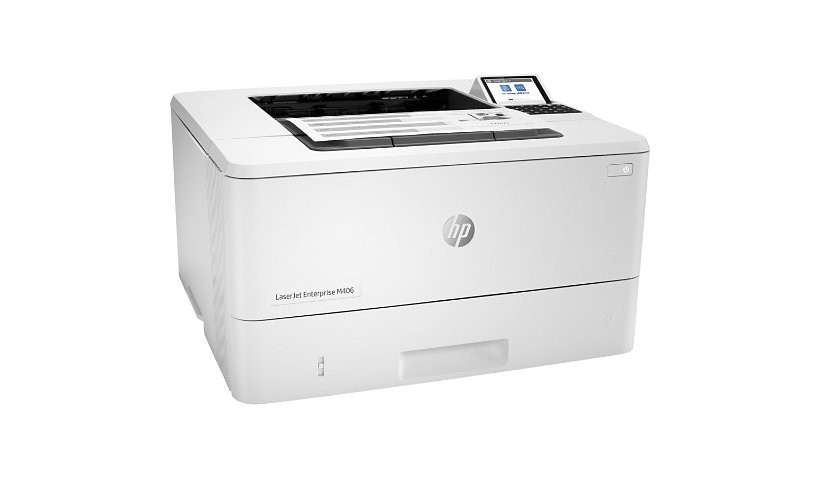
HP LaserJet Enterprise M406dn Desktop Laser Printer - Monochrome
$675.94
$529.00
Mfg # 3PZ15A#BGJ
CDW # 6402110
| UNSPSC 43212105
Quick tech specs
- HP FutureSmart firmware can be updated with the latest features to optimise your investment for years to come.
- Easily enable workflows across your fleet with a consistent user experience and intuitive, tablet-like icons.
- Centralise control of your printing environment with HP Web Jetadmin, and help build business efficiency.

Know your gear
HP's entry-level Enterprise-class printer with speeds up to 42 ppm[9] and strongest security.
This printer uses dynamic security, which may be updated periodically by firmware updates. The printer is intended to be used solely with cartridges using an original HP chip. Cartridges using a non-HP chip may not function or may cease to function. More at:
- Tray 1: A4, RA4, A5, B5 (JIS), B6 (JIS), 10 x 15 cm, A6, 16K, envelopes (B5, C5 ISO, C6, DL ISO); Custom: 76 x 127 to 216 x 356 mm; Tray 2: A4; RA4; A5; B5 (JIS); B6 (JIS); A6; 16K; 105 x 148 to 216 x 356 mm; Optional Tray 3: A4; RA4; A5; B5 (JIS); B6 (JIS); A6; 16K; 105 x 148 to 216 x 356 mm
- 1 Hi-Speed USB 2.0 Host; 1 Hi-Speed USB 2.0 Device; 1 Gigabit Ethernet 10/100/1000T network
- Up to 100,000 pages
- One-year, On-site Repair 24-hour / 7 day a week phone support

HP LaserJet Enterprise M406dn Desktop Laser Printer - Monochrome is rated
3.60 out of
5 by
21.
Rated 5 out of
5 by
tempedog from
M406dn setup
Instructions for setup are lacking. Can not complete set up. Online help will not accept my credit card with has $10,000 free on it. hp is not help.
Date published: 2025-01-16T00:00:00-05:00
Rated 5 out of
5 by
Crosby & Assoc. CPA LLC from
Great
this is an awesome wireless printer hope it holds up to my 4240n printer of 9 years
Date published: 2024-06-19T00:00:00-04:00
Rated 5 out of
5 by
Acct office from
difficulty setting up printer
This printer is incredibly difficult to set up. It goes through the drivers and setup but will not print. Used the tools to troubleshoot, spoke to support and it took forever to fix the issue.
Date published: 2021-11-11T00:00:00-05:00
Rated 5 out of
5 by
SvenF from
Works as expected
Just plugin a network cable and the power supply cable and wait until the printer is ready.
Thanks to the web access of the printer which you can access with each and every browser.
Installation of FW update went easily even without having installed any drivers for the printer itself.
Driver installation was a bit tricky since my firewall was blocking certain parts. Temporarily disabling the firewall helped.
I am very pleased with the printer.
Date published: 2021-09-27T00:00:00-04:00
Rated 5 out of
5 by
unhappy_customer77 from
Worst Printer Ever!!
We purchased this because HP said it was compatible with Windows 2000 and we are running older measurement equipment with that OS. It is not compatible, so we tried on a XP system... software would not load, then we tried a Windows 7 system, incompatible dll files. So finally we tried a Windows 10 install, everything looked good, the software said it installed successfully, but.... nothing printed... I even opened up Notepad, typed a few lines and attempted to print, I could select all other installed printers except the m406, when I selected m406 the print button would turn grey not allowing the selection. I would rate this less than one star if I could... We are retuning this printer
Date published: 2021-08-24T00:00:00-04:00
Rated 5 out of
5 by
Kwalyti from
Never Again!
I have never had such issues with a printer series. We have purchased a 404n and 406dn in the last couple of months and from the beginning, neither of them has worked correctly. I have spent upwards of 3 hours on the phone with HP. It seems there is some incompatability with the firmware and driver that HP has loaded on this series. Now it is hit and miss trying to find a driver to work with the new firmware upgrade. No one has time for this! HP get your act together!! These little desktop printers should be a no brainer.
Date published: 2021-07-06T00:00:00-04:00
Rated 5 out of
5 by
PRaheja from
Smart Printer
Perfect printer for a small business for limited space.
Date published: 2022-01-20T00:00:00-05:00
Rated 5 out of
5 by
KateyDo from
My go-to printer
Beautiful, clear, text and numbers. In accounting we want clarity above all else. We always get it with the HP LaserJet series!
Date published: 2022-06-27T00:00:00-04:00
Rated 5 out of
5 by
Cathy TO from
Good Value
Just got this connected and it is running great!
Date published: 2023-02-08T00:00:00-05:00
Rated 5 out of
5 by
Al in MT from
Great Printer
Gray printer! Does what I bought it for!
Date published: 2023-01-29T00:00:00-05:00
Rated 5 out of
5 by
None 2023 from
Ghost Printing
Printer was easy to install but once was up and running started printing weird things and we could not get it to stop.
Date published: 2023-02-09T00:00:00-05:00
Rated 5 out of
5 by
NicknamesAreUseless from
Good Printer - poor toner requirement.
Workhorse printer, easy to manage. Unfortunate requirement to use only HP branded toner.
Date published: 2023-12-26T00:00:00-05:00
Rated 5 out of
5 by
Larry M. from
The new laser jet printer
So far the printer is almost as good as the Laser jet 4050 that it is replacing. I loved that printer up til I could not get a printer replacement for the ink. If I can find some one to replace that both will be in use for a long time.
Date published: 2026-02-21T00:00:00-05:00
Rated 5 out of
5 by
Grandpa 2 from
Grandpa
Returned this printer as it does NOT do duplex (Double Sided). Replaced it with one that does.
Date published: 2026-02-22T00:00:00-05:00
Rated 5 out of
5 by
Peter and the Wolf from
Works
Seems to work as expected, except that warning triangle is always lit for no apparent reason.
Date published: 2026-03-04T00:00:00-05:00
Rated 5 out of
5 by
null from
Nice printer
This is a great printer. it is very easy to setup and get going. The user is very happy with it and is not giving them any problems. It has a small footprint so it does not take up much space on their desk.
Date published: 2021-11-03T16:29:11-04:00
Rated 5 out of
5 by
A Michael Dianich from
Lasarjets
HP 4001n works great.
Older HP died, so purchased new HP Z2 Tower G9 Workstation, (Windows 11.)
I have an HP Lasarjet 5100 which is now unusable and desperately needs a Windows 11 driver.
Please advise how to find and download a driver compatible with new desktop.
Thank you!
Date published: 2026-03-08T00:00:00-05:00
Rated 5 out of
5 by
tom deltona from
printer
great product works fine
Date published: 2026-03-19T00:00:00-04:00
Rated 5 out of
5 by
Victoria2018 from
Great, compact dual tray laser printer
This printer was perfect for my needs. I decided to go with this printer for my car as I need to sometimes print documents while on the road. Some require a mix of legal and letter size packages. This allows me to print a full package at one go and not have to print separately based on paper size. Although the legal size paper has to be fed and does not have a tray to "live" in, it still does the job of printing mixed packages. Having this feature also allows a more compact unit rather than having dual trays stacked on top of each other. For this reason, it was perfect for me having this model as a mobile printer. The only thing that was confusing was the set up with the trays and having it print mixed document packages. It took several hours for me to figure out and having to look at other online resources. Maybe someone who is more tech savvy wouldn't have this issue.
Date published: 2026-03-18T00:00:00-04:00
Rated 5 out of
5 by
Chrisibob from
Excellent printer
Excellent printer
Date published: 2026-03-29T00:00:00-04:00
Rated 5 out of
5 by
Jerry H. from
Great office printer
After 21 years with a HP2300 I had to go HP again. Great little printer. It seems faster and clearer than the old one. It also spools and prints way faster. Happy to get this for my gallery. Hopefully it last half as long as it's older brother.
Date published: 2026-03-12T00:00:00-04:00