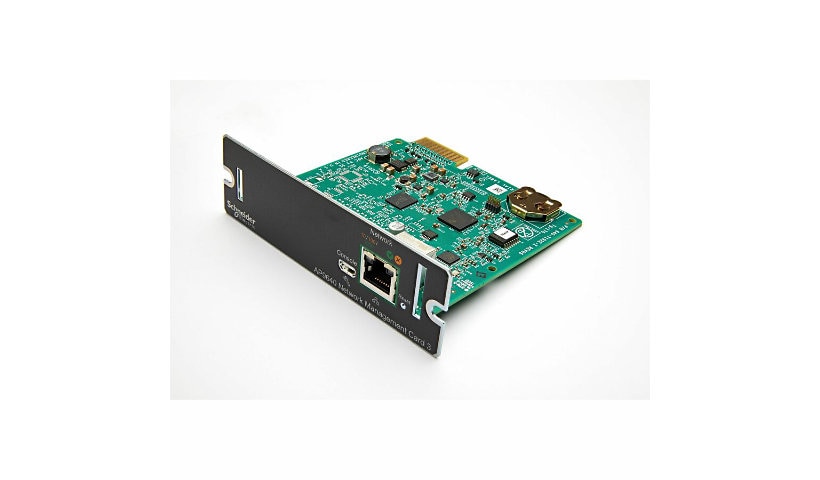
Quick tech specs
- Proprietary Slot Type: SmartSlot
- Protocols: HTTP
- Protocols: SSH
- Protocols: Telnet
- Number of Network (RJ-45) Ports: 1
- Height: 1.5"
- Depth: 4.5"
- Management: Data Logging
- Protocols: SSL
- Protocols: SNMP
- Network (RJ-45): Yes
- Ethernet Technology: Ethernet
- Width: 4.8"
- Weight (Approximate): 2.82 oz
Know your gear
APC UPS Network Management Card allow secure monitoring and control of an individual APC UPS via web browser, command line interface, or SNMP. Embedded technology provides exceptional reliability with notification features that inform you of problems as they occur.
Enhance your purchase
APC UPS Network Management Card is rated
4.50 out of
5 by
25.
Rated 5 out of
5 by
0 from
AP9630
Product was what we expected it to be. Received in a reasonable time, delivered without incident. Easy installation, easy config. Works as expected, and we are happy to have it in our system...a good tool for us!
Date published: 2011-12-08T00:00:00-05:00
Rated 5 out of
5 by
0 from
Solid piece of gear
This new management card replaces the older AP9617/9619 card. It's about time too. Security is drastically improved, along with numerous other areas.
You do NOT have to use the serial port to configure, there is a wizard you can run from the support CD that allows you to perform initial setup of unconfigured devices on your network. Requires windows, so if you are an all-linux shop, you'd need to run this software on a windoz guest VM. Solid piece of gear.
Date published: 2010-05-24T00:00:00-04:00
Rated 5 out of
5 by
0 from
Network Management Card
It's hard to fall in love with the network management card for a UPS - not a very sexy product. One thing I can say about these, though, is that they work exactly as advertised and last forever.
My best tip: Get the MAC address off the sticker before installing the card (because you can't always read it from the enclosed test results printout). Then create a DHCP reservation for the card before connecting it to the network. This will save you figuring out or running the utility to determine the unit's IP address.
I had to update the firmware to match that of another UPS for redundancy purposes. Although the firmware takes a little while to update itself, the process itself is easy to do from your workstation - don't hesitate if you have a reason for updating.
Date published: 2012-08-20T00:00:00-04:00
Rated 5 out of
5 by
0 from
Setup
Looks like they went back to the stone age on the serial connected set up on the card. The 9617 and 9619 basic setup is better.
Date published: 2010-02-20T00:00:00-05:00
Rated 5 out of
5 by
0 from
Great Purchase
What a great buy. Saving time and money being able to manage the UPS remotely.
Date published: 2017-04-11T00:00:00-04:00
Rated 5 out of
5 by
0 from
ap9630
Works like a charm for what it is. I do not like the flipping of proprietary interfaces since buying a new card with every unit is not good spending practice. Since the unit fails before the card does for me.
Mine are all beaten daily by a paint a shop, so I need to keep track of vitals before they fail.
Date published: 2011-02-06T00:00:00-05:00
Rated 5 out of
5 by
0 from
AP9630
Great card Product was what we expected it to be. Easy installation, easy config. Works as expected, and we are happy to have it in our system
Date published: 2017-04-11T00:00:00-04:00
Rated 5 out of
5 by
0 from
UPS Management Card
This product should be sold with every UPS because it saves dispatching technicians to remote locations. Works great.
Date published: 2017-06-26T00:00:00-04:00
Rated 5 out of
5 by
0 from
Great purchase
highly recommended for our smaller customers. many choose to purchase this card along side UPS.
Date published: 2017-09-01T00:00:00-04:00
Rated 5 out of
5 by
0 from
More People should USE THIS CARD!
I see way too many people that seem to neglect to configure this card for an appropriate level of email or SNMP notification. Too many messages quickly becomes annoying, but to NOT configure this card for extreme or important events, like battery failures or over temperature warnings, is regretful. These NMCs can be your best friend, when allowed to do the jobs they were designed to do!
Date published: 2017-04-11T00:00:00-04:00
Rated 5 out of
5 by
0 from
This card is worthy of its cost.
I have this card installed in many locations, some 100s of miles apart. The status notifications have show several sites that over voltage was being received and flagged repairs that were needed. This has more than paid for the purchase and install costs. We are installing these cards at all locations. I recommend you do too.
Date published: 2010-09-03T00:00:00-04:00
Rated 5 out of
5 by
Hello123 from
Money Saver
Deployed two of these with a couple of Smart UPS 3000 units. No issues - installation and operation have been great. Potential money saver - could keep you from investing time and $$$ on a service/health check call. Would recommend these to most customers.
Date published: 2019-07-31T00:00:00-04:00
Rated 5 out of
5 by
setenforce1 from
Solid piece of gear
This new management card replaces the older AP9617/9619 card. It's about time too. Security is drastically improved, along with numerous other areas. You do NOT have to use the serial port to configure, there is a wizard you can run from the support CD that allows you to perform initial setup of unconfigured devices on your network. Requires windows, so if you are an all-linux shop, you'd need to run this software on a windoz guest VM. Solid piece of gear.
Date published: 2010-05-24T00:00:00-04:00
Rated 5 out of
5 by
RichD from
Would Recommend
We like using these in our SMX devices. Provide greater control and good info.
Date published: 2017-08-16T00:00:00-04:00
Rated 5 out of
5 by
Ntiguy from
Great Purchase
What a great buy. Saving time and money being able to manage the UPS remotely.
Date published: 2017-04-11T00:00:00-04:00
Rated 5 out of
5 by
Reno runner from
This card is worthy of its cost.
I have this card installed in many locations, some 100s of miles apart. The status notifications have show several sites that over voltage was being received and flagged repairs that were needed. This has more than paid for the purchase and install costs. We are installing these cards at all locations. I recommend you do too.
Date published: 2010-09-02T00:00:00-04:00
Rated 5 out of
5 by
Bob from
UPS Management Card
This product should be sold with every UPS because it saves dispatching technicians to remote locations. Works great.
Date published: 2017-06-26T00:00:00-04:00
Rated 5 out of
5 by
DaveN from
Network Management Card
It's hard to fall in love with the network management card for a UPS - not a very sexy product. One thing I can say about these, though, is that they work exactly as advertised and last forever.
My best tip: Get the MAC address off the sticker before installing the card (because you can't always read it from the enclosed test results printout). Then create a DHCP reservation for the card before connecting it to the network. This will save you figuring out or running the utility to determine the unit's IP address.
I had to update the firmware to match that of another UPS for redundancy purposes. Although the firmware takes a little while to update itself, the process itself is easy to do from your workstation - don't hesitate if you have a reason for updating.
Date published: 2012-08-20T00:00:00-04:00
Rated 5 out of
5 by
esstek from
More People should USE THIS CARD!
I see way too many people that seem to neglect to configure this card for an appropriate level of email or SNMP notification. Too many messages quickly becomes annoying, but to NOT configure this card for extreme or important events, like battery failures or over temperature warnings, is regretful. These NMCs can be your best friend, when allowed to do the jobs they were designed to do!
Date published: 2017-04-11T00:00:00-04:00
Rated 5 out of
5 by
sealant from
Installation Quick and problem free
This product works flawlessly. I installed it with the smart UPS on. Be sure to use an anti static strap while installing-take this seriously! I installed the utility program included with the network card to search and find the IP address on the network. Once found I logged in using the default user id and password listed in the manual. I configured the unit to my needs and that was it. If for some reason you cannot discover the IP address you can go to the configuration screen on your smart UPS and find the IP address that way. From your browser enter the IP address with this format http://xx.x.x.xx (note do not use https) you won't find the webpage.
Date published: 2017-11-23T00:00:00-05:00
Rated 5 out of
5 by
skypilot from
ap9630
Works like a charm for what it is. I do not like the flipping of proprietary interfaces since buying a new card with every unit is not good spending practice. Since the unit fails before the card does for me.
Mine are all beaten daily by a paint a shop, so I need to keep track of vitals before they fail.
Date published: 2011-02-06T00:00:00-05:00
Rated 5 out of
5 by
fgriff1 from
AP9630
Great card Product was what we expected it to be. Easy installation, easy config. Works as expected, and we are happy to have it in our system
Date published: 2017-04-11T00:00:00-04:00
Rated 5 out of
5 by
md from
AP9630
Product was what we expected it to be. Received in a reasonable time, delivered without incident. Easy installation, easy config. Works as expected, and we are happy to have it in our system...a good tool for us!
Date published: 2011-12-08T00:00:00-05:00
Rated 5 out of
5 by
AE from
Great purchase
highly recommended for our smaller customers. many choose to purchase this card along side UPS.
Date published: 2017-08-31T00:00:00-04:00
Rated 5 out of
5 by
alandbets from
Setup
Looks like they went back to the stone age on the serial connected set up on the card. The 9617 and 9619 basic setup is better.
Date published: 2010-02-19T00:00:00-05:00