

Eaton Tripp Lite Series Triple-Monitor USB C Dock USB C Docking Station with 4K HDMI & DisplayPort, VGA - USB-A/C, GbE,
$400.00
$143.99
Sign in for your price
Mfg # U442-DOCK7D-B
CDW # 6057192
| UNSPSC 43211602
Quick tech specs
- Dock Station extends 720p video across HDMI/DisplayPort and VGA monitors simultaneously in MST mode
- Converts audio/video signals from sources supporting USB-C DisplayPort Alt Mode
- Tripp Lite is now part of Eaton
- Sends mirrored 1080p video across HDMI/DisplayPort and VGA monitors simultaneously in SST mode
- Provides 20V 5A 100W power output for fast-charging

Know your gear
USB-C Docking Station Turns Your Device's USB-C or Thunderbolt 3 Port into 14 New Ports
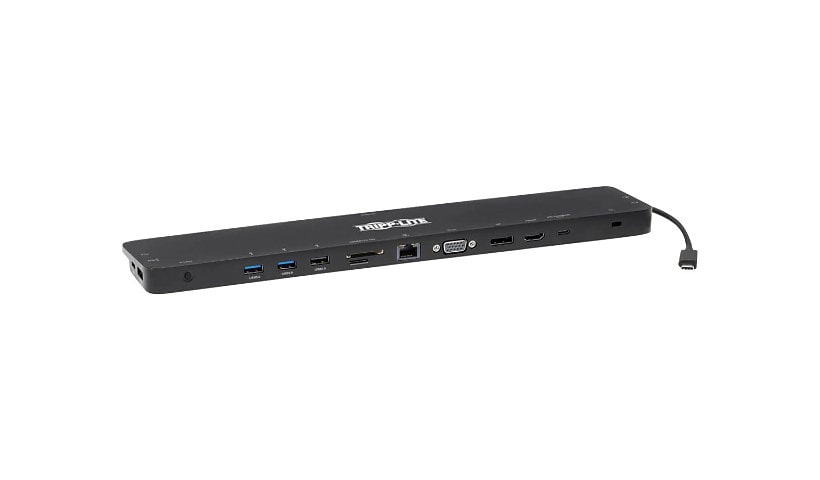
This universal USB-C dock with PD Charging expands the potential of your Windows laptop, Chromebook, smartphone or PC's USB-C or Thunderbolt 3 port. Connect the dock using the included USB-C cable, and add 14 ports to your device:
? 4K HDMI
? 4K DisplayPort
? 1080p VGA
? RJ45 Gigabit Ethernet
? (2) USB 2.0
? (2) USB 3.2 Gen 1
? USB 3.2 Gen 1 with 5V 1.5A (7.5W) charging
? USB-C PD 3.0 Charging up to 20V 5A (100W)
? USB-C 3.2 Gen 1 data
? 3.5 mm audio/headphone jack
? SD and Micro SD card slots
Supports USB-C DisplayPort Alternate Mode for Transmitting Audio/Video Signals
By connecting the detachable USB-C host cable to a source device that supports USB DisplayPort Alt Mode, you can output 4K video and digital audio to a compatible monitor, television or projector without installing special software drivers.
Transmits Crystal-Clear True 4K Video and Digital Audio with 4:4:4 Color
The DisplayPort (DP) output supports true 4K resolutions up to 4096 x 2160 at 30 Hz. The HDMI output supports Ultra HD resolutions up to 3840 x 2160 at 30 Hz. The VGA output supports high-definition resolutions up to 1920 x 1200, including 1080p, at 60 Hz. This docking station also supports 4:4:4 chroma subsampling for top-level PC gaming or using your HDTV as a PC monitor.
DisplayPort SST and MST Modes Allow Connection of Multiple Displays
By connecting the detachable USB-C cable to a source that supports DisplayPort Single-Stream Transport (SST) or Multi-Stream Transport (MST) mode, you may connect up to three displays simultaneously. This allows you to display the same image on all monitors, extend your host desktop across all with different windows open on each, or combine all into one large display as a video wall. Connect multiple monitors in Extended (4K @ 30 Hz HDMI and 4K @ 30 Hz DP; 1080p HDMI and 1080p VGA; 1080p DP and 1080p VGA; or 720p HDMI, 720p DP and 720p VGA) and Mirror (4K @ 30 Hz HDMI and 4K @ 30 Hz DP; 1080p HDMI and 1080p VGA; 1080p DP and 1080p VGA; or 1080p HDMI, 1080p DP and 1080p VGA) modes.
Note
: macOS laptops or computers will only extend to one monitor. The others will be mirrored. Additionally, graphic limitation on the source may affect the quantity of monitors the dock can display. The source graphics card provides a limited bandwidth for each display.
USB 3.2 Gen 1 and USB 2.0 Ports Connect Keyboards, Thumb Drives and Other Peripherals
Three USB 3.2 Gen 1 ports accept USB peripherals, such as flash drives, mice, keyboards and printers. They support fast data transfer rates up to 5 Gbps and are backward compatible with USB 2.0 and USB 1.1 devices. One also supports 5V 1.5A (7.5W) of power dedicated to fast-charging your mobile device. Two other ports are USB 2.0.
Note
: Host must support USB OTG (On-the-Go).
PD Charging Port Charges the Connected Notebook, Tablet or Other Device
One USB-C port supports Power Delivery (PD) 3.0 charging of connected PD Charging-compliant devices, such as laptops, Kindles, iPads and Android smartphones. Connect the device's AC wall charger to the USB-C PD port, which supports power input up to 20V 5A (100W). This port, as well as the dock's other USB-C port, can also be used for transferring data up to 5 Gbps. PD 3.0 Fast Role Swap technology ensures all data and power connections remain stable if the wall charger becomes accidentally dislodged.
Note
: USB-C PD port does not support Quick Charge (QC).
Accesses a Wired Gigabit Ethernet Network
The RJ45 port offers access to a Gigabit Ethernet network when Wi-Fi is unavailable or when a wired connection offers faster speeds. Connect using a UTP cable (sold separately), and enjoy true 10/100/1000 Mbps Ethernet speeds for fast data transfers.
Connects Speakers, Microphone and Other Audio Equipment
The USB-C docking station's 3.5 mm mini stereo jack is convenient for connecting speakers, headphones or a microphone to your workstation. You can listen to music or record the latest episode of your podcast.
Allows External Memory Access
The memory card slots support Micro SD and SD/MMC cards for transferring data to and from your connected computer, laptop or tablet. You can access both slots at the same time.
Anti-Theft Lock Protects the USB-C Docking Station When You Aren't Around
Connect a user-supplied computer/laptop security cable lock (not included) to this port to protect your source device against theft.
Ready to Use Right Out of the Package
The plug-and-play USB-C dock is specifically designed for use with Windows laptops and other notebooks, smartphones, tablets and devices equipped with a USB-C or Thunderbolt 3 port. Drivers will auto-install upon the initial connection to the host. Its compact footprint fits easily into your desk space without taking up much valuable room.
This universal USB-C dock with PD Charging expands the potential of your Windows laptop, Chromebook, smartphone or PC's USB-C or Thunderbolt 3 port. Connect the dock using the included USB-C cable, and add 14 ports to your device:
? 4K HDMI
? 4K DisplayPort
? 1080p VGA
? RJ45 Gigabit Ethernet
? (2) USB 2.0
? (2) USB 3.2 Gen 1
? USB 3.2 Gen 1 with 5V 1.5A (7.5W) charging
? USB-C PD 3.0 Charging up to 20V 5A (100W)
? USB-C 3.2 Gen 1 data
? 3.5 mm audio/headphone jack
? SD and Micro SD card slots
Supports USB-C DisplayPort Alternate Mode for Transmitting Audio/Video Signals
By connecting the detachable USB-C host cable to a source device that supports USB DisplayPort Alt Mode, you can output 4K video and digital audio to a compatible monitor, television or projector without installing special software drivers.
Transmits Crystal-Clear True 4K Video and Digital Audio with 4:4:4 Color
The DisplayPort (DP) output supports true 4K resolutions up to 4096 x 2160 at 30 Hz. The HDMI output supports Ultra HD resolutions up to 3840 x 2160 at 30 Hz. The VGA output supports high-definition resolutions up to 1920 x 1200, including 1080p, at 60 Hz. This docking station also supports 4:4:4 chroma subsampling for top-level PC gaming or using your HDTV as a PC monitor.
DisplayPort SST and MST Modes Allow Connection of Multiple Displays
By connecting the detachable USB-C cable to a source that supports DisplayPort Single-Stream Transport (SST) or Multi-Stream Transport (MST) mode, you may connect up to three displays simultaneously. This allows you to display the same image on all monitors, extend your host desktop across all with different windows open on each, or combine all into one large display as a video wall. Connect multiple monitors in Extended (4K @ 30 Hz HDMI and 4K @ 30 Hz DP; 1080p HDMI and 1080p VGA; 1080p DP and 1080p VGA; or 720p HDMI, 720p DP and 720p VGA) and Mirror (4K @ 30 Hz HDMI and 4K @ 30 Hz DP; 1080p HDMI and 1080p VGA; 1080p DP and 1080p VGA; or 1080p HDMI, 1080p DP and 1080p VGA) modes.
Note
: macOS laptops or computers will only extend to one monitor. The others will be mirrored. Additionally, graphic limitation on the source may affect the quantity of monitors the dock can display. The source graphics card provides a limited bandwidth for each display.
USB 3.2 Gen 1 and USB 2.0 Ports Connect Keyboards, Thumb Drives and Other Peripherals
Three USB 3.2 Gen 1 ports accept USB peripherals, such as flash drives, mice, keyboards and printers. They support fast data transfer rates up to 5 Gbps and are backward compatible with USB 2.0 and USB 1.1 devices. One also supports 5V 1.5A (7.5W) of power dedicated to fast-charging your mobile device. Two other ports are USB 2.0.
Note
: Host must support USB OTG (On-the-Go).
PD Charging Port Charges the Connected Notebook, Tablet or Other Device
One USB-C port supports Power Delivery (PD) 3.0 charging of connected PD Charging-compliant devices, such as laptops, Kindles, iPads and Android smartphones. Connect the device's AC wall charger to the USB-C PD port, which supports power input up to 20V 5A (100W). This port, as well as the dock's other USB-C port, can also be used for transferring data up to 5 Gbps. PD 3.0 Fast Role Swap technology ensures all data and power connections remain stable if the wall charger becomes accidentally dislodged.
Note
: USB-C PD port does not support Quick Charge (QC).
Accesses a Wired Gigabit Ethernet Network
The RJ45 port offers access to a Gigabit Ethernet network when Wi-Fi is unavailable or when a wired connection offers faster speeds. Connect using a UTP cable (sold separately), and enjoy true 10/100/1000 Mbps Ethernet speeds for fast data transfers.
Connects Speakers, Microphone and Other Audio Equipment
The USB-C docking station's 3.5 mm mini stereo jack is convenient for connecting speakers, headphones or a microphone to your workstation. You can listen to music or record the latest episode of your podcast.
Allows External Memory Access
The memory card slots support Micro SD and SD/MMC cards for transferring data to and from your connected computer, laptop or tablet. You can access both slots at the same time.
Anti-Theft Lock Protects the USB-C Docking Station When You Aren't Around
Connect a user-supplied computer/laptop security cable lock (not included) to this port to protect your source device against theft.
Ready to Use Right Out of the Package
The plug-and-play USB-C dock is specifically designed for use with Windows laptops and other notebooks, smartphones, tablets and devices equipped with a USB-C or Thunderbolt 3 port. Drivers will auto-install upon the initial connection to the host. Its compact footprint fits easily into your desk space without taking up much valuable room.
Add to Compare
Enhance your purchase
Tripp Lite USB C Docking Station Triple Monitor 4K HDMI DP VGA USB A/C Gbe is rated
4.60 out of
5 by
23.
Rated 5 out of
5 by
John from
Excellent product, worth the money as opposed to competitors
This product is great and it works and 1/2 the price of a competitors dock. Finally was able to display multiple screens using the HDMI port. Worth the money.
Date published: 2020-08-25T00:00:00-04:00
Rated 5 out of
5 by
Howard from
Works as planned
Got this to connect a laptop to a series of peripherals - two printers, a monitor, keyboard, external hard drive etc. Seems to be working as desired. I found the instructions on how to route the power difficult to follow, it works now but my laptop repeatedly says that I am connected to an inadequate power source (I used the power source that came with the laptop) - however the laptop charges and all seems to be working. Good way to reduce clutter and have a laptop ready to go at any time.
Date published: 2023-08-01T00:00:00-04:00
Rated 5 out of
5 by
Camilo from
Useful and handy
The wide array of ports makes it useful and it is very well inegrated to look seamless
Date published: 2023-02-07T00:00:00-05:00
Rated 5 out of
5 by
FEMR_BR from
Best Dock Ever!
Really simple to install and make all connections.
Using it at the office and home office, really light and fits my backpack.
Date published: 2023-04-19T00:00:00-04:00
Rated 5 out of
5 by
Mason from
I would recommend this product to everyone
I use this product in my office every day. I have recommended it to everyone else in the office and it's a hit. It allowed us to go from 2 monitors to 3 which significantly increases the productivity for the work we do. Overall amazing product with great quality.
Date published: 2023-02-21T00:00:00-05:00
Rated 5 out of
5 by
Kat from
I like this product
Used for my laptop
Date published: 2023-03-06T00:00:00-05:00
Rated 5 out of
5 by
Matthew from
Bought 400+
Works as intended except for WOL. Working with support on this to figure it out.
Date published: 2022-01-25T00:00:00-05:00
Rated 5 out of
5 by
Trent from
I would purchase products by Tripp-Lite again.
Unfortunately, the unit I received had an issue with the video ports BUT I would like to give Tripp-Lite 5 stars for its customer service. They are in the process of sending me a replacement at no charge.
Date published: 2020-12-26T00:00:00-05:00
Rated 5 out of
5 by
Sam from
Great product!
I use the docking station at work in order to have several monitors displaying at the same time. This product helps me be more efficient at my job.
Gracias TRIPP-LITE
Date published: 2022-10-13T00:00:00-04:00
Rated 5 out of
5 by
Kayla Bennion from
Tripp lite docking station
Slim and light weight, perfect for travel and easy set up!
Date published: 2022-10-18T00:00:00-04:00
Rated 5 out of
5 by
John from
Not without faults, but a worthy purchase
My primary reasons for choosing this Dock were (1) it supported VGA, which I needed for one of my monitors, and (2) its under-the-laptop profile which gave it the edge over other contenders.
My first unit incurred "infant mortality" two days after I began using it, with nearly every function failing by the fifth day. Warranty support wasn't as easy to access as I would have liked, but they did replace the unit. Delivery time was near 10 days, which was disappointing, but I survived.
The instructions could have been clearer, but the new unit performs very well in all aspects. It charges my laptop, drives my two external monitors, connects my several USB devices, and "moves" the audio connection to the side I wanted it on. I have no complaints about any of its performance.
I did, however, realize that the low profile isn't as helpful as I had hoped. The ports are difficult to reach and their labeling requires better eyesight than I currently possess. The case is all hard plastic, so it slides easily on every surface. I would like it better with feet of some sort, maybe on both sides, so at least some of it would stay where I put it.
Date published: 2024-08-21T00:00:00-04:00
Rated 5 out of
5 by
Leighanne from
I would recommend this product.
This was a very easy set up and works well!
Date published: 2022-04-22T00:00:00-04:00
Rated 5 out of
5 by
Raveen from
One stop solution. Great product.
Great product, one stop solution for your devices. Works well with my laptop.
Date published: 2022-04-25T00:00:00-04:00
Rated 5 out of
5 by
G from
Like it alot
Love the product does exactly what I need it to
Date published: 2022-06-01T00:00:00-04:00
Rated 5 out of
5 by
Sundeep from
Versatile Tool
This is one of the best things I bought to set up my workstation. Total value!
Date published: 2022-02-14T00:00:00-05:00
Rated 5 out of
5 by
Dal87 from
Great setup
Really like the ability to position the dock away from the desk surface without losing functionality. Do wish the included cable was slightly longer.
Date published: 2021-11-26T00:00:00-05:00
Rated 5 out of
5 by
Alan from
I loved this product
Very compact with all the ports necessary to run my workspace from home.
Date published: 2022-10-28T00:00:00-04:00
Rated 5 out of
5 by
Mariella from
Can't be beat!
Easy to use. Works great, is slim and portable. Economical purchase compared to Dell. Can't beat it!
Date published: 2020-11-27T00:00:00-05:00
Rated 5 out of
5 by
Jim from
I would buy again
This docking station has been working great since I started using it in April of 2022
Date published: 2022-08-18T00:00:00-04:00
Rated 5 out of
5 by
Toni from
Great product
I liked using the product. I would recommend longer cords to connect to your laptop as it is too short now and it restricts space availability.
Date published: 2022-07-26T00:00:00-04:00
Rated 5 out of
5 by
Matt O from
This product works wonderuflly
I use this product for work and I just become a super great convenience for me. Having to only plug in 1 cable makes it convenient for transferring my laptop!
Date published: 2022-11-02T00:00:00-04:00
Rated 5 out of
5 by
Cindy Duncan from
Use it at work and love it!
We use these at my school for teachers to use at their desks with their school-issued laptops. We connect them to our desk monitors and keyboards. So far everyone is loving them and they are super easy to use once you get the peripherals set up to your dock. Just plug into your laptop and you are set to do some work!
Date published: 2022-11-09T00:00:00-05:00
Rated 5 out of
5 by
dllin from
It works great.
On my MacBook.
Date published: 2021-05-26T00:00:00-04:00