

StarTech USB-C / USB-A Hybrid Docking Station for MacBook Pro / Air M1 M2 M3 M4 & Windows, Thunderbolt Dock, 60W PD
$269.56
$249.99
Mfg # DK30C2DPPD
CDW # 5452173
| UNSPSC 43211602
Quick tech specs
- Universal docking station works w/ USB Type-C, Thunderbolt and USB Type-A laptop computers
- USB-IF, VESA & DisplayLink certified dock; 60W power delivery
- 4-Port USB 5Gbps (2x Fast Charge); 1x USB-C and 3x USB-A, Gigabit Ethernet & 1x 3.5mm audio/headset, K-slot, mount option
- DisplayPort / HDMI ports supporting up to Dual 4K 60Hz
- Compatible Windows, macOS, Ubuntu and ChromeOS; Dual extended monitors on MacBook Air/Pro (base Apple M-Series) laptops that natively only support one

Know your gear
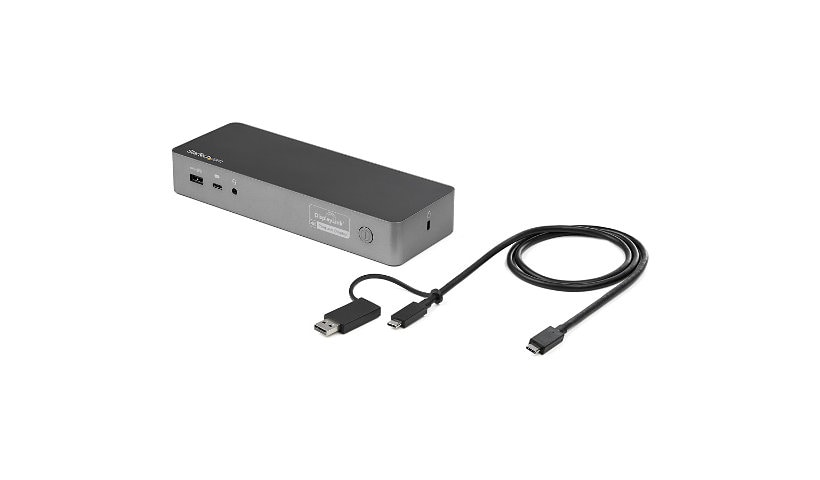
Create a dual-4K 60Hz workstation with this certified universal laptop docking station for USB-C and USB-A laptops. The USB-C dock features 60W Power Delivery 3.0, dual HDMI and/or DisplayPort monitors, fast-charge, and both USB-C and USB-A peripheral ports. The Uniquely Universal Host Cable The USB-C dock comes with a universal host cable that is designed with an attached USB-C to USB-A adapter to accommodate USB-A laptops. The cable also features an extended length of 1 meter (3.3 ft.) to support a wide variety of workstation setups. Flexible Monitor Connections This is a dual 4K60Hz video docking station with support for both Ultra HD DisplayPort and/or HDMI monitors that lets you configure your video connections to best suit your needs. Dual 4K DisplayPort Up to 4096 x 2160p @ 60Hz Dual 4K HDMI Up to 4096 x 2160p @ 60Hz Single 4K DisplayPort + Single 4K HDMI Up to 4096 x 2160p @ 60Hz Single 5K DisplayPort * Up to 5120 ?- 2880 *Requires monitor support for 5K using two DP ports Certified for Universal Compatibility & Reliability This docking station is fully certified to meet top industry standards for USB-IF (USB 3.1 Gen 1, USB Type-C and Power Delivery), VESA DisplayPort and DisplayLink (video connections) certification to guarantee the highest quality, reliability, and compatibility. 60W Power Delivery Using a single cable, the dock powers and charges your laptop as you work with 60W PD for faster charging, using the 135W power adapter. Easy and Convenient Setup For fast setup right out of the box, the combo cable (USB-C with attached USB-A adapter) lets you connect any laptop. The dock has mounting holes for workstation mounting (bracket not included). The Connections You Need Connect your devices with four USB 3.1 ports: 1x USB-C and 3x USB-A. Fast-charge your USB-C or USB-A smartphone. The dock provides a GbE port (PXE Boot support & Wake-on-LAN) and 3.5 mm 4-position headset audio jack. It also includes a security lock slot (K-slot) to protect against theft. For more installation flexibility, you can use StarTech.com mounting brackets (SSPMSVESA) that are specifically designed for our docks and hubs, to mount your dock to a desk, wall, or other surfaces to give you the customized setup you need. The IT Pro's Choice Since 1985 StarTech.com conducts thorough compatibility and performance testing on all our products to ensure we are meeting or exceeding industry standards and providing high-quality products to IT Professionals. Our local StarTech.com Technical Advisors have broad product expertise and work directly with our StarTech.com Engineers to provide support for our customers both pre and post-sales. DK30C2DPPD is backed by a StarTech.com 3-year warranty and free lifetime technical support. More from the Manufacturer
Add to Compare
Enhance your purchase
StarTech USB-C / USB-A Hybrid Docking Station for MacBook Pro / Air M1 M2 M is rated
4.50 out of
5 by
2.
Rated 5 out of
5 by
Minhle from
MinhLe
i can output my monitor without driver installation
Date published: 2025-03-07T00:00:00-05:00
Rated 5 out of
5 by
Teknesia from
It works for M1/M2 MacBook Air (2023 model)
It works for M1/M2 MacBook Air (2023 model) - but in the end I decided the cons were not for me just to gain my third screen on my MBA M2 laptop. Here's the details:
Pros:
- Lets me connect 2 screens to my MBA M2 (2023) - Sweet, it really does work :) but...
Cons:
- Slight response delay vs native screens - somewhat annoying
- Night Shift does not work on DisplayLink or HDMI screens attached to this hub. Some might not care, but I use this constantly in the am and pm to avoid eye fatigue and sleep issues with blue light
- Requires Additional drivers from DisplayLink to work
- Privacy concerns re: sharing screen content 100% of the time (this is how the technology works - using a workaround in the OS)
- Cannot watch ANY streaming video content (Netflix, Hulu, Disney, Paramount, etc etc ect) on ANY screens while DisplayLink screen sharing (again, required to work) is enabled - even the native laptop screen. This is a copyright protection feature; Turn off DL and poof - streaming shows the video.
Date published: 2023-10-27T00:00:00-04:00