

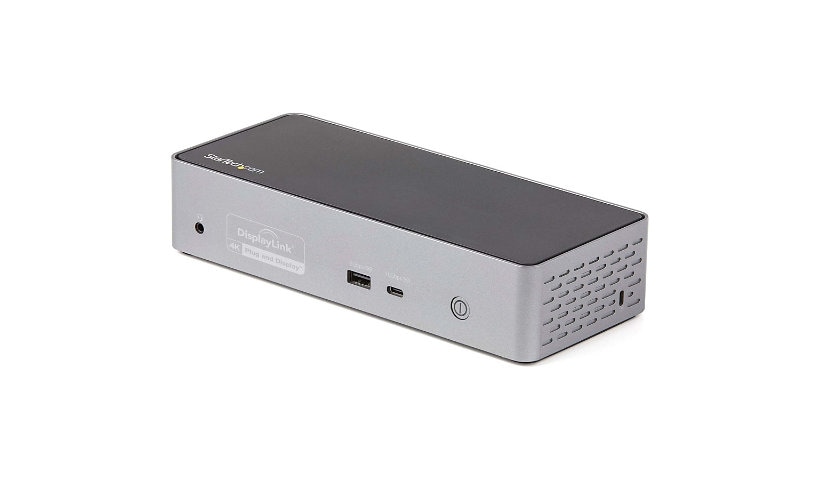
StarTech USB-C Quad Monitor Docking Station for MacBook Pro / Air M1 M2 M3 M4, Windows, 4K Thunderbolt Dock, 100W PD
$294.99
$272.99
Sign in for your price
Mfg # DK31C4DPPD
CDW # 6629528
| UNSPSC 43211602
Quick tech specs
- C docking station; Quadruple displays 4K 60Hz video; 4x DisplayPort and/or 4x HDMI monitors
- 100W Power Delivery USB C Dock to power/charge USB Type-C/Thunderbolt laptop
- Compatible w/ Windows, macOS, ChromeOS
- 1x USB-C 10Gbps (15W charging); 3x USB-A 5Gbps (1x fast-charge 1.5A)
- Works w/ Lenovo X1/Dell XPS/MacBook Pro/Air (Intel, base M-Series)/Surface; Works w/ USB4/TB4 host device; GbE (PXE Boot/WoL); TRRS headset/mic; K-slot; MAC address changer

Know your gear
This USB-C Gen 2 10Gbps docking station turns your USB-C ® or Thunderbolt™ 3 MacBook Pro, Windows laptop, and Chromebook into a powerful workstation. A USB 3.2 Gen 2 Type-C dock features everything you need, from quad HDMI or DisplayPort video outputs up to 4K 60 Hz to 10Gbps USB-C & USB-A downstream peripheral ports to 100W Power Delivery. HDMI & DisplayPort for Four Monitor Outputs This USB-C Gen 2 docking station with DP 1.2 and HDMI 2.0 HDR support, is a perfect choice for dual, triple, or quad monitor setup, supporting up to quad 4K 60Hz display output, with any combination of four DisplayPort or HDMI video interfaces, on USB-C Gen 2 laptops, MacBooks (including M1 based systems) and Windows-based Thunderbolt 3 laptops. Display & Resolution Specs: Quad 4K DisplayPort Up to 3840 x 2160p @ 60Hz Quad 4K HDMI Up to 3840 x 2160p @ 60Hz Quad 4K (Mix of DP & HDMI) Up to 3840 x 2160p @ 60Hz Dual 5K DisplayPort* Up to 5120 ? 2880 Single 5K DisplayPort* Up to 5120 ? 2880 + Dual 4K HDMI/DisplayPort Up to 3840 x 2160p @ 60Hz *Requires monitor support for 5K and uses two DP ports for one 5K display connection Power & Charge with 100W Power Delivery Power and charge USB-C/Thunderbolt 3 workstation laptops & ultrabooks with 100 watt PD. Higher power delivery, more than other USB-C 10Gbps quad monitor docks. Charge smartphones and other high powered devices with two downstream front-facing charging ports with BC 1.2 for USB-A and USB-C devices. Fast-charge ports support always-on charging so devices will charge whether or not a host laptop is connected. Plenty of Downstream USB Ports This USB-C Gen 2 docking station features 4 downstream USB ports in total to connect USB peripherals. 1x USB-C 3.2 Gen 2 (10 Gbps 15W/3A) 1x USB-A 3.2 Gen 1 (5 Gbps 7.5W/1.5A) 2x USB-A 3.2 Gen 1 (5 Gbps 4.5W/0.9A) Also included, is a gigabit Ethernet port with PXE Boot and WoL support, as well as 4-position TRRS stereo audio headset/mic port. Additional Security Features This USB-C docking station comes with plenty of security features a K-slot for a Kensington style laptop lock and holes to mount the dock on the desk or wall and includes a USB-IF Certified 1m USB-C cable. Extra Ventilation USB-C dock features optimized ventilation on both ends and bottom side of dock to provide cooling support to higher temperature thermals that can be generated by high performance video/graphics applications and multiple 4K 60Hz video outputs. Enhance Productivity and Device Management with the StarTech.com Connectivity Tools Application Developed to improve performance and security, StarTech.com Connectivity Tools is the only software suite on the market that works with a wide range of IT connectivity accessories. The software suite includes: Advanced Windows Layout Utility: To setup and save custom windows layouts. Mac Address Pass-Through Utility: To improve network security. USB Event Monitoring Utility: To track and log connected USB devices Wi-Fi Auto Switch Utility: Enabling users to quickly access faster network speeds via wired LAN. For more information and to download the StarTech.com Connectivity Tools application, please visit: www.StarTech.com/Connectivity-Tools
Add to Compare
Enhance your purchase
StarTech USB-C Quad Monitor Docking Station for MacBook Pro / Air M1 M2 M3 is rated
4.40 out of
5 by
9.
Rated 5 out of
5 by
Huff from
So Versitile!
Received this device a month ago and could not be happier. I have been able to install this in my home office with 3 external monitors and it lit up perfectly! Plenty of ports and heavy duty to say the least. This thing a brick, but in a good way. The best review I can give is that my wife plugged her work laptop in and I did not have to do anything! She was off and running!
Date published: 2023-10-12T00:00:00-04:00
Rated 5 out of
5 by
Eclair4648 from
Solid Dock
This dock for 4 monitors is pretty amazing. This dock performed as expected and I was able to connect 4 monitors over display port effectively. One thing to note is that monitor 4 always took a little longer to "pop-up", but this wasn't a deal breaker for me. Once all 4 monitors were online, they stayed up. I will say that the monitors I used are NOT 4K so your experience with 4K might be a tad different, but overall connecting 4 monitors was painless. The 100W power was a little inadequate for my workstation and I wish this the capability of delivering upto 230W of power for power hungry workstations. Overall, the build quality of this is pretty solid -- something you know you expect out of StarTech.
Date published: 2023-09-05T00:00:00-04:00
Rated 5 out of
5 by
DjLuis from
DK31C4DPPD Dock Station with Multiple LED Brands
I had the opportunity to test the Startech DK31C4DPPD dock station with various LED brands, and it exceeded my expectations:
Performance (5/5): This dock station seamlessly connected to my laptop and an array of LED monitors, whether it was for watching a video, gaming, content creation, or general use. The Power Delivery feature made it even more convenient by charging my laptop while connecting to all my devices.
Versatility (5/5): No matter the monitor brand, the Startech DK31C4DPPD handled them all effortlessly, delivering impeccable video quality. It's a versatile solution for any setup.
Ease of Use (4/5): Setup was straightforward, and it's essentially plug-and-play. My only minor gripe was the power button placement and missing USB slots in front.
Value for Money (4/5): While not the most budget-friendly option, the dock station's performance and compatibility with multiple LED brands make it a worthwhile investment.
In conclusion, the Startech DK31C4DPPD is a versatile solution that enhances productivity and connectivity, regardless of the LED brand. I highly recommend it to professionals looking for a reliable docking solution.
Date published: 2023-10-23T00:00:00-04:00
Rated 5 out of
5 by
JTech from
Not working
I downloaded the lates drivers, rebooted several times tried the various ports and nothing
Date published: 2024-09-29T00:00:00-04:00
Rated 5 out of
5 by
pstokes from
Reliable Product.
I have used a couple of docks in this line across multiple employers and they have been rock solid. I've been using a laptop as my primary computer for years now and just plugging a single cable in beats grabbing a bundle and plugging in a half dozen cables every time you walk in the office. I have one oddity that I'm not sure if its with the dock or with Apple, occasionally Ill plug in an only one of my monitors is detected at first, if I turn my dock off and on then all my monitors wake up. This is a suggestion, place the headphone jack on the back, some people still use desktop speakers. After over 5 years of using Startech docks I don't have a complaint, they may be a bit pricier but they just work.
Date published: 2023-10-04T00:00:00-04:00
Rated 5 out of
5 by
soren182 from
Look no further
The initial unboxing didn't quite deliver the anticipated excitement that often comes with revealing a product you had high hopes for. The device resembles a brick and demands a robust external power source. On a brighter note, when your focus is firmly on functionality, it becomes effortless to disregard the hefty addition you've just introduced to your workspace.
A single, streamlined USB-C cable that offers nearly instantaneous power and ample support for multiple 4K displays. I'd like to believe that my computer's performance is what provides this experience, but my past experience with similar products has shown me that it's not the case. This has truly changed my expectations of docking stations and provided the ability to feasibly manage multiple displays without any headaches.
If you're looking to enhance your workstation and simplify your connectivity needs, I highly recommend this multiple video docking station. If you're comparing different docking stations, make sure to give this one a try as your first choice. It will save you the time and disappointment of exploring other options. It's a fantastic addition to any setup.
Date published: 2023-10-03T00:00:00-04:00
Rated 5 out of
5 by
SGTO416 from
Great dock with lots of ports!
This docking station has everything you need to setup a home office environment:
2 - USB 3.2 Type-A (9 pin, Gen 1, 5Gbps)
1 - USB 3.2 Type-A with BC 1.2 (9 pin, Gen 1, 5Gbps, 7.5W Power)
1 - USB 3.2 Gen 2 USB Type-C (Fast-Charge, 24 Pin, 10 Gbps)
4 - DisplayPort
4 - HDMI
1 - Ethernet Gigabit
1 - 3.5 mm Mini-Jack (4 Position)
Host Connectors
1 - USB 3.2 Type-C (24 pin, Gen 2, 10Gbps)
Having both HDMI and DisplayPorts for monitors is fantastic - you no longer need adapters to make sure you can plug in. The GB port is great for those that want to be hard wired vs wifi to achieve optimal network speeds. The 100w laptop charging port is fantastic as it provides ample charging for the devices I was testing on this device (HP and Dell).
Out of the box I did have to upgrade to the latest DisplayLink drivers and it was smooth sailing after that! Great addition to the home office.
Date published: 2024-06-17T00:00:00-04:00
Rated 5 out of
5 by
Trying from
Yes windows, no Mac?
Specs looked promising. Works great with a Win10 laptop driving two FHD on HDMI but does not work with multiple newer MacBook Pro or air (macOS 12.5 Mojave. Tried different cables, reboots, ports. Just doesn’t like the Mac.
Date published: 2022-08-23T00:00:00-04:00
Rated 5 out of
5 by
Shashank from
Excellent quad 4K dock
I bought this to use with my setup that consists of a 3 yr old Thinkpad that has a 5Gbps USB-C port (no thunderbolt, connected to few USB 3.0 devices and four monitors. Two of the monitors are 4k and other two are 2k.
Pros:
1. Setup was super easy. After plugging in all the monitors and devices, I installed Displaylink drivers and everything worked instantly.
2. Monitor resolutions were off in Windows, so it required a few clicks to set. Again, super easy.
3. This is one of the non-thunderbolt docks with a downstream USB-C port.
4. For each monitor, there is an option to use HDMI or Displayport. I have all the monitors connected to HDMI and running at 60Hz.
5. I ordered a dock mount (Startech part# SSPMSUDWM), which allows mounting the dock on the wall or under a desk. I have it mounted under a desk.
Cons:
1. I wish there were more USB-A ports. The dock has total 3 USB-A ports, which I feel may not be enough for some people. I had to get a USB hub with 7 ports and connected it to the dock.
2. The power button LED, is on the opp side of where all the display ports are. So it means that if you place the dock with all the ports facing you, then the power button LED would be on the back and not easily reachable/visible.
My wish list for this dock:
1. The charger is huge. Mounting it under the desk isn’t easy. I wish Startech can make a GaN charger, which would be much smaller and easy to mount.
2. The ethernet port is 1Gbps. I wish Startech can upgrade this to a 10Gbps port or at least a 2.5Gbps port. Many other docks offer higher speed ethernet ports these days.
Date published: 2022-03-31T00:00:00-04:00