Skip to Main Content
Notifications
Notifications
CDW Logo

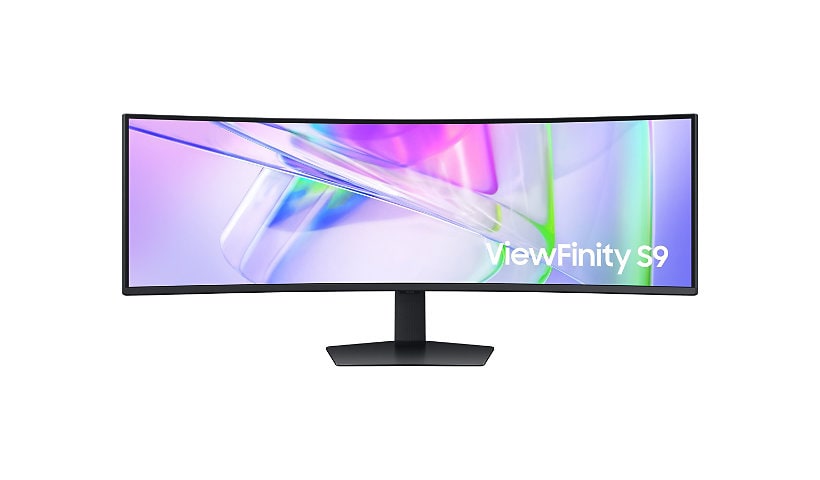
Samsung C43J890DKN - CJ89 Series - LED monitor - curved - 43.4"

Mfg # C43J890DKN CDW # 5198119 | UNSPSC 43211902

Quick tech specs

  • CJ89 Series
  • curved
  • 3840 x 1200 @ 120 Hz
  • 300 cd/m²
  • 5 ms
  • speakers
  • LED monitor
  • 43.4" (43" viewable)
  • VA
  • 3000:1
  • HDMI, DisplayPort, 2xUSB-C
  • dark gray/blue
View All View More

Know your gear

With no bezel blind spots, perfectly matched image quality, and fewer cables the CJ89 is a smart alternative to dual monitor setups.

This item was discontinued on January 11, 2021

Enhance your purchase

Samsung C43J890DKN - CJ89 Series - LED monitor - curved - 43.4" is rated 3.85 out of 5 by 26.
Rated 5 out of 5 by from I would not buy this again the display quality itself is very nice and meets my satisfaction. i do wish it were a few inches taller, but that's not a huge deal to me. i have problems waking this after my mac goes to sleep. i have a new 16" mbp, and previously used this for a few months with 2017 15" mpb. the manual and support site offer little help. the systems menu is very limited for mac users too. (they offer windows drivers so its possible its an excellent windows monitor) i find samsung's support is very frustrating to deal with too. they have level 1 people (very nice, friendly) but no ability to get to l2 or l3 when you are spinning your wheels. bottom line, i would avoid this one if you are a mac user.
Date published: 2020-10-12T00:00:00-04:00
Rated 5 out of 5 by from Surrounded by the Samsung 43” CJ890 The Samsung 43” CJ890 Super Ultra-Wide Curved Monitor is an impressive display. I find it easy to use the work area in three different sections. It is well-sized for having a full-page presentation slide next to a full-page text document and running a browser or mail application. All at the same time. The visual impact of moving an application window feels like the application window is on the inside of a glass sphere. Fully-immersed is an apt expression of the experience – very different than staring at our small mobile devices. I am reviewing this product as an Insider… Assembly was a piece of cake and the box protected the unit really well. The USB-C output has a 95-Watt charge capability, so my computer draws power from the display. I put my white PC charger in the closet and reduced clutter; though, I have had to get accustomed to the charging capability going away when the display is turned off. I like the additional outputs on the display, very simple to charge a mobile device, plug in a keyboard, etc. and the removable backside panel hides it all very well. Even my 4K webcam sits on top with more stability than my old 28” display. The device is certified with Windows and worked flawlessly with my two MBPs – something I had concerns about. The speakers are surprisingly good for a display, though I realized that some of my PC USB-C outputs apparently don’t support audio out. I like the eye saver mode – having learned that our eyesight is easily compromised by too much blue light and not enough healing long-wavelength near-infrared. This is my new favorite display and it is all because of the experience of the curved immersive experience. Now I need one for the office! [This review was collected as part of a promotion.]
Date published: 2018-11-26T00:00:00-05:00
Rated 5 out of 5 by from Not for MAC users I bought this monitor primarily to use with my 2017 Mac Book Pro. I know this monitor doesn't have Thunderbolt, but I wanted the larger screen size that isn't available in the Samsung Thunderbolt monitor. The display does work with the Mac book through Display Port over USB-C. The problem is if the Mac book ever goes to sleep, it can be a challenge to get the display to detect an input again. This can be very frustrating when you are trying to use your Mac book and the display won't come up. I have had to do everything from change the USB-C port on my mac book to completely reboot to get the display to recognize the input. Also for some reason the USB-C port doesn't always provide the power needed to charge the Mac Book. It works most of the time, but occasionally the Wattage drops and the Mac Book starts draining the battery. To be sure my Mac Book won't run out of power, I need to connect the Mac charger also.
Date published: 2019-04-03T00:00:00-04:00
Rated 5 out of 5 by from Wide Screen Bliss I've used this monitor for over 2 weeks now and it has been an absolute pleasure so far, not all is perfect about it but it's very small issues. I am still in awe looking at videos or booting up a video game and seeing all this real estate. The picture quality is also fantastic, nothing top notch but it’s perfectly suited for whatever your needs are. It's simple to use and set up. The biggest problem I had was moving my other monitors around to have a large setup. I love that it has built-in speakers, they aren't that great but it's nice to not use headphones sometimes. Pros: - Super widescreen, no need for 2 monitors next to each other and not divide or space between. - Very Bright and colorful screen - Has its own KVM built-in - Has its own “monitor split” to use another device like a laptop for half of the screen for you pc and one for your other device - Very solid quality built as expected from Samsung. - The mount is solid and easy to use even one handed. - Has a lot of ports in the back Cons: - Price is still high, you could still probably find 2 great monitors for cheaper than just one of these - Although it has a lot of ports in the back, they aren’t enough, One HDMI, one display port, 2 USB C, 1 USB 3.0 and 2 USB 2.0. For Something that mocks 2 monitors, it should a least have 2 HDMI or 2 Display ports I feel. - Not all things look good super wide, a lot of programs still aren’t built with support for it in mind and just looks super stretched out. - The built-in speakers aren’t going to please audiophiles - Super heavy screen and instructions to put together might not be for everyone and is very basic [This review was collected as part of a promotion.]
Date published: 2018-12-19T00:00:00-05:00
Rated 5 out of 5 by from Monitor will not wake up from sleep mode The monitor looks great, and I love the versatility of having 43" of screen real estate. It has one *terrible flaw* Oftentimes when I lock my computer / it goes into sleep mode the monitor will NOT wake up along with my computer. I have to *physically unplug* the monitor and plug it back in. I've been crossing my fingers for a firmware update or SOMETHING that will stop this from happening. If it wasn't for that, it would be 5 stars! [This review was collected as part of a promotion.]
Date published: 2019-04-08T00:00:00-04:00
Rated 5 out of 5 by from Great pic Only thing wrong with it was only one video h in other than that it’s a work of art.
Date published: 2018-12-06T00:00:00-05:00
Rated 5 out of 5 by from One Amazing monitor This monitor is simply amazing, 43" of pure awesome. I really like how you are able to connect two computers to it at once and use both at the same time. You can do single source (one computer at a time), PBP (Picture by Picture) and PIP (Picture in Picture). I'm not a fan much of PIP, but I do like PBP. I do find that it's a little slow switching between sources and layout formats, but with a little getting used to, it shouldn't be too bad. I don't think I would go so far as to call this a gaming monitor (I haven't noticed Samsung directly calling it a gaming monitor either, and this monitor actually appears on their business site), but it's more than just a business monitor. It seems to be treading a line in between the two. I say this because you don't see gaming monitors with built in KVM switches, or being able to hook and view two sources on the same monitor at the same time, that's a business need, and not a gaming need. However, you also don't see business monitors with 120hz refresh rates either. The 5ms response time for the monitor is a minimum one would want for fast paced gaming as well. I think Samsung tried to satisfy two needs with this one monitor, and they did a pretty good job of it too. It's a nice balance that allows you to use this very well with either gaming or business and switch back and forth as needed. I've already set it up so that at times I'll have my work laptop taking up half the monitor and at the same time my gaming computer will be taking up the other half of the monitor. Yes, I was gaming and working at the same time. :P I like being able to multi-task like that and this monitor helps make it easier than usual to do. This really is a great monitor. I'm still trying to decide if i want to dedicate this to my main computer, if so, it will replace my dual monitor setup (2 x 21" monitors), OR if I want it to replace my gaming monitors and let this be my main monitor for my gaming computer. If I do that, I will actually lose screen real estate though as my gaming system currently uses a tri-monitor setup (3 x 24" monitors). Despite the loss in screen size, the picture is SO MUCH nicer than my tri-monitors look. I'll probably just hook both up and be done with having 5 monitors and just use this one instead. I'll definitely free up a lot of space going that route. Trust me, you don't know it yet, but you NEED this monitor. :) Thank you #SamsungInsiders for letting me acquire this monitor at a discount for my review. [This review was collected as part of a promotion.]
Date published: 2019-01-02T00:00:00-05:00
Rated 5 out of 5 by from 3 in 1 screen = success! I still remember late 2012 when I upgrade my system to 2 screens system and how it effected my productivity as I'm working from home and use my PC system for 8-10 hours a day for work. After receiving this screen I will never forget late 2018 because that is a huge step forward! This Samsung wide-screen can act as 3 screens side by side so you can have 3 different desktops in one screen. That option is the one I like and use constantly. The 2nd feature of the screen I like is eye saver mode. This mode cut blue light emission. I find it very important as I work a lot during night-time. The 3rd feature I find useful is the ability to connect 2nd computer (in my case - laptop) and use the screen as 2 - 24" screens side by side. The price of the screen is a little steep but worth it and I would recommend everyone to buy it if you are in the market for 2 or more high-end screens. [This review was collected as part of a promotion.]
Date published: 2018-11-29T00:00:00-05:00
Rated 5 out of 5 by from Best Productivity Monitor on the Market Purchased this monitor for undergraduate coding and engineering workstation. The compatibility between systems is incredible. PROS: I am able to charge my laptop and phone through two usb-c cords, display out from the laptop and desktop at the same time. Star Citizen plays at 60+ FPS on build 3.3, and may be the most beautiful digital experience I've ever witnessed. CONS: When using headphones in-direct to the monitor there is a slight while. Could be bad contacts, but using the headphones with either the desktop or laptop directly does not replicate the noise. 21:10 is a crazy aspect ratio. If you are using this, it's because you really enjoy ultra-wide. Expect content for common ratios to play a little wonky every once in a while. OTHER: The KVM switch is great, though as many people know the switch is not instantaneous. I find myself switching between source, while paired to both the keyboard and mouse to be the most effective use.
Date published: 2018-11-20T00:00:00-05:00
Rated 5 out of 5 by from AWESOME Monitor! Samsung CJ89 is a very good monitor. It is a ultra wide 32:10 42" monitor. It is a impressively wide double full-HD resolution monitor. It just like two full HD monitor put together side by side. It has very has good picture quality, wide color gamut and high native contrast ratio with HDR support. It has 120Hz refresh rate, much more then the needs of office use. With high refresh rate, I can feel very low lag even I just use it for office use case. When I scroll up and down the word document. It works very well, even long time usage, my eye feel much better than my older monitor. It come with factory color calibration data. I never saw this kind of data in my past monitor purchasing experience. You can connect two video cable to monitor, your laptop will detect two full HD monitors. It is like two full HD monitor together side by side "NO EDGE"....THIS is AWESOME feature!!!! I can use half monitor for coding and another side for reading document, email, or bower website with "NO GAP" in between. I put my older Monitor in vertical, I can look the trace, writing email and coding at the same time without arrange monitor. Another AWESOME feature is creating huge and complex Excel sheet...I can create a huge table and see the column from A to BG at the same time. And, I can create a very complex formula without change the line. This advantage improve me a lot of working efficiency. The 1800R curve provides just the right viewing angles when you sit right in the center of the monitor. It is not suitable for discussing issue with colleagues. The 3840 X 1200 resolution is kill my colleagues's monitor during screen sharing in the meeting. From their screen, everything become very small. But, this is not the fault of this monitor. You can just switch dual monitor mode, this issue will be resolved. And, you got another free screen during meeting. It also has build-in speaker, the sound quality is also very good. And, it is build-in in the monitor. It saved me lot of desk space. The signal is transmit via HDMI cable. It is also good for watching movies. I also tested eye protection mode. The screen look darker, I will use it before i went to my bed. But, I disable it during working hours. The another drawback is the its leg, the leg is putty long. You can need a big desk for it. But, you can use wall mount to resolve this problem. Its leg build-in cable management feature. But, I plan to purchased a wall mount for it. It has 1 HDMI and 1 display port connectors. No, any DVI or D-SUB connector. With this high resolution, I will suggest to use HDMI or display port connector, not D-SUB. It also has adjustable tilt and high leg, but, you don't have much room on left or right adjustment. If you are not the central, the screen quality will become very bad. In overall, this is best screen in my life now. Even it is a gaming monitor, but, it is very suitable for office use. [This review was collected as part of a promotion.]
Date published: 2018-11-27T00:00:00-05:00
Rated 5 out of 5 by from Wonderful monitor! The picture quality of this monitor is excellent. The colors are beautiful. The speakers are built into the monitor. They're not very good at bass, but one could hardly expect them to be for their size. The clarity is great and easy to read. I've never had a monitor this size. I really like it. [This review was collected as part of a promotion.]
Date published: 2018-12-14T00:00:00-05:00
Rated 5 out of 5 by from Average Monitor . Needs Updates The Picture is amazing, it stops right there. The "how to" instructions are very limited. The KVM is the worse I've seen on a monitor. When I switch from CPU to the XBOX and then go back, the screen forgets that both my systems are plugged into the inputs. So I have to unplug display cables and power down the monitor to get another go at getting it to work. There needs to be an update to fix the built in KVM. Also I don't know why but Samsung should have put another HDMI port on here. .. Its sad to say but I don't think they give equipment like this a lot of attention.
Date published: 2019-03-11T00:00:00-04:00
Rated 5 out of 5 by from Superb Monitor Where to begin, 4k display 60hz / 100hz / 120hz with more than enough screen to easily support multi tasking projects. Like the other 4 Samsung Monitors this one arrived with 0 dead pixels, no screen bleed and in perfect condition, Set up was easy, hardest part was moving it from the Living Room (where I unpacked and inspected it) to the Master Bedroom (where it was installed) Its a bit heavy which can be expected and a little cumbersome. If you want the highest quality, best ratted and most value for your dollar, Then I would strongly suggest the 43" CJ890 Ultra-Wide, You simply wont find a better product. Eye Saver is just that, I have a small 3 piece speaker system so those I disabled immediately. The on panel button controller might take a moment to get use to. The only thing that I didn't like about this was the 1yr warranty, With that said I do own several other Samsung Monitors the oldest one is (Estimated) 8yrs old and to this day I have had 0 problems with it, Its just dated resolution wise. TY for another solid Monitor!
Date published: 2018-12-21T00:00:00-05:00
Rated 5 out of 5 by from Great Product but Pathetic Support Great monitor but you will have to wade the waters yourself. Pathetic Support. Continue to have issues where open windows move over to the Surface Pro and I have to drag them back to the monitor. Monitor will go in sleep mode and does not wake. You call support and they start reading the manual.. virtually reading the manual...
Date published: 2019-10-03T00:00:00-04:00
Rated 5 out of 5 by from The monitor switching is sorely lacking I love just about everything about this monitor, EXCEPT I have major annoyance every time I need to switch my input. It will cycle through empty inputs (like now I have on HDMI and DisplayPorts inputs hooked up), but it cycles through both USB-C inputs every time, and then it will often hang there, so I have to go back into the menu, do 2 pushes, and then wait. I wish I could either disable checking for some inputs so it will just always skip them or it were smarter/faster about checking. SUPER ANNOYING!
Date published: 2020-03-23T00:00:00-04:00
Rated 5 out of 5 by from 43" CJ890 Is awesome i've been using this monitor since feb 2020. i continue to push the monitor's functionality. the usb hub is awesome. i originally had my macbook pro (2013) going to a multi port dock and that into my monitor via hdmi. i could access all of the peripherals and external ssd drive easily through the usb hub. i recently bought a new macbook pro with thunderbolt ports and wanted to ditch the multi dock and go straight to the monitor. i wanted the quicker response the the usb hub, to charge my mac and reduce the number of cables. i was so happy when it all worked using the included cables with the monitor. i have since found a longer thunderbolt cable and have had great success. this monitor is clear, fast and responsive. i highly recommend it!
Date published: 2020-08-24T00:00:00-04:00
Rated 5 out of 5 by from Saving my neck This screen has been a life saver for my neck and back. Prior to this I had 3 separate monitors that forced me to look and operate in positions that have increased my neck pain. This monitor allows me to look straight a head and be able to see all the information I need without turning my head. The KVM switch is effective and I have not had an issue with it. The only thing that I would like to see more DP ports.
Date published: 2019-08-02T00:00:00-04:00
Rated 5 out of 5 by from Immersive for gaming, surprisingly dumb OSD I like the visual quality, and for gaming, it's super immersive. The stand is very deep (takes up a lot of desk space), I wish it was 1-2" less deep. When the screen is pure black (e.g. on load screens), there is a flickering noise in the right half of the monitor (I checked with another brand new DP cable, still persists). It's not visible when the pixels are lit. The connections are awesome both for input and the USB-C #2 for charging my 95W notebook. I use my gaming PC through DP and my laptop in input USB-C #2. The bundled USB-C cable is high quality but is too short: if you route it through the channel in the stand, it ends up at the back of the monitor. However, the biggest con (and main reason for this review) is the frustratingly dumb OSD and quick buttons. It looks like it was very lazily designed, a bit more love would make a huge difference (hope Samsung can patch this). My two typical scenarios is using just the DP in full screen or also using USB-C in SBS. Problems: 1. The three quick buttons in the bottom only work if there is a video signal on the selected input. This completely defeats the purpose of the input select and SBS/PIP buttons. 2. When selecting input, I have to manually cycle through all inputs, also for ports that have nothing plugged in (USB-C #1 and HDMI). Why can't I select the input from a menu directly, why can't the empty ports be manually disabled or better yet, detected empty and skipped automatically? 3. When I want to use SBS (USB-C #2 on lest, DP on right), the SBS selection always defaults to DP on left, HDMI on right. It cannot be customized, neither does it remember my last setting. Who on earth looked at this and thought "hmm, good enough"? Please Samsung, patch the OSD and shortcut button operation so that it makes sense! Thanks
Date published: 2020-03-21T00:00:00-04:00
Rated 5 out of 5 by from KVM switch works only for UCB type-c ports Great monitor with display. Feature wise has lots of drwbacks 1. KVM switch is incomplete, works only for USB type-c ports and not for HDMI or DP ports. 2. Samsung Dex works only on HDMI, so you cant use Samsung Dex with Keyboard and Mouse connected to this monitor. 3. Easy Setting Box is not available for this monitor model.
Date published: 2020-01-05T00:00:00-05:00
Rated 5 out of 5 by from Flickering white spots on the right half of monito I purchased this product recently and it didn't take me much time to notice a defect on the screen. I could randomly see white spots appearing and disappearing on the right half of the screen on multiple location. This is especially evident on a black background and lasts less than a second It is so frustrating to find Samsung products don't pick up such issues on the quality checks. I tried exchanging on Amazon but the only option available is to return and buy a new one. The problem is the same product is not available at the price it was purchased and I have to spent an extra 300 bucks to get a new one. The only way forward is to take the route of Samsung repair which I am not sure how long it might take. One really good aspect about this monitor which I didn't find in my research of other products is the availability of KVM switch. I could easily connect my mac and pc simultaneously and switch between the two with the convenience of a single button press. The super ultrawide screen has really enhanced by productivity/gaming experience
Date published: 2020-04-18T00:00:00-04:00
Rated 5 out of 5 by from Not as advertised, nice but disappointing The set-up was not easy and not well explained. I spent an hour on Samsung chat yesterday with 3 different agents trying to figure out how to use the USB hub and looking for an explanation on why my computer cannot connect to the USB PC-In port. The monitor stand is so huge that the monitor stands out about 12" from the wall, so I had to move my desk, and now this massive monitor is too close to me. The speakers are also underwhelming.
Date published: 2020-06-01T00:00:00-04:00
Rated 5 out of 5 by from Looks Nice, But... Features are not that great if you can't get them to work. The short cut buttons don't work, my screen was popping out of the frame, the setting menu options are incorrectly labelled and the manual does not actually describe how to connect the monitor in a way that makes it work (eg: it does not discuss the incorrectly labelled settings you need to adjust for connecting a USB-C cable). Good luck...
Date published: 2020-07-26T00:00:00-04:00
Rated 5 out of 5 by from Challenges working with 2 computers Over all the monitor is very good. Having a singular screen that is 43" wide and the ability to have 2 computers using one monitor is very nice. That being said, I have trouble when I turn on the monitor to get the monitor to recognize both computers. Computer #1 is connected via the display port connector and computer #2 is connected via the powered USB type-C. I don't know if there is a startup sequence that I should be following but eventually get it to work if I boot up computer #1 (connected to the DP) and they boot up computer #2 (USBC) and then play with restarting #2/connecting/disconnecting the USBC cable form the laptop #2. Eventually I can get the monitor to recognize both devices when using the source switch to switch between devices. Once I get the monitor to recognize both all is good unless I turn off the monitor and in that case I am back to the trial/error process to get the monitor to see both devices. Would welcome any words of wisdom as to how to get this to work without trial/error.
Date published: 2020-01-20T00:00:00-05:00
Rated 5 out of 5 by from It's just a great monitor! As a gamer I love it! No dead pixels. It's plenty fast enough for even the best of games. Look no further! This thing is awesome!
Date published: 2019-12-23T00:00:00-05:00
Rated 5 out of 5 by from Sweet! Enjoying it I bought this on 12 May. I was contemplating the 49 inch. The 43 inch is wide enough for me. I’m able to open and view multiple documents at once. This is especially import for spreadsheets. This may not be ideal for gamers but I’m not a gamer. So if you need more space to work, I recommend consider this model. I’m happy with my purchase.
Date published: 2020-05-15T00:00:00-04:00
Rated 5 out of 5 by from Superb performance i've had the cj890 for about a week in active use, and it is simply magnificent. making the jump to a curved screen for my new win10 system was not a big deal, as i had been using a dual-screen flat screen samsung monitor setup for over ten years. i am accustomed to having a lot of screen real estate, but the cj890 has taken this a step further. the image is totally bright and clear, with almost no vignetting at all on the corners, no dead pixels, and no problems. i am also pleased that the unit has built in speakers that sound fine. i am running the unit off of a 40 foot hdmi cable...the quality is top notch.
Date published: 2020-07-11T00:00:00-04:00