

Plugable USB C Triple Monitor Docking Station | 3X HDMI or 3X DisplayPort | Mac, Windows, Thunderbolt, USB4, USB-C
$324.99
$229.99
Sign in for your price
Mfg # UD-6950PDZ
CDW # 7318513
| UNSPSC 43211602
Quick tech specs
- C docking station supports triple 4K 60Hz displays via HDMI or DisplayPort
- Six USB 3.0 ports and Gigabit Ethernet simplify IT standardization across USB-C, USB4, and Thunderbolt systems
- Backed by Plugable’s 2-year warranty
- DisplayLink technology ensures reliable multi-monitor performance even on M1–M3 Macs or Neo Macs, reducing help desk tickets
- Supports USB Type-C with DP1.2, USB4, and Thunderbolt computers with Windows 10 or 11, macOS 11+, and ChromeOS v100+

Know your gear
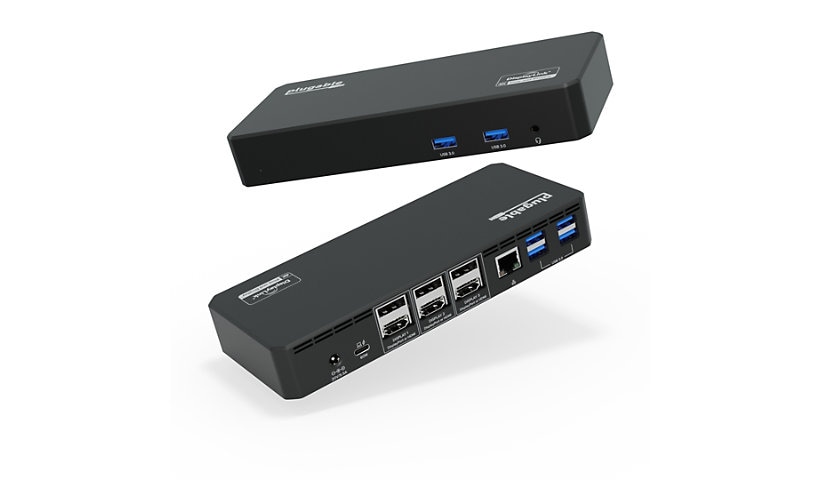
The UD-6950PDZ runs up to three 4K 60Hz monitors from one USB-C cable by combining USB-C DisplayPort Alt Mode with DisplayLink technology, adding display outputs beyond what many laptop GPUs natively support. That’s why it can help base M1, M2, and M3 MacBooks connect more than one external display when DisplayLink Manager is installed.
Built for professional productivity, this dock gives finance teams, analysts, developers, project managers, customer support teams, and hybrid workers more screen space for spreadsheets, video calls, dashboards, documents, and reference material. It is designed for office workflows, not high-refresh gaming or GPU-intensive rendering.
Six video outputs are built in, 3x HDMI and 3x DisplayPort, but you connect any three. Mix monitor types based on what your office already owns, helping IT teams standardize desks without replacing existing displays.
For business deployments, DisplayLink drivers can be staged or deployed by IT on Windows systems, while each Mac requires a one-time DisplayLink Manager install and Screen Recording permission approval. For best results at triple 4K 60Hz, use the included USB-C cable or another cable rated for video, data, and charging.
In the box: UD-6950PDZ dock, USB-C cable, power adapter, and quick start guide. Backed by Plugable’s 2-year warranty and lifetime North American-based support.
Built for professional productivity, this dock gives finance teams, analysts, developers, project managers, customer support teams, and hybrid workers more screen space for spreadsheets, video calls, dashboards, documents, and reference material. It is designed for office workflows, not high-refresh gaming or GPU-intensive rendering.
Six video outputs are built in, 3x HDMI and 3x DisplayPort, but you connect any three. Mix monitor types based on what your office already owns, helping IT teams standardize desks without replacing existing displays.
For business deployments, DisplayLink drivers can be staged or deployed by IT on Windows systems, while each Mac requires a one-time DisplayLink Manager install and Screen Recording permission approval. For best results at triple 4K 60Hz, use the included USB-C cable or another cable rated for video, data, and charging.
In the box: UD-6950PDZ dock, USB-C cable, power adapter, and quick start guide. Backed by Plugable’s 2-year warranty and lifetime North American-based support.
Add to Compare
Enhance your purchase
Plugable USB C Triple Monitor Docking Station | 3X HDMI or 3X DisplayPort | is rated
4.90 out of
5 by
14.
Rated 5 out of
5 by
Jayms Still from
Highly recommended, i like it so much
very well designed, plenty of different ports needed is a home studio, with 4 screens and many MIDI controlers. Excellent and fast customers support.
Date published: 2026-07-31T00:00:00-04:00
Rated 5 out of
5 by
az944 from
works well
I had some problems with the docking station, but customer support replaced it without hassle. The replacement works fine..
Date published: 2024-04-02T00:00:00-04:00
Rated 5 out of
5 by
Kellym214 from
Great!
I got this a few weeks ago and just needed to use it the other day for the first time. This portable dock is great for traveling, or even just sitting at home! I just plugged my laptop into it and it held a charge to let me finish the task I needed to complete, since I wasn’t near my charging cable.
Date published: 2023-04-26T00:00:00-04:00
Rated 5 out of
5 by
Desire from
perfect dock
This is honestly the perfect dock, if you need it. It is sleek, black, and it can be easily hidden. The USB C and ethernet plug ports are a life saver. It does seem to be a bit glitchy sometimes, especially when going from Roku to TV screen. Absolutely worth it!
Date published: 2023-05-09T00:00:00-04:00
Rated 5 out of
5 by
Rj48 from
Wanted to try multiple monitors this made it easy
Got this to try using multiple monitors at once to expand my view. When it arrived the first thing I noticed was well it was packaged to assure no damage before I got it. The directions were clear and easy to follow, the download worked flawlessly and in no time at all my monitors were up and running ! It was so simple I don't know why I waited so long. The docking station is well constructed and came with everything needed. Could not be more pleased !
Date published: 2023-05-10T00:00:00-04:00
Rated 5 out of
5 by
Rd745 from
Works great
This adapter made my life so easy. I needed to run multiple monitors to use our sounds and slide features for our worship service. This was easy to install and get up working. It is fast and efficient and works as it should. Very happy with this display dock.
Date published: 2023-04-10T00:00:00-04:00
Rated 5 out of
5 by
Mena from
Easy Use and Setup
I love my new USB dock. It was very easy to set up and get working. I know I am able to view all three monitors at the same time which makes it very easy to work from. The device seems well-made and good quality. All of the plug-in seem to fit in nice and snug as well as the USBs.
Date published: 2023-04-24T00:00:00-04:00
Rated 5 out of
5 by
Nikk1000 from
Great addition for the laptop
Laptops are great when on the go but when you need to be productive at your desk, it can be challenging. With laptops getting thinner and lighter, that means less room for ports which means less things can be plugged in. This dock is universal and great for adding multiple peripherals. The speed of transfer is great too.
Date published: 2023-11-08T00:00:00-05:00
Rated 5 out of
5 by
gremerkle from
works great
I have been struggling with ways to organize all my electronics cords. This helped me keep the cords together so that they would not tangle. This is a great way to increase the USB ports available and to keep cords better organized.
Date published: 2023-04-25T00:00:00-04:00
Rated 5 out of
5 by
Naee from
Awesome product
Works great easy to use. Has multiple functions and multiple ports to use at once would definitely recommend for people who need more than one monitor for their work. Also works for charging your rechargeable devices
Date published: 2023-04-17T00:00:00-04:00
Rated 5 out of
5 by
Ken3 from
Perfect for Business
This triple display dock is exactly what I needed. Now I have the ability to use three monitors, and I can literally do three things at once. It sounds a little silly, but it saves a ton of time being able to write invoices, send emails, and use the calculator all at once. This thing is the best piece of technology I own, next to the computer!
Date published: 2023-05-10T00:00:00-04:00
Rated 5 out of
5 by
BrooklynWynter from
My family loves it!
Needed this Plugable USBC Triple Display Dock for my gamer kids (Eyeroll). My son said it was a must have for his multiple screens so I just nodded my head and complied. Lol the setup wasn’t too bad as the steps were pretty easy. But I did have to download some software beforehand. My son says it works perfectly for him with no connection issues as of far. All in all, I think as a parent it was worth the money because my kids are happy and that’s what matters. They work hard and deserve it…just like I deserve the peace and quiet that comes with that! Haha!
Date published: 2023-05-26T00:00:00-04:00
Rated 5 out of
5 by
Rayanne1234 from
Great
This is so handy and works great! We use it with our gaming computer ans it's amazing with it. It's a nice size too and looks really sleek. Really handy to have around! I like how portable it is tooo.
Date published: 2023-05-24T00:00:00-04:00
Rated 5 out of
5 by
Jon9383 from
Very Handy
Like most people I have a setup on my desk with multiple monitors, blue tooth keyboard and Bluetooth mouse. I need a lot of flexibility with powering these and getting everything connected. I’ve been using this for a while and it has been great so far.
Date published: 2023-05-05T00:00:00-04:00