

Plugable Universal Video Graphics Adapter for USB 3.0 and USB-C for Macs Windows - Extend HDMI Monitor up to 1440p@60Hz
$59.99
$39.99
Sign in for your price
Mfg # UGA-HDMI-S
CDW # 7392897
| UNSPSC 26121600
Quick tech specs
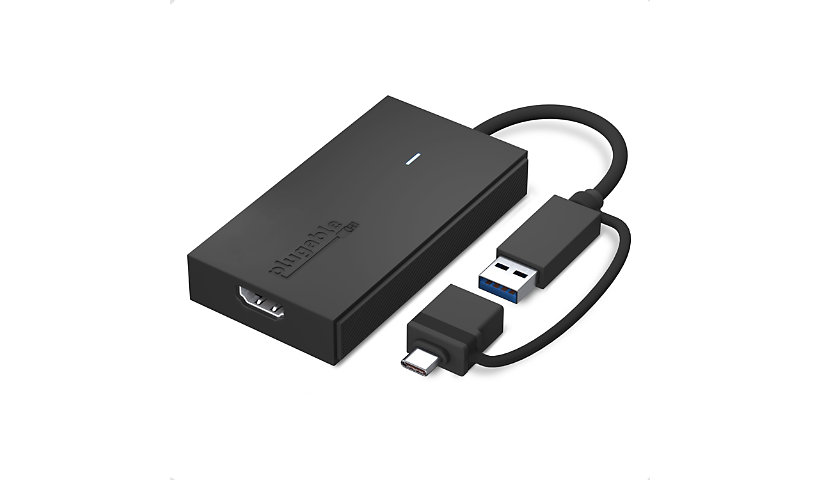
- in-1 cable supports USB 3.0, USB-C, USB4, Thunderbolt 3/4—no adapter needed
- Extend video across multiple monitors for meetings, spreadsheets, and more (no HDCP content)
- Increase screen real estate for seamless multitasking and efficient workflows
- Add up to 8 displays (2560x1440) on Windows/ChromeOS via docking stations; macOS supports up to 4
- Works with Windows 10/11, macOS 10.14+, and ChromeOS 100+ (SMI driver required)
- Backed by Plugable's 2 year warranty

Know your gear
Extend Your Monitor the fast, simple, and affordable way. The Plugable UGA-HDMI-S makes it easy to add an HDMI display to almost any laptop or desktop without the cost or complexity of a full docking station. With a hybrid 2-in-1 cable that works with both USB 3.0 Type-A and USB-C ports, including USB4 and Thunderbolt 3/4, you never need to worry about carrying multiple adapters or matching the right connector to your computer. It works with the ports you have today and the devices you’ll upgrade to in the future.
Add a 2560x1440 at 60Hz Quad HD display to enhance clarity and expand your workspace for productivity tasks like spreadsheets, presentations, dashboards, and creative work. Because the HDMI to USB cable adds a dedicated HDMI port, your other USB ports remain free for peripherals. And if you need even more screen space, the HDMI to USB adapter for monitor can scale to large multi-monitor setups by using multiple adapters. Windows and ChromeOS systems can support up to eight extended displays, while macOS supports up to four, making it ideal for professionals who need multiple screens for analysis, development, design, remote work, or research.
Powered by Silicon Motion (SMI) technology, the adapter provides dependable performance across operating systems. Windows users benefit from automatic driver installation through Windows Update, while macOS users complete a simple one-time InstantView driver installation. Compatible with Windows 10 and 11, macOS 10.14 and later (including M1, M2, M3, M4 and M5 systems), and ChromeOS 100 and newer. Not compatible with DisplayLink software or HDCP-protected content such as Netflix or Hulu.
Designed to work with a wide range of laptops including MacBook Pro/Air, Dell XPS, HP Spectre, Lenovo ThinkPad, Microsoft Surface, and many more, this adapter is a reliable solution for expanding screen real estate in home offices, classrooms, and corporate environments. Corporate users should note that some IT-managed systems may restrict driver installation. The adapter may use a small amount of CPU resources under heavy load, but this is typically not noticeable in normal use.
The UGA-HDMI-S includes the adapter with hybrid cable, a quick start guide, a two-year warranty, and support from Plugable’s US-based technical team. If you're looking for an easy, affordable way to add a high-quality display to your computer, the UGA-HDMI-S provides a flexible and dependable solution for everyday productivity.
Add a 2560x1440 at 60Hz Quad HD display to enhance clarity and expand your workspace for productivity tasks like spreadsheets, presentations, dashboards, and creative work. Because the HDMI to USB cable adds a dedicated HDMI port, your other USB ports remain free for peripherals. And if you need even more screen space, the HDMI to USB adapter for monitor can scale to large multi-monitor setups by using multiple adapters. Windows and ChromeOS systems can support up to eight extended displays, while macOS supports up to four, making it ideal for professionals who need multiple screens for analysis, development, design, remote work, or research.
Powered by Silicon Motion (SMI) technology, the adapter provides dependable performance across operating systems. Windows users benefit from automatic driver installation through Windows Update, while macOS users complete a simple one-time InstantView driver installation. Compatible with Windows 10 and 11, macOS 10.14 and later (including M1, M2, M3, M4 and M5 systems), and ChromeOS 100 and newer. Not compatible with DisplayLink software or HDCP-protected content such as Netflix or Hulu.
Designed to work with a wide range of laptops including MacBook Pro/Air, Dell XPS, HP Spectre, Lenovo ThinkPad, Microsoft Surface, and many more, this adapter is a reliable solution for expanding screen real estate in home offices, classrooms, and corporate environments. Corporate users should note that some IT-managed systems may restrict driver installation. The adapter may use a small amount of CPU resources under heavy load, but this is typically not noticeable in normal use.
The UGA-HDMI-S includes the adapter with hybrid cable, a quick start guide, a two-year warranty, and support from Plugable’s US-based technical team. If you're looking for an easy, affordable way to add a high-quality display to your computer, the UGA-HDMI-S provides a flexible and dependable solution for everyday productivity.
Add to Compare
Enhance your purchase
Plugable Universal Video Graphics Adapter for USB 3.0 and USB-C for Macs Wi is rated
4.60 out of
5 by
8.
Rated 5 out of
5 by
susande90e_1412 from
A small, all in one connecting device that works w
I received this product free from Influenster and Plugable Technologies in exchange for my honest feedback. My college son wanted to add a few monitors to his laptop at school. This product works great! It’s also portable and small for when he moves home over the summer. An all in one unit. It’s basically just a plug in and go thing. The video connection works well and it doesn’t slow the wifi down. The adapter does get warm but not hot. There is a help line number in the box if you need it but the instructions are pretty clear. I expect this will work for several years or more.
Date published: 2026-01-16T00:00:00-05:00
Rated 5 out of
5 by
alondrau12_700 from
Adapter
My husband, who loves all these products, will work perfectly for us this adapter, it looks excellent quality and works very well, its functionality is excellent.
Date published: 2025-12-12T00:00:00-05:00
Rated 5 out of
5 by
michaelrossd8fe937c_1881 from
Works great
Works great I use it on my TV to plug in USB devices. It definitely is handy for my devices. It's not a tiny but it's small enough to be manageable and efficient.
Date published: 2025-12-18T00:00:00-05:00
Rated 5 out of
5 by
jessicab986_9979 from
HDMI adapter
Easy to use and high performance item. I am able to plug in my phone to this and see it on the monitor of my computer. It’s a useful tool if you need to connect technologies
Date published: 2025-12-13T00:00:00-05:00
Rated 5 out of
5 by
michaell189_3392 from
Connectivity 101
This is the perfect device to be able to connect many different electronics for any setup. It’s nice that it is so small and lightweight. So easy to install that my grandma could do it,
Date published: 2025-12-24T00:00:00-05:00
Rated 5 out of
5 by
koimsta_5230 from
Worked!
My husband is a gamer. This helped save space by not using as many adapters. Organized the cables a little better! As long as it works, I find it hard to complain. The product does as intended!
Date published: 2025-12-22T00:00:00-05:00
Rated 5 out of
5 by
melissag4152_5598 from
Works Great
This adapter is super easy to use. It performs great, and connection is a breeze. Plus you get quality audio when linking devices. It is one of the best universal video graphics adapter that I have used. Highly recommend. I am not the biggeat tech. person, and if I can easily use it so can you.
Date published: 2025-12-29T00:00:00-05:00
Rated 5 out of
5 by
kinaguzman_8409 from
Good
Great adapter! Easy to use. And you can buy another adapter if needed to use a different port entrance. You can also just connect the usb and the HDMI.
Date published: 2025-12-31T00:00:00-05:00