
Skip to Main Content
Notifications
Notifications
CDW Logo

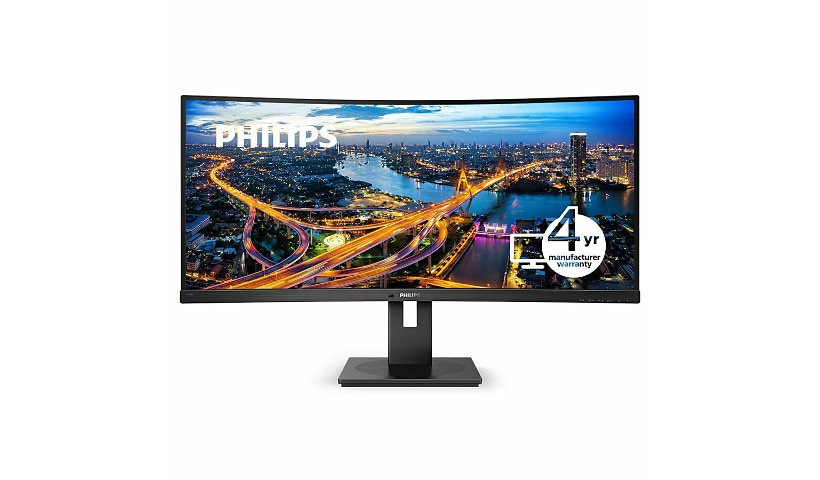
PHILIPS 346B1C 34 inch Monitor, Cuved, LED, UltraWide QHD, USB-C (90W), USB-Hub, 4 Year Manufacturer Warranty - 34"
$397.99
Mfg # 346B1C CDW # 5833110 | UNSPSC 43211902

Quick tech specs

  • CrystalClear images with UltraWide QHD 3440 x 1440 pixels
  • Built-in KVM switch to easily switch between sources
  • Effortlessly smooth action with Adaptive-Sync technology
  • MultiView enables simultaneous dual connect and view
  • Built in USB-C docking station
  • 4-year Advance Replacement Warranty in the US and 4-year Philips Warranty in Canada
View All View More

Know your gear

See more. Do more.
The Philips B line 34" curved UltraWide display gives wrap-around view of your work. All-in-one USB-C and ergonomic stand design make for optimal working conditions. Eye comfort features with TUV certified to reduce eye fatigue.

CrystalClear images with UltraWide QHD 3440 x 1440 pixels

These Philips screens deliver CrystalClear, UltraWide Quad HD 3440 x 1440 pixel images. Utilizing high performance panels with high-density pixel count, 178/178 wide viewing angles, these new displays will make your images and graphics come alive. The UltraWide 21:9 format enables more productivity with more room for side-by-side comparisons and more viewable spreadsheet columns. Whether you are demanding professional requiring extremely detailed information for CAD-CAM solutions, or a financial wizard working on huge spreadsheets, Philips displays delivers CrystalClear images.

Built-in KVM switch to easily switch between sources

With MultiClient Integrated KVM switch, you can control two separate PCs with one monitor-keyboard-mouse set up. A convenient button allows you to quickly switch between sources. Handy with set-ups that require dual PC computing power or sharing one large monitor to show two different PCs.

Built in USB-C docking station

This Philips display features a built-in USB type-C docking station with power delivery. Its slim, reversible USB-C connector allows for easy, one-cable docking. Simplify by connecting all your peripherals like keyboard, mouse and your RJ-45 Ethernet cable to the monitor's docking station. Simply connect your notebook and this monitor with a single USB-C cable to watch high-resolution video and transfer super-speed data, while powering up and re-charging your notebook at the same time.

Effortlessly smooth action with Adaptive-Sync technology

Gaming shouldn't be a choice between choppy gameplay or broken frames. Get fluid, artifact-free performance at virtually any framerate with Adaptive-Sync technology, smooth quick refresh and ultra-fast response time.

TUV Eye Comfort certified to reduce eye fatigue

Philips display meet TUV Rheinland Eye Comfort standard to prevent eye strain caused by prolonged computer use. With TUV Eye Comfort certification, Philips displays ensure flicker-free, low blue mode, no disturbing reflections, wide viewing angle and less reduction of image quality from different angles and ergonomic stand designs for ideal viewing experience. Keep your eyes healthy and boost work productivity.

Less eye fatigue with Flicker-free technology

Due to the way brightness is controlled on LED-backlit screens, some users experience flicker on their screen which causes eye fatigue. Philips Flicker-free Technology applies a new solution to regulate brightness and reduce flicker for more comfortable viewing.

LowBlue Mode for easy on-the-eyes productivity

Studies have shown that just as ultra-violet rays can cause eye damage, shortwave length blue light rays from LED displays can cause eye damage and affect vision over time. Developed for wellbeing, Philips LowBlue Mode setting uses a smart software technology to reduce harmful shortwave blue light.

PowerSensor saves up to 70% energy costs

PowerSensor is a built-in 'people sensor' that transmits and receives harmless infrared signals to determine if user is present and automatically reduces monitor brightness when user steps away from the desk, cutting energy costs by up to 70 percent and prolonging monitor life.

$397.99
Add to Compare

Enhance your purchase

Better Together

Current Item
PHILIPS 346B1C 34 inch Monitor, Cuved, LED, UltraWide QHD, USB-C (90W), USB-Hub, 4 Year Manufacturer Warranty - 34"

This Item: PHILIPS 346B1C 34 inch Monitor, Cuved, LED, UltraWide QHD, USB-C (90W), USB-Hub, 4 Year Manufacturer Warranty - 34"

$397.99

Total Price:
PHILIPS 346B1C 34" Monitor is rated 3.00 out of 5 by 10.
Rated 5 out of 5 by from Use Thunderbolt cable to connect your MacBook Pro I selected this Monitor Philips 346B1 for its ability to connect a MacBook Pro via USB-c. 1 Cable for audio, video and power and connecting peripherals. The cables that comes in the box is a USB-C cable but only powers the MacBook. You need to buy a seperate Thunderbolt cable to use it as you would expect it. Philips should add text on the product website and in the user manual! I read posts of Mac users returning the screen because they did not get it to work.
Date published: 2020-08-31T00:00:00-04:00
Rated 5 out of 5 by from Multi-use solution combining many components First, I opted for the Philips over other brands due to this being the only one on the market (at the time of writing this) with an ethernet port. This was very important for me since my work laptop does not have one, and I wanted a one cable solution (USB C) to dock and have everything just work. Most users might get away with WiFi, but my work and hobbies need low latency and dedicated bandwidth usage not shared on the family WiFi. I first used this monitor at work and found it so useful I bought a second one for him use. Now with all the working from home, I am able to have my personal laptop dock plugged in via Display Port and USB, then I have my work laptop utilize the USB C cable from the monitor. My keyboard, mouse, webcam are all plugged into the monitor, so now I have audio, video, keyboad, mouse, webcam all connected and switchable depending on which one I'm using. This has been a great solution to minimize plugging/unplugging, manually switching components--or worse having duplicates of everything. This has been life changing! No issues with either of my displays as of yet (3 months with work monitor, 1 week with home monitor). The resolution on this is awesome, improves productivity over a standard monitor and better for spreadsheets than dual monitors in my application. The only con on this setup is the speakers are not the best (they can be loud but sound muffled) as you can imagine is pretty standard on new TVs and monitors. I use a 2.1 system plugged into the monitor and a headset on calls so this is not an issue for me.
Date published: 2020-10-01T00:00:00-04:00
Rated 5 out of 5 by from Got for video editing I'm very pleased with the quality of this monitor. The colors, brightness, and accuracy are very nice. The price was good as well. The only semi annoying thing is how it goes to sleep after 5mins or so, and I can't seem to figure out how to change it. Most importantly the monitor feels durable. It feels high quality, unlike some other brands that tend to feel cheap. This feels high quality.
Date published: 2020-11-23T00:00:00-05:00
Rated 5 out of 5 by from This monitor disappoints on pretty much every fron Here's the big thing: If your device does not support USB-C DisplayPort Alt Mode, you won't be able to use the "Just use one USB-C port!" feature that's so heavily advertised, and you won't find that information on any website where you can actually buy the device. I chose this monitor because I wanted to be able to use it as a KVM. I wanted to be able to plug in more than one machine and easily switch between them. Many, MANY devices only have USB-C ports these days, but none of my three such laptops has the key feature that would have made this at all useful. So if you want to have three docks sitting on your desk, I guess you're in good shape? But if you actually want to use this device anything like it's advertised, you probably won't be able to do it, and you'll spend a couple hours trying to figure out why, and then come and write an annoyed review just like mine. If you DO get it working, it's just OK. It doesn't switch between inputs easily. The menu is clunky. The sound is awful. It doesn't get anywhere near as bright as built-in laptop displays. The mouse tracking is laggy at best. Basically you can do a LOT better with a monitor.
Date published: 2020-10-14T00:00:00-04:00
Rated 5 out of 5 by from USB-C docking doesn't work USB-C docking doesn't work at all. The monitor keeps saying "No video input (USB C)" when plugged in with either the USB cable that comes with the box or the cable provided by MacBook Pro. MacBook doesn't even show the "Arrangement" tab under "Display" settings since it doesn't detect any external monitor. Contacted Amazon support, they suggest me to return a new one as this may be a hardware issue. Then the 2nd one comes in with the exact same issue. Two bad units in a row is really a red flag for quality control.
Date published: 2020-05-02T00:00:00-04:00
Rated 5 out of 5 by from Great features - but it's dead after 2 months... Love the curved screen, high res, hub functionality, USB power delivery. Unfortunately the monitor died within two months of purchase (audio, hub and backlight are working, but the screen won't show any picture - not even the Philips logo on power-on). I can only hope warranty support is fast...
Date published: 2020-01-26T00:00:00-05:00
Rated 5 out of 5 by from Failed *AGAIN* after 3 months I previously posted a review saying it failed after 2 months. Fortunately, I received a replacement shortly thereafter. Unfortunately, 3 months later I am back there again. It failed exactly in the same way - blank screen (audio/usb/power keeps working). It seems to have something to do with using HDMI and USBC at the same time, because both this and last time it happened when I had both ports in use. Buyer beware - don't waste your money on this monitor.
Date published: 2020-04-26T00:00:00-04:00
Rated 5 out of 5 by from Great monitor with amazing features I got a pair of these for Christmas, the KVM is a lifesaver and easily lets me dock my laptop (XPS15) for when I need productivity. Attached to my desktop these things are good for gaming and great for general usage and productivity.
Date published: 2020-02-26T00:00:00-05:00
Rated 5 out of 5 by from Good hardware quality, but disgusting software It will be better when Philips resolve few software issues: - Provide DDC/CI Utility for Mac/Windows (Volume/Brightness control) - Fix wake-up on Type-C devices. 346B1C can't see video input after going to sleep. Reconnecting cable isn't help. So, I must click power button twice and watch bright unskipable Philips logo each time when my laptop is wake-up. That's disgusting. But you can still use via HDMI or DisplayPort.
Date published: 2020-11-13T00:00:00-05:00
Rated 5 out of 5 by from USB-C connection This monitor works fine with HDMI and Display ports. My problem is I cannot find a USB-C cable that is compatible with the monitor. I bought 4 different USB-C cables, all with display capabilities up to 4K and 8K but none of them was able to display. I do not know its a problem with the monitor or I need to get a specific USB-C cable.
Date published: 2025-02-04T00:00:00-05:00