

NetAlly LinkRunner G2 - network tester
Mfg # LR-G2
CDW # 4859681

Know your gear
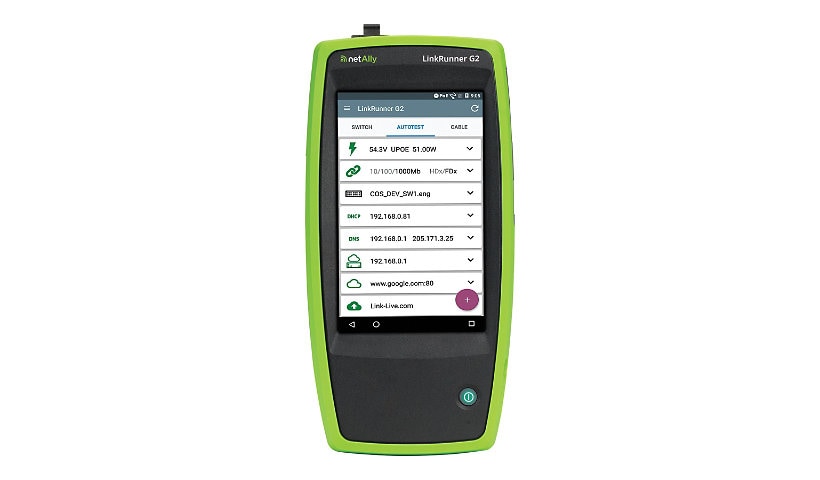
LinkRunner G2 – The Smart Network Tester for the connected world – combines network connectivity testing on an extensible Android based platform. By providing quick and simple validation of the cable, loaded four pair PoE/UPOE, as well as network connectivity testing alongside your favorite free apps, LinkRunner G2 represents a breakthrough in workforce productivity. Includes LinkRunner G2 with Li-ion battery, Power supply with regional power plugs, WireView Cable ID #1, Inline RJ-45 coupler, USB 2.0 to Micro USB cable, 8 G Micro SD card, Small Soft Case, and Getting Started Guide.
Enhance your purchase
NetAlly LinkRunner G2 - network tester is rated
3.50 out of
5 by
2.
Rated 5 out of
5 by
Robin Puliparambil from
Validates solutions in new deployment testing environments and helps us prove to clients that we're delivering what they're looking for
What is our primary use case?
I use LinkRunner for new deployment testing environments to validate solutions and to prove to us and our clients that we're delivering what they're looking for. LinkRunner provides us with all the relevant information we need, test results, and validates everything that we've done.
The tools are shared across our team, which is about eight people.
How has it helped my organization?
The number of bulk test tools that we carried is reduced from three bags to one tiny bag. That's an improvement. We manage only one or two devices in theory versus 10 different pieces of test equipment for 10 different results and variables. It's helped our company a lot.
LinkRunner generates a report that summarizes everything, so we don't have to pull all the results from different tests, put it together, make sense of it, and then talk to the client about it. We can customize a single report with a company's value-adds, which saves a lot of time.
NetAlly's free Link-Live Cloud Service is a highlight of our use case, especially because most of the other tools that we use don't have a cloud platform. It allows us to save test results. We've had situations where a client requested to see those test results because we didn't provide them originally. It was definitely a face-saving stage because we were able to pull the report easily from the cloud platform.
The solution's ability to simplify network validation and configuration of copper and fiber Ethernet networks is absolutely brilliant. It would have taken us an hour to run those tests on individual test tools with a dedicated toolkit. LinkRunner has one tool to achieve all this, so we can do everything within 10-15 minutes for the same amount of tests. There has been a huge time reduction. Running tests multiple times across different individual pieces of the network reduces time as well.
It helps us streamline workflows. There are specific tools for test reasons or validations, so if we did this with any other tool, we would've spent many hours doing individual tests. Because we're doing it in one go with LinkRunner, we save a lot of time. We have a one-panel view, which allows us to see everything, cleanly summarizes it, and points out where the problems are. It's highly relevant and highly useful, especially for a network engineer.
We use LinkRunner's AutoTest feature a lot. The AutoTest feature shows us the connectivity status. It picks up the DHCP IP. It saves us a lot of time because we don't have to manually configure things.
The AutoTest feature on its own is just a part of the puzzle. It's one piece that allows us to make sure we have physical connectivity. It's more time-saving than anything else. The AutoTest feature alone doesn't meet all of our needs, but together with the AutoTest performances, iPerf, etc., it works very well.
LinkRunner is easy to use and saves a lot of time. It's programmed so that all the usual tasks are automated, which means we don't have to select variables, values, etc.
LinkRunner's speed in providing results is very good.
The solution automatically uploads test results to Link-Live Cloud Service, which definitely saves us time. The only downside is that we have to manually select "Upload It." I wish that piece was automated more than anything else, including graphs. I couldn't find that feature, but it's been pretty straightforward to use other than that.
The solution has definitely reduced troubleshooting time. About 70% of our time and effort has been reduced.
Our networking staff is more productive because of this solution. They have time to focus on other things.
What is most valuable?
Performance testing is the most valuable feature. It gives a brief summary of the information we're looking at, such as latency, jitter, and the available throughput.
What needs improvement?
I wish they had software that could create continuous streams of traffic. I'm not sure if that's possible with LinkRunner, but it would be very helpful in some of the test case scenarios that clients are looking for, in regards to the quality of service.
I would like to see automated cloud updates so we can automatically upload test results instead of manually doing it.
For how long have I used the solution?
I have been using this solution for less than a year.
What do I think about the stability of the solution?
We haven't had any issues with stability.
What do I think about the scalability of the solution?
The scalability is questionable, but I'm open to being corrected on that. Right now, we're starting to see 25 Gig and 50 Gig throughputs, and even 100 or 400 Gig throughputs. It would be nice to see testing tools that can do 400 Gigs. 400 Gigs might be pushing it, but I would like to see at least 100 Gigs because that's slowly becoming the norm.
How are customer service and support?
I haven't needed to contact technical support.
How would you rate customer service and support?
Positive
Which solution did I use previously and why did I switch?
We used various tools and applications to replicate what we were doing. They were all Linux-based tools or specific cable test-run tools. We put them all aside thanks to LinkRunner.
How was the initial setup?
I had to make one call to the partner, but everything else was straightforward. It took less than ten minutes to get the solution up and running. After that, we took it out to client sites and used it for different testing results, AutoTest performances, etc., over a period of days.
The solution hardly requires any maintenance. The firmware updates come from the cloud platform.
What was our ROI?
We have absolutely seen ROI with the time and effort that our engineers are saving.
For one of our projects, we had to do tests on every single individual network device. Doing that without LinkRunner would have taken at least five times the effort. LinkRunner immediately saved us that time by one-fifth.
We have also saved time because the information is consolidated into a report. The cloud solution formats it into a graph. It's presentable and easily extracted. We got a lot of time back, which we could use for other projects.
What's my experience with pricing, setup cost, and licensing?
It was difficult to sell this to my management because the price is really high compared to other testing tools. However, we've seen a pretty good return on investment considering our outcomes and the time we have saved. The first year has been great.
Which other solutions did I evaluate?
We approached a lot of vendors in regard to various solutions. We were trying to get a 10 Gig capacity throughput because it was a requirement that the client absolutely wanted to test. Not many solutions delivered that.
We also wanted summarized and collated information instead of needing to use ten different tools to achieve the same result. LinkRunner meets all of those needs.
What other advice do I have?
I would rate this solution eight out of ten.
It's not a ten because of the scalability piece. If I wanted to step it up with other interface levels, the scalability would be limited. I would like to see the addition of a couple of simple tests and a traffic generator feature.
Which deployment model are you using for this solution?
On-premises
If public cloud, private cloud, or hybrid cloud, which cloud provider do you use?
Other
Disclaimer: PeerSpot contacted the reviewer to collect the review and to validate authenticity. The reviewer was referred by the vendor, but the review is not subject to editing or approval by the vendor.
Date published: 2022-08-15T00:00:00-04:00
Rated 5 out of
5 by
reviewer2005659 from
Substandard battery life makes unit unreliable, but it has reduced our troubleshooting time
What is our primary use case?
I work for one of the biggest port operators in the United Kingdom. I'm a network analyst/engineer, and I use the LinkRunner on a daily basis to check network connectivity from areas around where I work or from the switches in the LAN room, whether it's to check VLAN info to determine if the port is live, or end-to-end testing of the cables.
How has it helped my organization?
The end-to-end testing of cables [is a benefit] when you're working on a campus-wide network and you want to detect if there's a fault. If you're working on the OSI layers, and you're starting right down at the bottom on the physical layer, it can rule out if there's an issue with that quite fast, and save a lot of time being wasted trying to troubleshoot things with IP addresses et cetera, when it's detected a problem with the cables being crossed or unterminated.
What is most valuable?
The most valuable feature is the end-to-end testing with the "dart," as they call it, where you can test for faults in the cable or if they've been terminated properly.
Its ability to simplify network validation and configuration of copper and fiber Ethernet networks is good. The checking of the termination on copper is good. I haven't used it much for fiber, to be honest, but I use it to locate physical problems with a cable. It's very good because it also gives you the distance, which wires are crossed, and which ones are damaged.
Troubleshooting with it is also good, with physical faults on a cable. It is good as well for VLAN information and IP information.
The AutoTest feature is the one I use the most. It will provide me with the VLAN that's being presented, the switch hostname. It didn't use to provide the actual port number, which sometimes is imperative if you're trying to troubleshoot something. It will do an IP test, so it will tell you the default gateway address and the IP address it's getting. And it will do a few tests where it goes out to Google, so you can see if it can get to the actual outside public network. And that all gets uploaded to the portal, which you can access through a PC when you get back to your main office.
That Auto Test information is essential because I go to a lot of remote sites. You want to leave knowing that all that info, the comprehensive information, is uploaded back to the portal. You don't want to get back and find there are bits missing.
The fact that results are automatically saved to NetAlly's Link-Live cloud service is very important because if there are a few of us with LinkRunners, and we're assessing the network connectivity at different areas within the campus, we can have them all uploaded and it's all stored centrally. And we can access other people's results as well. Definitely [it's important] instead of trying to get that info at a later date, it's all there within minutes. The automatic uploading of test results definitely saves time and helps with the management of test results.
It's reduced troubleshooting time by about 20 percent because of the features I've mentioned [like] the centrally uploaded data, and because of the scope of things, it can look into like DHCP, IP connectivity, VLANs being presented, and physical issues on a port.
What needs improvement?
Where it does fall short, though, is getting the port numbers off the switch.
Also, for ad hoc additions, moves, and changes of wired connections, it was a bit hard to pick up at first because it's not straightforward how to label each test you are doing on it. There is a section on there where you can add notes to each test, which I discovered later. Having said that, once you get your head around that, it is good.
It's quite easy to use but the interface for the web portal could be made easier.
Also, the battery life is not very good on a LinkRunner G2 at all.
For how long have I used the solution?
I've used it for the last five or six years.
What do I think about the stability of the solution?
Performance-wise it is good, apart from the battery. The battery indicator icon might say there's a third of a battery-full on there, but then you do an AutoTest, it looks good, you're trying to upload it, and bang, it disappears.
What do I think about the scalability of the solution?
It is limited because of the battery life. And in fact, at Networkshop in 2017, I spoke to a LinkRunner member of staff and I explained the issue with the battery. They said that I needed to buy a better LinkRunner, a more advanced model, which I thought was a bit strange because even after having it for a few weeks, the battery would just die on you.
I don't use it extensively. There are a lot of features on it that I don't use, like the web browser. I usually just use the port testing, the AutoTest, and the dart with the end-to-end cable testing. I'm satisfied with the way things are.
Which solution did I use previously and why did I switch?
The company decided to go with LinkRunner's NETSCOUT, as opposed to Fluke, for some reason. It might have been the price. I don't know because I'm not involved with the purchase of them.
How was the initial setup?
Setup of the LinkRunner G2 is quite straightforward and it's also straightforward if you have one transferred over to you from another department, or another user leaves and you take that on. It was just [a matter of] taking the device off that name and putting it under your own. You got a code sent through and then it was just a case of putting your email address in and then accessing the portal again.
It takes half an hour, if that.
Which other solutions did I evaluate?
LinkRunner G2 has made our networking staff more productive, but we were using Flukes before that and Flukes had higher battery life. I'd be lying if I didn't say that hasn't caused issues.
What other advice do I have?
Once it's on, it's fast at providing results, but it does take a while to power up and get established.
Make sure you learn how to put notes onto each AutoTest you do so that you can decipher what's what when they're in the uploaded portal. And also keep an eye on the battery as soon as you get it, and if it starts failing, contact their support. I feel that the battery on mine, and on others in the workplace, was substandard.
I give it a five out of 10. If it weren't for the battery, it would probably get a 10 out of 10. But because of the battery, it's infuriating and it's not reliable.
Disclaimer: PeerSpot contacted the reviewer to collect the review and to validate authenticity. The reviewer was referred by the vendor, but the review is not subject to editing or approval by the vendor.
Date published: 2022-10-27T00:00:00-04:00