

Lenovo ThinkVision MC60 (S) - webcam
$114.99
$88.99
Sign in for your price
Mfg # 4XC1K97399
CDW # 7431896
| UNSPSC 45121520
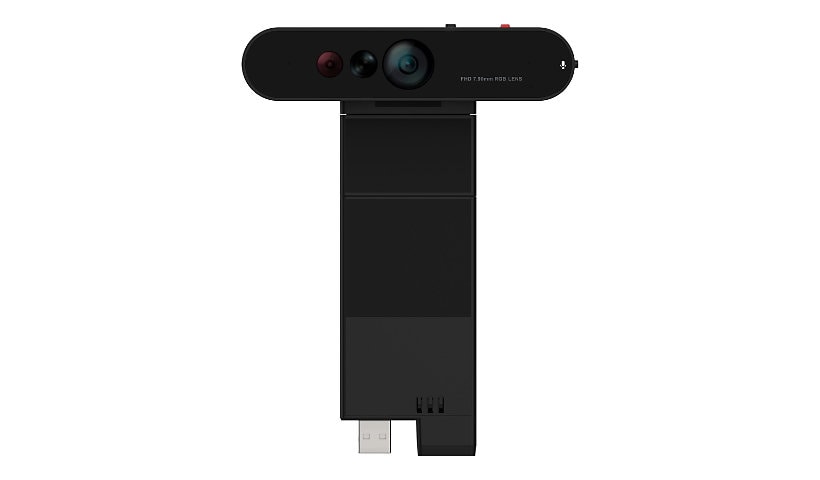

Know your gear
Take your virtual meetings to the next level. The ThinkVision MC60 Monitor Webcam is an
intuitive webcam that offers the most stunning video quality-full 1080p resolution designed
to fit on your monitor seamlessly. Capture your best perspectives with different FOV
angles of 65/78/90 degrees, autofocus features, and smart controls for seamless
collaboration. The ThinkVision MC60 Monitor Webcam is designed to cancel out
ambient noise with directional signal transmission technology that optimizes the
microphone between private and conference modes to give a tailored audio experience.
Its built-in, high-sensitivity dual mics capture clear voice inputs from up to two meters away.
Advanced security features such as the privacy shutter and anti-theft functionality ensure
privacy protection when you need it the most.
intuitive webcam that offers the most stunning video quality-full 1080p resolution designed
to fit on your monitor seamlessly. Capture your best perspectives with different FOV
angles of 65/78/90 degrees, autofocus features, and smart controls for seamless
collaboration. The ThinkVision MC60 Monitor Webcam is designed to cancel out
ambient noise with directional signal transmission technology that optimizes the
microphone between private and conference modes to give a tailored audio experience.
Its built-in, high-sensitivity dual mics capture clear voice inputs from up to two meters away.
Advanced security features such as the privacy shutter and anti-theft functionality ensure
privacy protection when you need it the most.
Add to Compare
Enhance your purchase
Lenovo ThinkVision MC60 (S) - webcam is rated
3.80 out of
5 by
9.
Rated 5 out of
5 by
David Belli from
Nice camera, advanced functions do not work
Really nice integration with the monitor. None of the advanced tracking or angle functions seem to work for me on Windows 10. I set them in the Lenovo app but nothing seems to happen.
Date published: 2025-02-19T00:00:00-05:00
Rated 5 out of
5 by
No Thanks 2425018382626 from
Works Well, Has Physical Security
Security: Has two physical switches. One to close the camera’s optics and one to turn off the microphone.
Windows Hello works well.
Setup: Plugged right in to the top of my monitor’s usb port.
Adjustability: The height and angle can be adjusted.
Date published: 2025-06-07T00:00:00-04:00
Rated 5 out of
5 by
DrUnixGuru from
Great design, quality and functionality.
It is compact and sits nicely on top of the monitor. It integrate well with the soundbar actually looks like part of the monitor. I was quite happy with the way it integrated with the monitor and how well it looks.
Besides the great design, it has an excellent picture quality and it works with Windows Hello. Very happy with it.
Date published: 2024-07-30T00:00:00-04:00
Rated 5 out of
5 by
BalancedOne from
No Power
Camera did not power on when plugged into ThinkVision Monitor. Plugged in another device into the USB port to ensure the port was functional which it was. Then it took four attempts to get a return label.
Date published: 2025-08-01T00:00:00-04:00
Rated 5 out of
5 by
frequent user of lenovo from
Careful when you purchase
This was recommended by the person on chat - but the monitors in our cart did not support it.
Date published: 2024-01-29T00:00:00-05:00
Rated 5 out of
5 by
Quatho from
ThinkVision MC60 (S) Monitor Webcam
Although there is nothing wrong with the camera, you can only attach it to Lenovo monitors, not Samsung.
Date published: 2023-11-03T00:00:00-04:00
Rated 5 out of
5 by
steaksauce from
Does the job, kind of ugly when installed
Fits in the slot of my Lenovo P24h-30 monitor and functions as advertised. The design of the camera alone with the extension suggests that it should fit flush to the top of the monitor, but it doesn't, there's about a 1cm gap that allows for pitch articulation of the camera, which is understandable, just kind of aesthetically unpleasant to be staring at the ASM and FRU numbers and QR code when I look at the top of the monitor.
Date published: 2025-02-15T00:00:00-05:00
Rated 5 out of
5 by
TomI from
Perfect addition!
Works seamlessly with my monitor. Couldn't ask for more.
Date published: 2025-12-15T00:00:00-05:00
Rated 5 out of
5 by
Jason Reid from
Fantastic addition to our Lenovo monitors
Fantastic camera unit. Easy to install, good picture quality.
Date published: 2025-05-05T00:00:00-04:00