

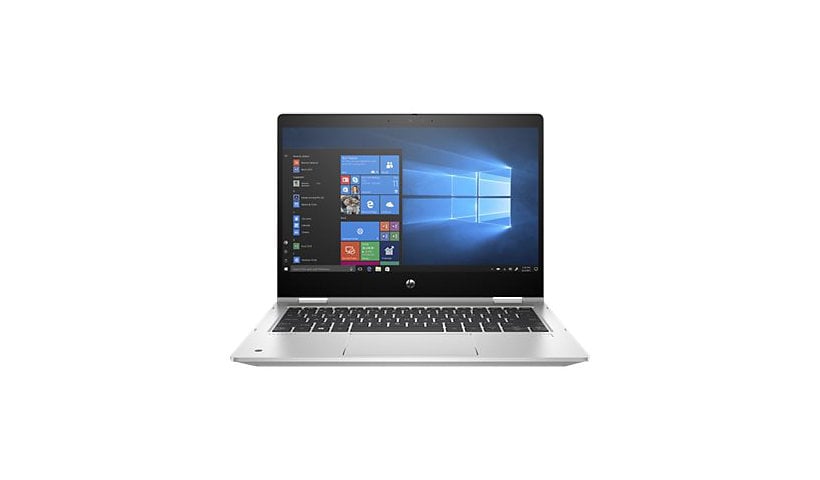
HP ProBook x360 435 G7 Notebook - 13.3" - Ryzen 5 4500U - 16 GB RAM - 256 G
Mfg # 17G37UT#ABA
CDW # 6087264
| UNSPSC 43211509
Quick tech specs
- Flip design
- Win 10 Pro 64-bit
- 16 GB RAM
- 13.3" IPS touchscreen 1920 x 1080 (Full HD)
- pike silver aluminum
- AMD Ryzen 5 4500U / 2.3 GHz
- Radeon Graphics
- 256 GB SSD NVMe, TLC, HP Value
- Wi-Fi 5
- kbd: US

Know your gear
Ideal for professionals in corporate settings or small to medium businesses, wanting an affordable combination of innovation, essential security and multimedia capabilities
The HP ProBook x360 435 delivers the power, security, and durability your growing business demands in a versatile 360° design that adapts to the way you work.
The HP ProBook x360 435 delivers the power, security, and durability your growing business demands in a versatile 360° design that adapts to the way you work.
Enhance your purchase
HP ProBook x360 435 G7 - 13.3" - Ryzen 5 4500U - 16 GB RAM - 256 GB SSD - U is rated
5.00 out of
5 by
2.
Rated 5 out of
5 by
ClairelyClaire from
Almost perfect ultrabook!
I bought two of these (for my husband and myself) with the same specs:
- AMD Ryzen 7 PRO 4750U
- 4GB RAM
- 256GB NVMe SSD
- Sure View 3 privacy display
- RealTek Wi-Fi and Bluetooth
- Dual camera
- Fingerprint reader
We avoid intel products when possible, and this laptop came up on my short list of ultrabooks with high-end AMD CPUs. I run Windows 10; my husband runs Arch Linux. Both work well on these machines. Windows 10 performs as well as can be expected given its lackluster performance in general, and Linux works great with minimal effort.
What I really like:
The graphics adapter is pretty capable. Neither one of us play super new games. Skyrim SE works well on low settings, but anything higher drops the framerate too low for gameplay (15-20fps).
Performance is very good, but nowhere near desktop-class. However, I didn't expect desktop performance from an ultrabook. The laws of physics preclude such parity. That said, I tend to do a lot of things at once - like 20-30 browser tabs (I use the new Edge based on Chromium), VSCode, and multiple Adobe applications simultaneously. This machine handles it like a champ. The only performance ding I noticed was when I was running a batch job in Photoshop, and it ran a bit longer per image than I expected, but only by half a second or less.
The USB-C charging was an important requirement for both of us, and it works well. I use third-party chargers just fine, but you will get a "USB device not recognized" notification any time you plug in a non-HP charger. You can install the HP Notification app to fix this, and you can disable its notifications in Windows so it shuts up. I like that this laptop also has an HP-standard DC input, so you can use a regular laptop power adapter while using the USB-C port for something else.
The keyboard is super nice. It feels great and is pretty quiet when typing, although nowhere near silent. Rather than media keys, the function keys are oriented toward workplace usage - projection, privacy screen, mute microphone, airplane mode, and a key that can be mapped to a shortcut, a key macro, or plain text. I really like the mute key, especially since voice and video chatting online is becoming more commonplace.
The trackpad is great. I've had a lot of frustrating experiences with trackpads in the past, mostly because of arbitrary driver limitations baked in by Windows OEMs. Microsoft *finally* figured out how to implement a universal trackpad driver, and it works very well. The trackpad is smooth and responsive.
The full-size HDMI output is another big bonus. It's super annoying to need special cables just to hook a computer up to a TV (we like to hook our laptops up to TVs while we travel to watch stuff in the evening), so I'm glad HP didn't go with mini DisplayPort or something similar.
The speakers are SO LOUD. I'm amazed at how much sound they can project, given they're tiny laptop speakers. They're great for streaming video content, watching a how-to while doing something handy, playing music, or whatever else. Really, the speakers are surprisingly good.
The enclosure itself is well-designed Hot air ventilates out the side instead of the bottom or rear edge, which I also really like - I tend to put writing implements and such across the hinge of my laptop while I'm working, and laptops that ventilate out the back make my pens hot. The bottom is plastic rather than aluminum, and this is *very* nice. Metal transfers heat too efficiently to be used on the bottom of a laptop - it's why your all-metal burns your thighs when the CPU really gets going. The plastic bottom is much better at absorbing and dissipating heat.
The front edge of this laptop's palm rest is very comfortable. I was working at a Microsoft Store when the all-metal Elite x360 was released, and while it was a beautiful machine, the front edge of the palm rest was like a knife. It was too angular and sharp for my wrists. This laptop, by comparison, has a much more comfortable design, with a smooth, beveled edge.
Another big bonus for this machine is its upgradeability. Most modern ultrabooks have soldered-on RAM, which means you're stuck with whatever maximum memory is available when you buy. This machine has two DDR4 RAM slots and can take a maximum of 32GB. It's much cheaper to buy RAM separately (and you'll get a lifetime warranty on it!), so we bought these with 4GB and upgraded to 32GB after purchase. With 4GB RAM, perf was surprisingly good. With 32GB, it's fantastic.
The SSD is also upgradeable. If you're trying to save money on the total purchase cost, I recommend the cheapest NVMe option. That way, you can upgrade later, and use the existing drive in a USB-C enclosure as a super-fast thumb drive and external SSD.
I wasn't sure about the screen bezel when this guy first arrived. I was upgrading from an older Dell XPS 13, which is well-known for its very thin bezel. It turns out I'm pretty happy with this design, because the screen is at a more comfortable height relative to the keyboard when I'm using this on my lap or sitting at a desk.
The webcam has a hardware slider to cover it up, which is pretty awesome. Of course, there's no similar cover for the second camera that lives in the left palm rest. HP should consider adding one in the next iteration of this hardware.
What I don't like:
The microSD slot was a misstep, in my opinion. I'd rather have a full-size SD slot, because all my digital cameras take a full-size card..
About the display:
I *really* would like to see this particular model offered with a high-DPI screen option. While high-DPI screens have their downsides (they're battery killers and burn-in is quite common), they are a serious advantage for any digital artist or designer. I also have a Surface Book, and the extra screen real estate provided for toolbars and palettes makes a huge difference in my workflow.
I suspect this is a side effect of the Sure View 3 privacy display, but the display on both our laptops has pretty bad backlight bleed - my husband's is across the entire bottom edge, and mine is in the upper corners and on the sides. It's most noticeable when Windows is booting and the screen is still black. I don't notice it at all with regular use.
The Sure View 3 privacy feature itself is a mixed bag. We haven't traveled since we got these machines, so we haven't really put it to a real-world test, but it seems as though it's not very private if the screen brightness is turned up. If you keep your screen brightness at or near the lowest level with the privacy display activated, it blacks out the screen from the sides and top. At medium-to-high brightness, it helps dim the display from the sides, but not completely. If data privacy in public is of significant importance to you, I still recommend getting a 3M polarized privacy filter. They really are the best option, because of how polarized plastic refracts light.
My other complaint is minor, but the minimum screen brightness with privacy off is way too bright for a dark room. I only use this laptop at maximum brightness when I'm outside in the sunlight.
Overall, I'm super happy with this laptop. A high-DPI display is the only thing I really wish I could change about it, but it's not enough of a downside to prompt to use my old Alienware 13 instead (which is a beast and only gets a few hours' battery).
Date published: 2020-10-01T00:00:00-04:00
Rated 5 out of
5 by
Dan Krueger from
great hardware
Hardware is very nice and seems to be of a durable looking build.
Unfortunately the HP Sure Click and HP Sure Sense software that's included caused conflicts that made the Start button become inactive until they were removed. It's running great now without those two programs.
Date published: 2020-10-05T00:00:00-04:00