
Skip to Main Content
Notifications
Notifications
CDW Logo

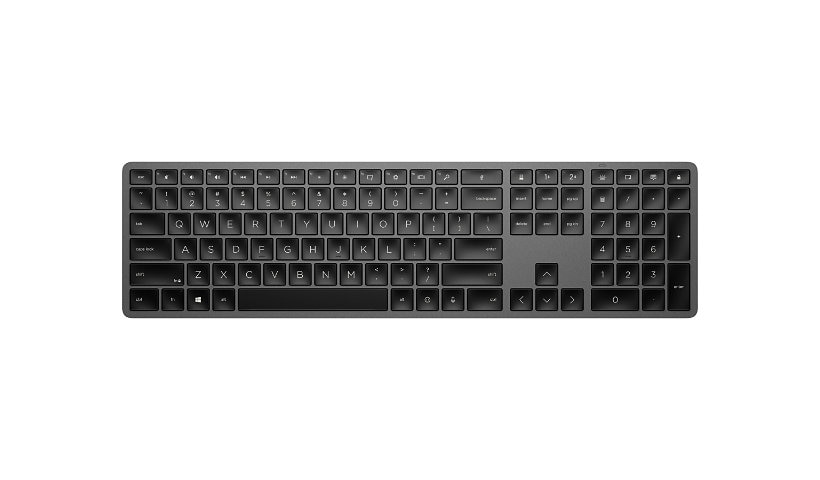
HP 975 Dual-Mode Wireless Keyboard
$124.00
$112.99
Mfg # 3Z726AA#ABA CDW # 6718665 | UNSPSC 43211706

Quick tech specs

  • Conveniently allows you to enter data faster with maximum efficiency
  • Programmable Keys keyboard/keypad feature for maximum efficiency and convenience
  • Plug and Play your keyboard with the PC and go
  • The Bluetooth wireless connectivity helps in reducing the clutter of wires around your Notebook
  • Quickly and easily connect with the notebook
View All View More

Know your gear

Hardware compatibility
Compatible with PCs with available USB-A port and Bluetooth® connectivity.

Now you can make your keyboard truly yours while enjoying an elevated typing experience. That's because you can connect up to 3 devices either via Bluetooth® or USB-A. We've also included many must-have features like comfortable, quiet, soft return keys, 20+ of which can be programmed with shortcuts, controllable smart backlight, and a long life, rechargeable battery.

Features | Connectivity and Versatility

Multiple connectivity options mean more flexibility. Connect up to 3 devices - two via Bluetooth® and one via 2.4 GHz USB-A dongle, and switch between devices using one button. Plus you can easily pair peripherals to a Windows 10 PC in two steps using Microsoft Swift Pair.

Smart Features. Better Typing Experience.

This keyboard quietly delivers comfortable typing consistency through higher key height, dished finger-shaped keys and soft return technology. Plus customizable smart sensors help adjust backlit keys based on your room lighting condition and turns on the backlight when you approach or off when not in use to save energy.

Long-Lasting Rechargeable Battery

Frequently battery changes are more than frustrating. They can also drain your productivity and who needs that? Problem solved with a battery that's rechargeable via a simple USB-C connection and lasts over six months.

Customize for Control

Customize your keyboard with HPAC and reduce needless keystrokes by programming the 20+ keys with shortcuts for your most used apps. Plus you can customize the backlighting feature by turning it on or off, adjusting light intensity, as well as the sleep mode timer.

Responsibly Made

Now you can purchase a keyboard that not only helps you be productive, but also helps the environment. We worked hard to design a keyboard that's plastics consist of 20% post-consumer recycled materials so you can feel good about your purchase.

$124.00
$112.99
Advertised Price
Add to Compare

Enhance your purchase

Better Together

Current Item
HP 975 Dual-Mode Wireless Keyboard

This Item: HP 975 Dual-Mode Wireless Keyboard

$112.99

Total Price:
HP 975 Dual-Mode Wireless Keyboard is rated 3.60 out of 5 by 10.
Rated 5 out of 5 by from A solid keyboard for MacOS or Wintel with almost flawless performance The HP 975 is a solid keyboard literally and figuratively. Unlike a cheap plastic keyboard, this one has real "heft" to it thus keeping it anchored in place while using. The keys have an excellent feel to the touch. The keys are arranged sensibly for use with a Windows as well as a MacOS laptop. In fact, I've been using it more with a MacBook than a Wintel. Fortunately, MacOS allows one to remap the keys, which I did by mapping the CTRL to OPTION, ALT to COMMAND, and WINDOWS to CTRL. I can now almost use the HP 975 with the MacBook and not think about the key placement. The bonus is that the DELETE key on the HP 975 works as **I expect** it to which relieves me from having to use the FN+DELET MacBook keyboard. I've see anecdotes (while reading product ratings) of people having issues with pairing across various brands and models of wireless keyboards. I've only experienced seamless, almost instantaneous, connectivity when using the HP 975 with either O/S after a hard power up or waking up after it goes to sleep. The only downside is that the battery only lasts about a week based on a workday of use even on the lowest keyboard back-light setting. In the same vein, an idiosyncratic behaviour is that it will revert to the default (??) brightest back-light setting after a power cycle. In conclusion, it's for the last two reasons that I held back on granting it five out of five stars, but it is very close. This one is a keeper!
Date published: 2025-11-01T00:00:00-04:00
Rated 5 out of 5 by from Love it! I have used the HP 975 Wireless Keyboard for over a month now, and I have loved it. They keystrokes are just soft enough and the key placement is ideal.
Date published: 2025-02-11T00:00:00-05:00
Rated 5 out of 5 by from Quiet, slim, and sleek Love this keyboard! The keys are quiet enough and sleek, slim design is great with any of my workstations. I got this keyboard on sale and when/if it goes on sale again, I will snatch another one up for my home workstation.
Date published: 2025-12-29T00:00:00-05:00
Rated 5 out of 5 by from Numlock light on my laptop keyboard turning on all the time. Product is good ,but need to solve hardware and software issues.
Date published: 2025-12-29T00:00:00-05:00
Rated 5 out of 5 by from This is a winner I bought it for the back-lit feature, but it does so much more. It has a substantial increase in features over the ones I purchased in the past at an economical price. I like the feel of the keys as I type, the compact size, and the fact that it is reachable. Now I am spoiled. Thanks, H.P.
Date published: 2025-12-27T00:00:00-05:00
Rated 5 out of 5 by from Outstanding keyboard This keyboard feels sturdy and solid, made of smooth polished metal. The key caps have little indents that fit your fingertips and the typing feels really buttery.
Date published: 2025-12-25T00:00:00-05:00
Rated 5 out of 5 by from Trash This keyboard died after 10 mins of use. I returned it and will never purchase one again.
Date published: 2025-12-14T00:00:00-05:00
Rated 5 out of 5 by from Good keyboard, small annoyances I like the minimalistic appearance, backlight, weight, finish, and built in battery with charging cable. My main dislike are the keys not having much space between them. It makes it easy to accidentally hit the wrong key, or two at the same time. I wish the F key lock wasnt something you have to manually press or adjust in the app settings, it should be the default and special functions should need the fn key. I wish there was an option to keep the backlight on permanently.
Date published: 2025-08-06T00:00:00-04:00
Rated 5 out of 5 by from Hit my keys try typing with me The touch to the keyboard is amazing. It feels like it was made for me to type with. Well engineered.
Date published: 2026-01-02T00:00:00-05:00
Rated 5 out of 5 by from Keyboard for computer Doesn’t work and I can’t find out how to return it or get it repaired
Date published: 2026-01-02T00:00:00-05:00