

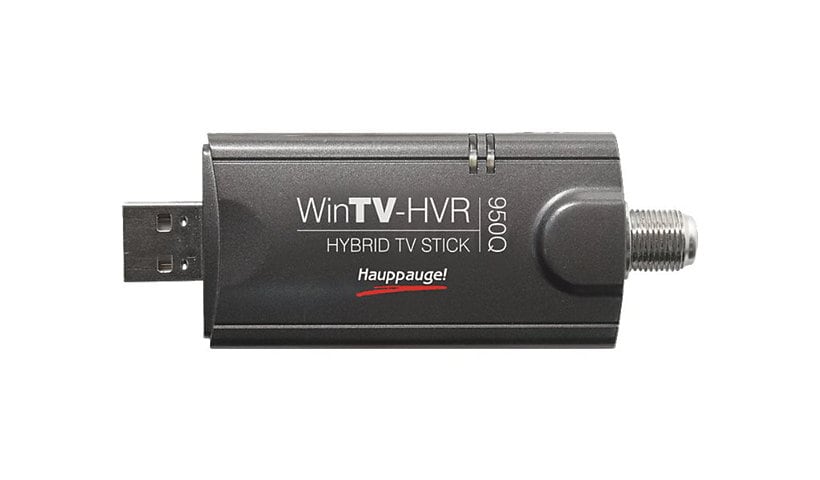
Hauppauge WinTV HVR-955Q - digital / analog TV tuner / video capture adapter - USB 2.0
Mfg # 1191
CDW # 1541223
| UNSPSC 52161546

Know your gear
Watch and record TV, in a window or full screen. Use the WinTV-Scheduler to record your favorite analog or digital TV shows using high quality MPEG-2. Play your TV recordings back to your screen any time.
Clear QAM digital TV channels are digital cable channels which can be watched on a TV set without requiring a cable TV set top box. Many cable operators transmit the local high definition ATSC channels using clear QAM. Some cable operators transmit additional non-premium TV programs using clear QAM.
ATSC high definition digital TV brings you sharper TV with great sound. Watch high definition digital TV at up to 1080i on your PC screen. WinTV-HVR-955Q 's ATSC digital TV tuner also has automatic identification of channel names plus will record high-definition digital TV programs to your PC's hard disk in an MPEG-2 format without losing quality.
You're prepared for the future. If you live in an area where you can't currently receive ATSC digital TV, the WinTV-HVR-955Q can still be used to watch and record analog TV from cable TV or a TV antenna. But you're prepared for the future! When ATSC digital TV comes to your area, WinTV-HVR-955Q will also receive digital TV?channels.
WinTV-HVR-955Q is easy to install. Just plug it into your PC or laptops' USB 2.0 port and connect a TV antenna (analog cable TV is also supported). In a few minutes you'll be watching analog or high definition ATSC digital TV on your PC or laptop screen. WinTV-HVR-955Q includes a portable digital antenna, so you can receive digital TV while you travel!
Clear QAM digital TV channels are digital cable channels which can be watched on a TV set without requiring a cable TV set top box. Many cable operators transmit the local high definition ATSC channels using clear QAM. Some cable operators transmit additional non-premium TV programs using clear QAM.
ATSC high definition digital TV brings you sharper TV with great sound. Watch high definition digital TV at up to 1080i on your PC screen. WinTV-HVR-955Q 's ATSC digital TV tuner also has automatic identification of channel names plus will record high-definition digital TV programs to your PC's hard disk in an MPEG-2 format without losing quality.
You're prepared for the future. If you live in an area where you can't currently receive ATSC digital TV, the WinTV-HVR-955Q can still be used to watch and record analog TV from cable TV or a TV antenna. But you're prepared for the future! When ATSC digital TV comes to your area, WinTV-HVR-955Q will also receive digital TV?channels.
WinTV-HVR-955Q is easy to install. Just plug it into your PC or laptops' USB 2.0 port and connect a TV antenna (analog cable TV is also supported). In a few minutes you'll be watching analog or high definition ATSC digital TV on your PC or laptop screen. WinTV-HVR-955Q includes a portable digital antenna, so you can receive digital TV while you travel!
Enhance your purchase
Hauppauge WinTV HVR-955Q USB TV Tuner is rated
3.80 out of
5 by
16.
Rated 5 out of
5 by
JFrench from
This Product Doesn't Work
I was fairly excited to try this new product and I am fairly proficient with technology. So, I was pretty frustrated to find that once I hooked it up properly and followed all directions that the accompanying software simply doesnt display any TV stations. And that is after I waited about an hour for it to find 76 TV stations. Also, no tech support phone number comes with the product for help in this instance.
Date published: 2009-07-22T00:00:00-04:00
Rated 5 out of
5 by
Beffect from
Does what it is supposed to
Works as advertised. It can be a little flaky but that could be just because it is a usb device.
Date published: 2009-03-10T00:00:00-04:00
Rated 5 out of
5 by
brouikri from
Win TV-HVR is not what I expected
Loaded this product on my new computer and wow, not what I expected! I get a total of 12 channels and most are not in the English language. Item also get very hot when it is plugged into the computer which concerns me if left plugged in for a long period of time. Love Dell just not this item!
Date published: 2010-06-03T00:00:00-04:00
Rated 5 out of
5 by
Dissatisfied customer. from
Garbage.
The first time I used this, it lasted about 40 minutes before it overheated and froze. Since then, after 20 minutes it’s done. I got a return authorization from Dell, but was unable to print a mailing label without subscribing to a service, and in my non-urban area the closest place where a label can be printed and the package shipped is 90 miles away. It’s in a drawer now, and I’m done with Dell.
Date published: 2019-05-15T00:00:00-04:00
Rated 5 out of
5 by
ColleenS from
Very Happy!!!
I wanted to be able watch AT&T U-Verse at my desk and multi-task while working at my computer! With this product and the the AT&T U-Verse Wireless receiver I was able to do just that! I love it and it is exactly what I wanted!
Date published: 2012-06-30T00:00:00-04:00
Rated 5 out of
5 by
AZProgrammer from
Great Product
The line between TV and Computer is ever so getting blurred. Yes , we can see episodes on Internet or threw services like Netflix but with this device the Computer becomes a intelligent TV which does sound like an oxymoron. But kidding aside, I now have another DVR with lots of memory. I am still struggling with the included software WIN TV version 7 but it is also compatible with Windows Media Center. But the device works fine and I would recommend it.
Date published: 2013-02-13T00:00:00-05:00
Rated 5 out of
5 by
RandyG from
Great Win TV
I really enjoy being able to record TV Shows that i like to watch to watch them at a time it convenient for me to watch. I now remotely connect to my computer with my iPad and can take the TV with me where ever I go.
Date published: 2011-06-16T00:00:00-04:00
Rated 5 out of
5 by
DellProductReview from
Worst electronic product I have ever seen.
Don't waste your time exploring this TV Tuner.
Date published: 2009-08-04T00:00:00-04:00
Rated 5 out of
5 by
twinx from
Great picture
We installed the HVR-950Q on friday night to be ready for World Cup on Saturday. After installing and taking the 30 minutes to auto-scan for channels I tuned in to a few local stations. To my surprise they showed up in HD without a decoder from the cable company. Changing channels is a bit tedious using the on-screen options but the reception is well worth it. I would highly recommend this product.
Date published: 2010-06-14T00:00:00-04:00
Rated 5 out of
5 by
Jeanne31 from
Nice Product for the money
Hooked it up to my computer, worked fine. Picture could be a little better but it does what I need it to do. I can watch TV and work on my computer at the same time. I don't use it with Media Center, I installed the WinTV software that came with the device.
Date published: 2011-05-02T00:00:00-04:00
Rated 5 out of
5 by
LSWO2009 from
Win TV Recorder working well
I recommend this product. I had no difficulty picking up Television stations. I am pleased with this product.
Date published: 2009-09-02T00:00:00-04:00
Rated 5 out of
5 by
geralda from
great tuner for PC
the price is really good for this, and I can use it on my desktop and my laptop when I travel.
Date published: 2009-03-11T00:00:00-04:00
Rated 5 out of
5 by
JeffSM from
Great Product
This tuner was easy to install. I had it pluged in and running in under 10 minutes. I use the DVR to record my favorite Off Air programs. Works great and happy with the purchase.
Date published: 2012-10-11T00:00:00-04:00
Rated 5 out of
5 by
BIGDAVE54 from
I HAVE HAD A BALL WITH THIS CARD
I am a ham radio operator and have always been fascinated with radio,television,and computers. I bought this card a while back and have been able to get a few premium tv stations as well as loads of extra stations over my basic cable coax from the local tv service. It is unbelievable what actually comes over the coax besides the basic package programs. I have also experimented in my car while waiting for my wife at the hairdressers and drs. office. I have hooked everything from exotic loaded atennas for HDTV to the supplied antenna. I like a $2.50 antenna I bought at a surplus lot the best for my car application.The supplied antenna is sorta wimpy and I don't use the remote at all. I have a Dell Inspiron running Win.Xp. I have downloaded drivers off the co. site and just ran the Media Direct setup...both have worked good in my location. I do live in a state capitol city so there are a lot of tv stations within 10-15 miles.
Date published: 2010-12-05T00:00:00-05:00
Rated 5 out of
5 by
eddie214 from
win tv
SIMPLICITY..there is much more i can say about it!!so easy to use,easy to hook up!works great,was ez to set up.love it!!!
Date published: 2012-06-13T00:00:00-04:00
Rated 5 out of
5 by
silverhairedfox from
Win TV my humble opinion
Typical computer product. If it doesn't work keep installing and doing the same settings over and over and eventually it will do the right thing even though you did the same thing you did the other 99 times.
Some of the settings are incomprehensible to me so I just left them on the default.
Once installed it's a great device/program. I save all my shows through the scheduler to the hard drive. I'm still experimenting to see if I can save them straight to a DVD. Space is a concern because an hour show takes all different amounts of space 2GB to 12GB per episode. No clue as to why so different and I'm afraid that a show might run out of space on a DVD.
The tuner scan pulled in more channels than I knew were available here. Unfortunately the numbering is weird i.e. what the heck channel is 2080 ? Still all in all a great device, good picture, works with my HP, Alienware, Gateway and ASUS PCs equally well.
Date published: 2010-12-10T00:00:00-05:00