

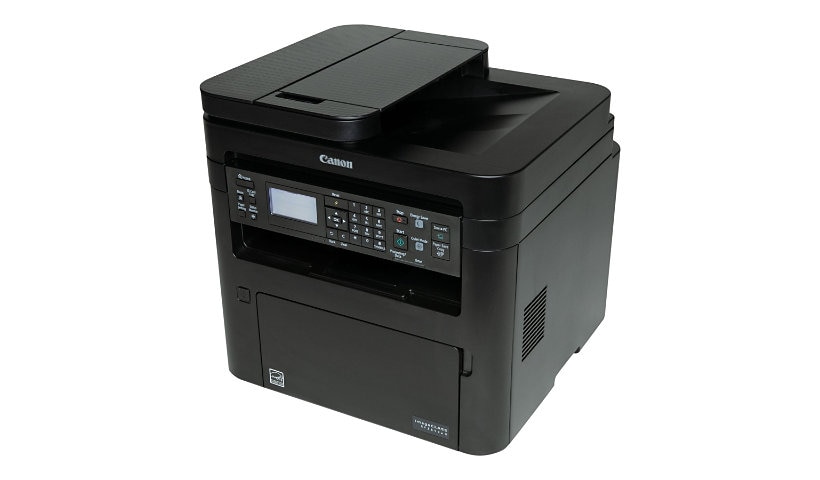
Canon ImageCLASS MF264DW II - multifunction printer - B/W
Mfg # 5938C020
CDW # 7303919
| UNSPSC 43212110
Quick tech specs
- Multifunction printer
- laser
- Legal (media)
- up to 30 ppm (printing)
- USB 2.0, LAN, Wi-Fi(n)
- B/W
- Legal (8.5 in x 14 in) (original)
- up to 30 ppm (copying)
- 250 sheets

Know your gear
The imageCLASS MF264DW II is designed for small office environments where black-and-white all-in-one capability is needed, and productivity, ease of use and large toner and paper capacity are priorities.
Enhance your purchase
Canon ImageCLASS MF264DW II - multifunction printer - B/W is rated
3.50 out of
5 by
22.
Rated 5 out of
5 by
Yammer from
No good can't print om Mac
No good unable to print on Mac very diff. and troublsome
Date published: 2023-01-19T00:00:00-05:00
Rated 5 out of
5 by
Mike Greenfield from
Great Support
The excellent level of technical support played a major role in my choice to purchase a Canon printer
Date published: 2023-10-27T00:00:00-04:00
Rated 5 out of
5 by
Jean A from
Need to fish for finished pages.
I had an earlier version of this printer and liked it a lot, so when my old one had a fatal accident I purchased this. It came with a setup disk that is not useful for Macs, so I had to download the drivers. It's a nice printer. But I have one quibble, which is that the printer doesn't see to want to give you the finished product. Instead of pushing the pages out where you can reach them, you have to sort of fish around with your fingers inside the machine. Huh? My older printer didn't have this problem.
Date published: 2023-11-27T00:00:00-05:00
Rated 5 out of
5 by
TNK from
The tech SPECIALIST did not know nor could tell me the use of the Rese
The tech SPECIALIST did not know the use of the Reset button
Date published: 2023-11-30T00:00:00-05:00
Rated 5 out of
5 by
JerryMu from
Can't connect to Mac
Can't connect to Mac. Maybe it can but I can't figure it out.
Date published: 2023-07-20T00:00:00-04:00
Rated 5 out of
5 by
AI873 from
It will not last long, even printing very little.
It's 12 months old and a plastic brick on my desk. My printer counter says 2550 pages and it's dead. all I get is a flashing ERROR on the display.
Date published: 2023-12-19T00:00:00-05:00
Rated 5 out of
5 by
Spectre13 from
No scan to email setting.
Despite finding and saving multiple documents for (MF264dw II) instructing on setting up scan to email, the current firmware of this printer (or the printer itself) does not have provisions for setting this up. I purchased this printer for all features advertised, but clearly, not all features are available.
Date published: 2022-12-20T00:00:00-05:00
Rated 5 out of
5 by
GA greg from
Good Buy on a quality Laser Printer
Packaging is quite protective. Very easy setup. Excellent prints.
Date published: 2023-05-03T00:00:00-04:00
Rated 5 out of
5 by
Vred from
Terrible new product, Software and hardware issues,
Absolute nightmare,
I used to like Canon but obviously their policy changed from serving customers to predatory tactics to make you user(subscriber) there is constant cartage issues, printer keep causing you problems if tonner low but still prints all good. I can notice if toner low or prints bad dont need to press buttons everytime to print something. Absolutely terrible Drive software I work with IOS Mac and no issues previously , late Canon is nightmare, can not install drivers, after installation constant connectivity issues, on printer hooked up not even on Wifi. i bought new MF264II used only 2 months and i am going to thro this junk to garbage, switching to Brother.
Date published: 2023-12-09T00:00:00-05:00
Rated 5 out of
5 by
JIMMINY CRICKET from
Good Printer and Features....BUT????
Very good print quality with copy, scan features and ADF. Should have USB cable to get running quickly because the setup manual is poorly written and very confusing to use. You need to be fairly knowledgeable of wireless, ethernet and direct connect networks to understand the garbeled instructions. You also need to know whether anti-virus software will interfere with the installation and that menue selections on the printer screen need to be set to wireless or ethernet. Also, instead of referring to device, should be printer or computer or modem! Manual should read, if direct connect do this.. step 1 etc, if wireless do this, step 1 etc or if ethernet do this..step 1 etc.! When you get the installation disc menu RUNNING and get to the point where the printer device is recognized, the process is smooth! But then, did you install the scanner drivers and are they working......not for me...and I had access to TI help! Cannon...you can do much better...for this I give you 3*, the printer is really a 5*.
Date published: 2023-04-21T00:00:00-04:00
Rated 5 out of
5 by
Violet8 from
Windows 11 Driver Issue for imageCLASS MF264dw II
After I installed the appropriate Windows 11 printer and scanner driver, it didn't work since the USB connection was not recognized. I wanted to uninstall windows 11 drivers, but it refused to and I had to go to C drive, program files and program files (x86), Canon, and right click to delete the windows 11 drivers. After deletion of the files, I uninstalled the drivers a second time. Finally, I installed windows 8 drivers, which recognized the USB connection, allowing for printing and scanning function.
Date published: 2024-12-18T00:00:00-05:00
Rated 5 out of
5 by
Arnold Stang from
A Compact Solution for Professional Efficiency
The Canon ImageCLASS MF264dw II checks all the boxes for a fast-paced, client-oriented work environment. The MF264dw II’s sleek, no-nonsense design fits comfortably in a home office or shared workspace, signaling professionalism without consuming excessive desk space. The printer's 30 pages-per-minute speed ensures quick turnaround for large reports or briefing documents. Its efficient toner usage aligns with cost-conscious operational strategies. Beyond printing, the scanner and copier functionalities have proven invaluable. The Canon ImageCLASS MF264dw II combines speed, reliability, and affordability in a compact package. This printer doesn’t just perform—it enhances the way I work!
Date published: 2024-12-19T00:00:00-05:00
Rated 5 out of
5 by
whend74 from
Perfect Office Printer
The Canon All-in-One black and white laser printer is fantastic for my home office needs. Easy to install and easy to maintain. I love that I can print wirelessly, even from my mobile devices. Absolutely recommend!
Date published: 2024-03-04T00:00:00-05:00
Rated 5 out of
5 by
shameraf from
Nice old school printer
Just received my canon printer and I am in love with it. I have had to buy 3 wireless printers in the past year. They all stop working or won’t connect to WiFi when I need them the most. Since I received the printer and set it up I have had no problems. Printing is now a breeze. It’s a huge printer the old school kind from the school computer room. You know the old saying if it ain’t broke don’t fix it !
Date published: 2024-02-13T00:00:00-05:00
Rated 5 out of
5 by
lorena_c from
Quality
The print quality is very good! I have a canon printer and it would take a long time to scan and process my printing. The set up was good and it wasn’t hard to set up.
Date published: 2024-03-16T00:00:00-04:00
Rated 5 out of
5 by
trant25 from
Easy to set up and works well
MF264dw printer from influenster. I work in an office at home so it's very convenient for me. The machine is compact so it doesn't take up too much space, easy to set up and easy to move. The machine runs well and is easy to use. So lucky to have it
Date published: 2024-02-13T00:00:00-05:00
Rated 5 out of
5 by
camilar222 from
Great addition to my office
It's was super easy to set up and connect to the wifi. The wireless printer works perfect, it took a minute to connect, and after that, it was work. I would recommend this printer to anyone who needs a black and white printer. It doesn't print color
Date published: 2024-03-01T00:00:00-05:00
Rated 5 out of
5 by
cameronb64 from
Nice for memes
It’s nice if u want to make random photos or anything ?? I use it for memes and random funny photos of google real funny BUT THANK U INFLUENCERS!!!!!!
Date published: 2024-02-13T00:00:00-05:00
Rated 5 out of
5 by
audreyg121 from
Great printer
The Canon imageCLASS mf264dw II printer is easy to set up and ready to use right away. I was impressed with how user-friendly the setup process was. The instructions were clear and easy to follow, and I was able to have the printer up and running within minutes. It's worth noting that the printer itself is rather large, taking up a lot of desk space. The user-friendly control panel made it effortless to navigate through the various settings and options. I was pleasantly surprised by the speed and quality of the prints. Whether I was printing documents or photos, the results were consistently sharp. Overall, I highly recommend the Canon imageCLASS mf264dw II printer for its hassel-free setup and impressive performance.
Date published: 2024-02-12T00:00:00-05:00
Rated 5 out of
5 by
angelas704 from
Great quality!
Best printer I've owned! Does take up more space but it is worth it for the quality. Works perfect for my business as I'm able to print documents right from my phone! The wireless printing is a must have!
Date published: 2024-02-19T00:00:00-05:00
Rated 5 out of
5 by
felipep11 from
Great printer for a home office
Solid printer that’s great for a home office. Setting took less than five minutes using my phone (worth noting I had to put in my wifi password using the tiny alphanumeric keypad which was annoying). It’s prints quickly and documents come out great. The only downside is it is quite large but you if you have the space you’ll appreciate all the functionality the printer has. Would definitely recommend this for a home office if you have the space.
Date published: 2024-03-21T00:00:00-04:00
Rated 5 out of
5 by
olindag3_9802 from
Me encantó
We love our new wireless printer! Setup was a breeze, and the ability to print directly from our phones has been fantastic. We hadn't had a printer at home for ages, and we love the convenience of having one. It's quite large, but the print quality is excellent.
Date published: 2025-11-28T00:00:00-05:00