

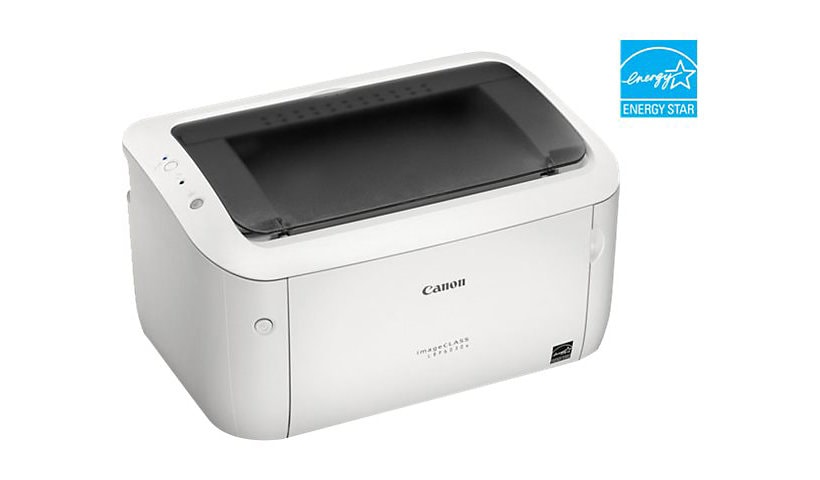
Canon imageCLASS LBP6030w - printer - B/W - laser
$140.99
$87.99
Sign in for your price
Mfg # 8468B003
CDW # 3438063
| UNSPSC 44103103
Quick tech specs
- Monochrome
- A4/Legal
- up to 19 ppm
- USB 2.0
- Color: Black
- Laser
- 2400 x 600 dpi
- Page Yield: 5000 pages
- Wi-Fi(n)
- Pack Quantity: 1

Know your gear
The Canon imageCLASS LBP6030w is a compact monochrome laser printer designed for home as well as office printing. With a 600 x 600 dpi print resolution and a print speed of up to 19 pages per minute, it produces crisp, clear text and graphics without compromising on time. This black and white printer offers high-speed connectivity features like USB 2.0 and 802.11 b/g/n wireless to get started instantly. With a 150-sheet front loading tray, it allows you to print several types of media. This monochrome laser printer works with the Canon Mobile Printing app to let you print directly from your Android or iOS-powered smartphones. It also features an Energy Saver Mode in which the printer uses just 1.6 watts power for maximum savings.
- First print speed of less than 8 seconds and average speed of 19 ppm for fast printing
- Wireless printer has single cartridge system containing both toner and drum for easy replacement
- 150-sheet front loading tray supports various media like heavy paper, transparency and more
- Energy Saver Mode with only 1.6 watts consumption for more energy savings
Add to Compare
Enhance your purchase
Canon imageCLASS LBP6030w is rated
3.60 out of
5 by
45.
Rated 5 out of
5 by
Catdog from
Sturdy small printer
Have used this printer for several yrs and travel with. It has always worked great, no issues, even when I got a new laptop it still connected and works great.
Date published: 2026-05-25T00:00:00-04:00
Rated 5 out of
5 by
Becky19 from
AAAARGH!!! lol. But seriously I am not happy ????
When I received this printer it has a part to put on it somewhere and I cannot find where it goes. It says it was supposed to come with a disk and it did not. Now I am trying to find how to do that wirelessly and that is like trying to find Waldo! I am getting frustrated because this is the second computer I will have to return within a week of each other.
Date published: 2026-03-25T00:00:00-04:00
Rated 5 out of
5 by
S Russell from
Image class printer
Perfect for a retired person who only prints a few pages each week. I may die before I have to replace the ink cartdrige!!!! Wonderful help in setting it up. Couldn't be more satisfied with this product.
Date published: 2025-09-10T00:00:00-04:00
Rated 5 out of
5 by
Bao from
Set up
Can't set up with computer. Can't install driver printer because Canon doesn't have it
Date published: 2025-09-17T00:00:00-04:00
Rated 5 out of
5 by
beto from
Imposible conectar to my iMac
Imposible conecta to my Mac
I don't know why is than difficult connect this printer to may Mac
Date published: 2023-12-20T00:00:00-05:00
Rated 5 out of
5 by
RonBA from
Excellent features
I have purchased the laser printer and still working like a champ. working OS computer systems from XP, Windows 7, 8.1, now Windows 10 pro
Date published: 2023-12-15T00:00:00-05:00
Rated 5 out of
5 by
CR1 from
Useless - NO DRIVERS ARE AVAILABLE ANYMORE
Canon no longer has any drivers for this unit. Windows does not support it either. Unit is completely useless now.
Date published: 2026-01-04T00:00:00-05:00
Rated 5 out of
5 by
omara25 from
Very practical printer
I love everything about this printer. It's very compact so it only takes a small portion of my desk. The text is nice and sharp. The best features that I like are that it closes right up when not in use to prevent dust from getting in. Wireless set up was a breeze and very consistent. Highly recommended printer
Date published: 2023-09-07T00:00:00-04:00
Rated 5 out of
5 by
adriblue from
Perfect for my small business!
I already had a laser printer (color and black/white), but this Canon laser printer is the office buddy I never knew I needed! I have a small business so I need to print quite a few shipping labels, so the black/white is perfect for me. I’m also very impressed at how quickly it prints them out! I blink, and it’s like the paper goes in, and boom, it’s out, all done! The toner is very easy to change, very straightforward and the instructions very clear. I haven’t been able to set up the WiFi because I don’t have a CD reader to install the software, but I have it connected to my PC, which is not a problem because this laser printer is so compact, it fits anywhere and I just close both trays when I’m not using it. I love how fast, reliable and quiet this printer is. Even if you don’t print a lot of documents, I think being able to print anything as fast as it does, is a great feature, a must have, if you have a home office or for school.
Date published: 2023-08-13T00:00:00-04:00
Rated 5 out of
5 by
raindropsonthebay from
Quick and efficient
This printer is perfect for printing documents. I had some trouble initially setting it up because I have an iMac. I was not able to do the completely wireless set up via my LAN but I was able to connect it after using a standard usb printer cord. The printed documents are a nice deep black without streaks or smears. It is compact in design and easily fits on a small self.
Date published: 2023-09-09T00:00:00-04:00
Rated 5 out of
5 by
melissaw24fd from
Compact B&W Printer
This product is nice and compact—fitting on a closet shelf in our office. The set up was a bit dated, requiring CD software. Otherwise, it wasn’t hard to set up. The printing is only black and white which for me is a negative. The printer printed quickly and nicely. I had some trouble getting things to print from my phone to the printer using wifi.
If you’re solely looking for a basic, black and white compact printer, this will do the job. If you want more bells & whistles, I’d say pass on this model.
Date published: 2023-09-02T00:00:00-04:00
Rated 5 out of
5 by
brijean92 from
Easy to use
Received this complimentary printer to review. It’s a great printer love that it doesn’t need the ink cartridges. Easy to set up it is wireless my only complaint is that it doesn’t have AirPrint. It’s a smaller printer so it doesn’t take up much room on desk which I love. I will definitely be using it a lot and recommend it if you want a wireless printer for home computer or laptop. If you’re looking for a printer that is wireless to print off of your phone I would recommend looking for something else.
Date published: 2023-08-10T00:00:00-04:00
Rated 5 out of
5 by
Tom27 from
Avoid at all costs!
Challenging to set up and does not print 2-sided. Piece of JUNK!!!!
Date published: 2024-11-04T00:00:00-05:00
Rated 5 out of
5 by
cec from
Don't Buy if You Have a MAC.Nightmare!
This is ridiculously difficult to install. The printer comes with a disc for installation - there are no other instructions provided. Since I have a Mac without a disc reader, I went to the Canon website and tried it that way. At this point I have read articles, watched numerous videos, and spent way too much time trying to hook this thing up - still with no success. I've wasted hours on this and gotten nowhere. I have no idea how it prints - I wasn't able to ever do that. I'm returning it and will never buy Canon again. Horrible experience.
Date published: 2025-02-23T00:00:00-05:00
Rated 5 out of
5 by
nerdalie from
Impossible to setup wireless connection
Wish I had read the previous reviews before purchase. I have a Mac and it's impossible to hook up wirelessly. I also tried using the phone app and it can't even find this printer wirelessly to connect. Setting up wireless involves connecting it directly to your computer. and running a Network setup tool. Spent hours at this point following the directions only to have it not connect to wireless. I'm just going to return it at this point.
Date published: 2025-03-15T00:00:00-04:00
Rated 5 out of
5 by
D Kobayasi from
Canon printer
The wifi connection takes a while, connecting the cable in the computer is not working and phone connection still says printer not available, it prints after a few minutes. We even moved wifi box closer, but it doesn't make a difference.
Date published: 2025-01-04T00:00:00-05:00
Rated 5 out of
5 by
lbritnee from
Easy to set up printing from computer, much less so mobile phone
It took less than 5 minutes to unbox and set up the printer for its first use from the desktop computer. A driver is included on a CD-ROM, and once the disc is in the drive, it is clear how to install it from there. It prints only in black and grey, but the printed item had sharp lines and a wide range of grey tones. The biggest disappointment was how difficult it was to figure out how to set up the printer for wireless printing from my Android phone. After searching the internet, we were able to find directions, but the process was much more difficult than installation to the computer.
Date published: 2023-09-01T00:00:00-04:00
Rated 5 out of
5 by
Bill from
Inexpensive powerhouse
Small footprint, big performance. Easy setup, fast printing
Date published: 2023-03-21T00:00:00-04:00
Rated 5 out of
5 by
Cobolsaurus from
Awesome basic printer! Do not miss it.
Awesome printer. I don't understand why it gets bad reviews. I think that what bothers most people is that it comes with a CD to install the drivers, and computers do not use CDs any more, but you can download the drivers from Canon's website. The installation of the software is made in two steps. First, configure the wireless connection with the printer via your WiFi connection, then install the drivers for your computer. There is a wealth of videos on YouTube that explain how to do so. Also, if you install two tiny apps on your Android device, you can also print wirelessly from your phone. It is an awesome printer without the hassle of inkjet devices (and the expensive cartridges). It is a basic B&W printer for basic needs. I love it.
Date published: 2024-04-27T00:00:00-04:00
Rated 5 out of
5 by
ku85jd from
I recommend
I have had this printer for almost a year and it prints great without any problems for me. I was easy to set up with my Windows 11 pc and my home wifi router.
Date published: 2025-12-29T00:00:00-05:00
Rated 5 out of
5 by
Kombo from
Useless
Absolutely no instructions no way to copy an image. Unrecognizable when trying to locate to print. CD that is included has no drivers for this model. Absolutely useless.
Date published: 2024-02-01T00:00:00-05:00
Rated 5 out of
5 by
Tylin from
Giant paperweight!
I bought this last year and it wouldn't connect to my wifi. Thinking it was my internet speed I bought new internet because it was past 30 days. Today I try again to set it up. Won't work still. Call Canon and they tell me I need a special type of USB cable to hook to the computers. It doesnt come with that cable lol. Now I have to download the computers software to it through customer service. Just do yourself a favor and don't buy! Unbelievable! Oh and I paid full price for mine lol. Going in the trash I guess
Date published: 2024-03-07T00:00:00-05:00
Rated 5 out of
5 by
tarren from
Super compact, quick, and quiet!
This little printer really works well. Setup was a breeze, and this is my first laser printer. I was able to hook it up to both of my phones and my laptop through Wi-Fi and I am not very computer or internet savvy. The printing is so quick! I was surprised at how quiet it was. It fit perfectly in my little cabinet so it doesn't have to sit out and be visible all the time, but at the same time it has a really cool and cute design so I wouldn't mind if it was sitting out. I'm really glad I got this and I'm excited to see how the laser printing compares to a regular printer. The papers I printed so far look great! I also heard that laser toner lasts a lot longer than regular printer ink, so that's a plus. I would recommend this printer to anyone looking for a good printer that is easy to set up, nice and small, and quiet.
Date published: 2023-08-09T00:00:00-04:00
Rated 5 out of
5 by
jass29 from
Awesome
I have never owned a printer myself/I’m not super tech savvy, but I found this printer. Very easy to use/install. The instructions were OK, I would’ve preferred some text instructions with the images.
The printer itself works great! I have never seen a printer, print anything so fast. It was a little confusing where the paper had to go, that whole paper deck area looks a little unfinished. The printer is a good size, very small/compact, perfect for my needs
Date published: 2023-09-04T00:00:00-04:00
Rated 5 out of
5 by
npbarryy from
Very nice basic laser printer
The Canon imageCLASS LBP6030w compact laser printer is an excellent choice for those seeking a reliable and space-saving printing solution. Its compact design makes it ideal for small offices or home use, and its wireless connectivity is a convenient feature. The print quality is sharp, and it's relatively fast for a compact printer. However, keep in mind that it's a monochrome printer, so it's best suited for text documents. Overall, a solid choice for basic printing needs.
Date published: 2023-09-10T00:00:00-04:00
Rated 5 out of
5 by
mirrorcat from
Fast and Easy
I love this printer! If you aren't the most tech savvy this print is a top choice. The set up was so easy and fast. It took less than 10 mins cones with a CD that walks you Thur set up. You have the option for wireless printing so you can work in any room in the house or just plug in your desk top or lap top. This is also a compact size that still works as a full size printer. Prints fast and excellent quality. Great for small spaces and light weight if you need to move it. Ink is easy to replace and check if it's running low. I recommend it if you are looking for a high quality easy to use printer.
Date published: 2023-08-09T00:00:00-04:00
Rated 5 out of
5 by
olecias from
Works Great!
This is a really great printer! It prints flawlessly and quickly. I also like that it isn’t too loud like other printers can be. I highly recommend this printer!
Date published: 2023-08-26T00:00:00-04:00
Rated 5 out of
5 by
Constant paper jams from
Would not recommend
Paper always jams. Prints correctly one out of 3 times, wasting lots of paper and time removing the jammed paper and resetting the machine.
Date published: 2026-01-29T00:00:00-05:00
Rated 5 out of
5 by
AppleJacks from
Good Value
It is a monchrome laser printer for less than $100 dollars. The ink doesn't evaporate. I like it.
Date published: 2024-03-31T00:00:00-04:00
Rated 5 out of
5 by
BRO from
Cannon LBP 6030W Laser Printer 9 years of use newsletter articles.
With years flying by the Cannon LBP6030w is not the printer with all the elaborate buttons but normal use and keeping it clean and covering the printer it's a work horse. Started using the Printer back on an Windows XP thru other versions to today with Windows 11 purchase the unit sometime back around 2014 and still running way past it prime.
Date published: 2024-01-12T00:00:00-05:00
Rated 5 out of
5 by
jshsr from
model not listed on canon web site
i bought it from best buy had to return it trying to set up from canon web site the model wasn't listed and couldn't set up the drivers for the printer
Date published: 2024-01-03T00:00:00-05:00
Rated 5 out of
5 by
Slingblade from
Nothing great about any of it.
I have set this up and it worked the second time I tried to use it I had to call support and they had to redo the setup something to do with Cannon changing the way The I Mac set up. I got it to work again and used it for one print and 3 days ago I went to use it and it printed on the right side 1 inch from the edge so I turned it off today It works again but the print is so light you can't read a thing so I did what the google search along with the cannon support page said to do. I cleaned everything. That didn't work. Changed out my cartridge and that did not work. I got a pile of junk that has let me down each time I needed it. so tomorrow I need to go and pay for all my things to get printed out again. I will never ever buy anything from Cannon again. The stress alone is enough to make me throw the time in the thing in the trash. took my money and gave me junk is what they did. I guarantee my boss will call me tomorrow and yell at me because this work is not printed out yet.
Date published: 2023-12-26T00:00:00-05:00
Rated 5 out of
5 by
J P Garcia from
It is still working fine with no issues!
I purchased this printer in 2015 since I don't really require a color printer. It serves my purposes. The documents I need to print are in black and white.
Date published: 2023-12-22T00:00:00-05:00
Rated 5 out of
5 by
emilyf235 from
Nice little printer
I received this product for free from Influenster and Canon in exchange for my honest review.
I haven't owned a printer in years. I didn't realize I missed one because I'd always just print something off at my parents' house. It's made store returns and work at home a little more convenient for me. And since I'm lacking desk space, this compact printer is nice to have around. It was easy for me to setup with my laptop and print from my phone. The only con I've come across is that the print quality isn't the best. Its a bit faint. So if you need high quality printing, maybe look for another option.
Date published: 2023-09-11T00:00:00-04:00
Rated 5 out of
5 by
ariakitty from
Good quality
Easy set up. Great print quality despite its lower price. I have not had any issues connecting to the printer wirelessly which sometimes happens because I have an older laptop. Great laser printer for the price!
Date published: 2023-09-03T00:00:00-04:00
Rated 5 out of
5 by
kslan from
Easy Setup Up
My son took this one over and he prints off all his art with it and so far it works great. Easy Setup. A little big for just a printer but if you have desk space it's great.
Date published: 2023-09-12T00:00:00-04:00
Rated 5 out of
5 by
BMC7463 from
Bad printer
Printer is cheap. Have the time the paper jams. I regret getting it.
Date published: 2024-09-08T00:00:00-04:00
Rated 5 out of
5 by
Ken C from
Simple and easy to set up, no cable necessary
One of the biggest advantage that made me considered this device is the ability for wireless printing. It was extremely easy to set up; as soon as i find a flat surface to set the device down and plug in the power cable, I turned the device on, turn on Wi-Fi, hit the WPS button on my router, wham, bam, thank you Canon. From unboxing to first set of printouts took all but 7.5 minutes.
Date published: 2022-07-02T00:00:00-04:00
Rated 5 out of
5 by
SStripling from
ImageClass and Dell is the way to go!
Excellent service, product and follow-up. Great experience all around!
Date published: 2023-12-26T00:00:00-05:00
Rated 5 out of
5 by
Kandy from
Finally got it to work
Finally got a printer. Small wireless and quick. Couldn't get it to work! Had my daughter try. She couldn't get it to work. My daughter n law was looking at it and found 2 pieces of packaging we hadn't taken out. Works great now.
Date published: 2023-10-10T00:00:00-04:00
Rated 5 out of
5 by
Fay from
Compact and quick printing
Compact design, good for small office or work from home; Printing speed is quick.
Date published: 2023-01-09T00:00:00-05:00
Rated 5 out of
5 by
CASchutte from
RV Printing made simple!
A very good bargain printer. I needed something light weight to trail with in a travel trailer and this fit the bill perfectly. We store it in a small tote, and it travels well.
Date published: 2023-03-07T00:00:00-05:00
Rated 5 out of
5 by
Dre_Day from
Best Printer Ever
I've had this printer since 2015 and it's still chugging. Had to replace toner once, got a 2 pack off Amazon for <$20. Highly recommend. It's wireless, it doesn't count pages, doesn't take upgrades. Just turn it on, connect it and go. I'm using it on Linux Mint now in 2023 and it works great!
Date published: 2023-12-05T00:00:00-05:00
Rated 5 out of
5 by
frustrated201 from
not working
When it feels like working , works fine ... but the big task is getting it to work. Always asking for drivers, always saying that is not plugged, that printer not installedf...is driving me crazy
Date published: 2026-05-11T00:00:00-04:00
Rated 5 out of
5 by
frustratedcanon from
Solution to "Drivers not available" in WIndows 11
I bought this printer a 2-3 years ago, it is a huge pain in the but, and the ink is fairly weak, I would recommend a different printer that might be more expensive, this one has been disappointing. I am writing this review to sort out a connectivity issue if nothing is working for you because I managed to get a solution and get it to connect; hopefully it will help someone else.
If you have windows 11, and you are trying to "add a printer" and it keeps saying "driver is unavailable" and even when you go to the website and download the driver and the same problem keeps coming up.
1. go to device manager, check for WSD Print provider, if that is where you see your printer, then take the next steps::
Connect with USB
Go to Settings ? Bluetooth & devices ? Printers & scanners ? Add a printer
Click "The printer I want isn't listed"
Select "Add a local printer or network printer with manual settings"
Choose "Use an existing port" ? select USB001 (or USB002)
Click "Have Disk" ? browse to the folder where the Canon driver was extracted (where you downloaded the LBP6030_v2111_WP_usEN --> UFRII --> USENG --> x64 --> Driver; click the file in there
Select the Canon LBP6030 and finish the install
Then you can connect with wifi like how you would normally attempt, then it works
Date published: 2026-05-15T00:00:00-04:00