
Brother QL-820NWB - label printer - B/W - direct thermal
$359.99
$262.99
Sign in for your price
Mfg # QL820NWB
CDW # 4432484
| UNSPSC 43212113
Quick tech specs
- 820NWB
- direct thermal
- 300 x 600 dpi
- USB 2.0, LAN, Wi-Fi(n), USB host, Bluetooth 2.1 EDR
- black, white
- Label printer
- Roll (2.4 in)
- up to 110 labels/min
- cutter

Know your gear
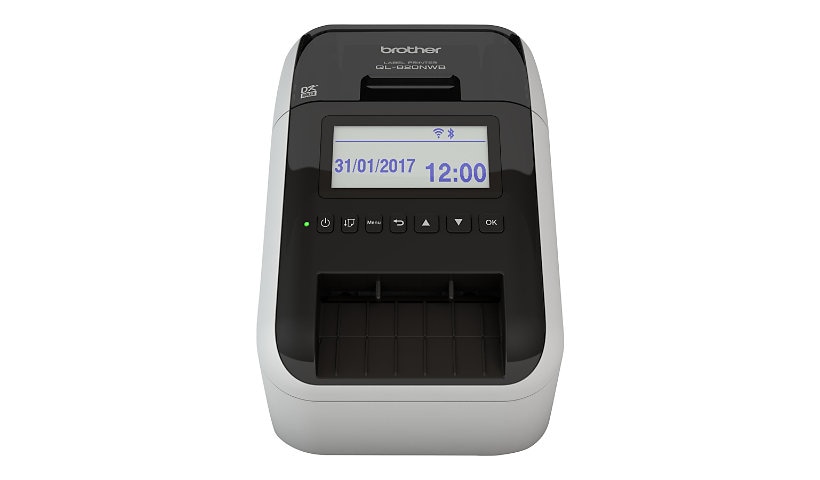
The Brother QL-820NWB offers flexible connectivity - Bluetooth wireless technology, Ethernet and Wireless (802.11b/g/n) interfaces. Also equipped with a USB Host interface, the Brother QL-820NWB is well-suited for use with a peripheral such as a scanner.
Create amazing Black/Red labels using DK-2251 or cost-effective, paper labels for packages, name badges, postage and more. Ultra-fast, printing up to 110 standard address labels per minute with black text at 300 dpi.
Create and print labels from your mobile device when connected to a wireless network via: AirPrint, Brother iPrint&Label. Using the free, Brother iPrint&Label app with your Apple iPhone, iPad, and iPod touch or Android smart phones you can quickly access and print label templates - or create your own custom labels with graphics or photos.
Easy to read Backlit Monochrome LCD screen allows for standalone use. Add an optional Li-ion battery for a complete mobile solution. Easy to integrate with free software development kits. Uses convenient, Brother genuine DK drop in labeling supplies.
Needs no ink or toner. Windows and Mac compatible.
Create amazing Black/Red labels using DK-2251 or cost-effective, paper labels for packages, name badges, postage and more. Ultra-fast, printing up to 110 standard address labels per minute with black text at 300 dpi.
Create and print labels from your mobile device when connected to a wireless network via: AirPrint, Brother iPrint&Label. Using the free, Brother iPrint&Label app with your Apple iPhone, iPad, and iPod touch or Android smart phones you can quickly access and print label templates - or create your own custom labels with graphics or photos.
Easy to read Backlit Monochrome LCD screen allows for standalone use. Add an optional Li-ion battery for a complete mobile solution. Easy to integrate with free software development kits. Uses convenient, Brother genuine DK drop in labeling supplies.
Needs no ink or toner. Windows and Mac compatible.
Add to Compare
Enhance your purchase
Brother QL-820NWB - label printer - B/W - direct thermal is rated
3.90 out of
5 by
9.
Rated 5 out of
5 by
Paul J. from
Bought to replace a Dymo Labelwriter 450 Turbo
I bought this to replace a dying Dymo 450 Turbo labeler (USB) that is shared. The fact that it is almost the same price and has BT\WiFi & LAN Ethernet was a bonus!
Unfortunately, the labels are totally different and do not work with our system properly even tho they both support P-Touch which at the time I thought was a standard labeling system (label format).
Brother actually uses their own formats which our system does not work with (truncates the label verbage)
I am sure that it is a great printer for general Win\Mac use, but be careful when buying this product to use with a non-standard system, as you are limited to a short choice of label formats!
I selected that I would recommend this product to others .... BUT only for regular OS use, UNLESS you have access to 3rd party (external) label setups which we don't.... (also the reason I gave it 3 stars).
I wish Brother could help me out with my issue, as this is a waste of a NEW labeler we will never use again!!
Date published: 2018-09-10T00:00:00-04:00
Rated 5 out of
5 by
Arian from
Great printer but where is the invoice??
Bought this great product direct from the Brother website. Shipped fast, works great, good support when I have a question. But where is the invoice?? Didn't receive anything by email and can't find anything on the website. Brother please do this for business purchases. Thanks.
Date published: 2021-08-12T00:00:00-04:00
Rated 5 out of
5 by
Yamishuk from
Pdf to sticker
We print stickers from pdfs created by our computer system. Works great!!
Date published: 2023-05-22T00:00:00-04:00
Rated 5 out of
5 by
Chef Trent Taylor from
Works well
Works great, a little slow and I can’t get it to print the round labels I got. I have to use the continuous labels and have it cut every 1.5 inches for my grab&go’s.
Date published: 2024-11-01T00:00:00-04:00
Rated 5 out of
5 by
SGT MAC from
Difficult Setup
I found this printer very hard to setup. I double label for file folders seems to be missing.
Date published: 2024-10-28T00:00:00-04:00
Rated 5 out of
5 by
LFG PLG from
Tedious, outdated, kinda cool
As the title says, this software was impossibly tedious to install and attempting to install it on my coworker's computers has been somehow worse. This along with the P-touch editor seem like strange out dated aspects to this supposedly modern helpful tool. P-touch Editor is kind of neat with all the clip art and templates, it has the feeling of old old Microsoft word but formatting is strange and again tedious. I imagine we'll get more comfortable with it as time passes but for now it's hard to get over the annoyance of 4 different user manuals and an hours long software installation process.
Date published: 2024-10-28T00:00:00-04:00
Rated 5 out of
5 by
Tj j from
Great printer and fast
Works great just wish they had blk and red labels in the smaller sizes
Date published: 2025-02-27T00:00:00-05:00
Rated 5 out of
5 by
Brandon L from
Needed a Replacement
Printer worked great and had excellent features. It had a power supply problem and customer service was quick to respond and sent out a replacement unit. Great experience!
Date published: 2025-01-16T00:00:00-05:00
Rated 5 out of
5 by
JRocks from
Decent little printer
Works as advertised. The biggest issue is that when the power goes out, it doesn't automatically reconnect to the wireless network. That's not great. We had to stick a UPS on each one to avoid this from happening if the lights go out for a few seconds.
Date published: 2024-07-24T00:00:00-04:00