
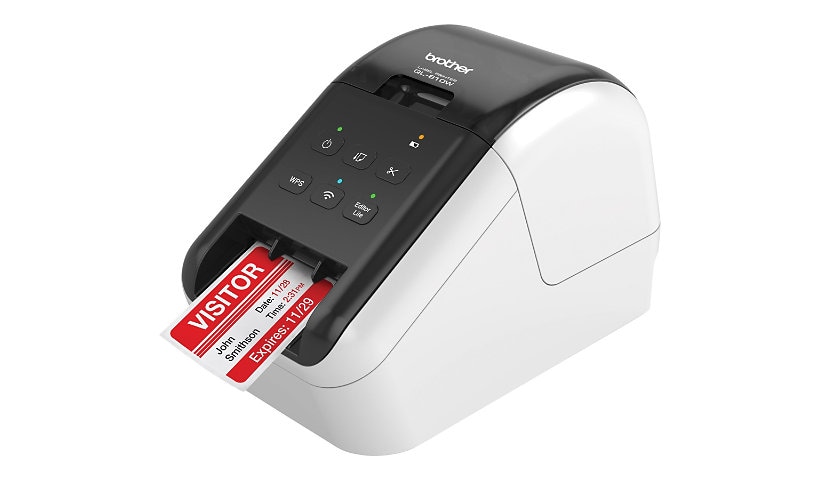
Brother QL-810W - label printer - B/W - direct thermal
$254.99
$185.99
Sign in for your price
Mfg # QL810W
CDW # 4432483
| UNSPSC 43212113
Quick tech specs
- 810W
- direct thermal
- 300 x 600 dpi
- USB 2.0, Wi-Fi(n)
- black, white
- Label printer
- Roll (2.4 in)
- up to 110 labels/min
- cutter

Know your gear
The Ultra-Fast Brother QL-810W label printer helps busy professionals easily tackle a variety of labeling tasks.
With the Brother QL-810W ultra-fast label printer you can create amazing Black/Red labels using DK-2251 or cost-effective, paper labels for packages, envelopes, file folders, name badges, postage and more. Ultra-fast, printing up to 110 standard address labels per minute with black text at 300 dpi.
The built-in Wireless interface offers easy connectivity - print from virtually anywhere or share on a network. With Brother's network management tools it is easy to integrate and manage on any network. Create and print labels from your mobile device when connected to a wireless network via: AirPrint, Brother iPrint&Label. Using the free, Brother iPrint&Label app with your Apple iPhone, iPad, and iPod touch or Android smart phones you can quickly access and print label templates - or create your own custom labels with graphics or photos.
Add an optional Li-ion battery for a complete mobile solution. Easy to integrate with free software development kits (Windows, iOS and Android). Uses convenient, Brother genuine DK drop in labeling supplies. Needs no ink or toner. Windows and Mac compatible.
With the Brother QL-810W ultra-fast label printer you can create amazing Black/Red labels using DK-2251 or cost-effective, paper labels for packages, envelopes, file folders, name badges, postage and more. Ultra-fast, printing up to 110 standard address labels per minute with black text at 300 dpi.
The built-in Wireless interface offers easy connectivity - print from virtually anywhere or share on a network. With Brother's network management tools it is easy to integrate and manage on any network. Create and print labels from your mobile device when connected to a wireless network via: AirPrint, Brother iPrint&Label. Using the free, Brother iPrint&Label app with your Apple iPhone, iPad, and iPod touch or Android smart phones you can quickly access and print label templates - or create your own custom labels with graphics or photos.
Add an optional Li-ion battery for a complete mobile solution. Easy to integrate with free software development kits (Windows, iOS and Android). Uses convenient, Brother genuine DK drop in labeling supplies. Needs no ink or toner. Windows and Mac compatible.
Add to Compare
Enhance your purchase
Brother QL-810W - label printer - B/W - direct thermal is rated
3.50 out of
5 by
8.
Rated 5 out of
5 by
Dan from
Good printer for a totally wireless setup
We use 6 of these to print labels with Planning Center Checkins software on an iPad. They have been working quite well as a completely wireless solution with no issue since we got them a year ago. The consistency of print has been good until recently which I believe can be sorted out with cleaning. The label holders were a bit of a strange situation because we ended up with a few that had to be forcefully broken apart so that the old roll could be removed and a new one inserted. WiFi connection is reliable even when our building is congested and batteries (purchased separately) have been doing their job well. Overall for the money we paid we are very happy.
Date published: 2019-11-13T00:00:00-05:00
Rated 5 out of
5 by
Office from
I would buy this product again
Office use
Date published: 2019-12-09T00:00:00-05:00
Rated 5 out of
5 by
Mark from
Bad tech support.
Label maker is good. Just bad customer support after the sale. They will not help support with tech support if the purchase is over 1 year.
Date published: 2025-05-29T00:00:00-04:00
Rated 5 out of
5 by
Kent from
Excellent Label Printer
I freely admit that I have not used all the Brother QL-810W features. I have not used the WPS button, which allows the user to connect this device easily and quickly to other computers on the network, provided those other computers are also WPS capable, but I am thrilled to use this feature when the need arises. This is also true for the Wi-Fi button as well as the Wi-Fi LED indicator. Again, this is a terrific feature that I plan to use when needed. The Editor Lite button is another terrific feature that I have not used but will come in handy when I do. The Editor Lite is a Windows-only application but is great if you are in a hurry and do not have the time to create a complicated, time-consuming label. I have my label printer plugged in. Thus, I do not use the battery feature, but this is another handy attribute of an excellent product and is beneficial if you have limited outlets or are in a location deprived of electricity. The P-touch software has a rich layout and is adaptable to the novice to the advanced user. I love the P-touch application feature where once you create a label, you next press the print button and the label in the P-touch application ejects, and the printer automatically cuts the label. You cannot go wrong with this choice for an efficient, easy-to-use label printer.
Date published: 2025-06-18T00:00:00-04:00
Rated 5 out of
5 by
Charles Le Designer from
How many times do you needlessly replace the print
Support and documentation are most important to me. This printer gets a zero for qulaity on these departments. I bought a long roll or prepunched Brother labels at Staples for about 30 bucks. Made 40 something hello my name is labels. The printer driver for Wifi never told me why it was unhappy. I unloaded all software and began again. This time just USB. Now I get an error and it says not right size paper. No button or check box that says :Use the label in the machine. Kiss . What a concept aye? So now I cruise all the printer thingeys in the app, changing one at a time until it prints. Like changing a 3.01 to 3.9" or 2.94 to 2.9 and checking off auto. I got it working and went through 40+ names using the file that worked. BTW the nice lady did not have me check any of this and requested a replacement.eee yah!
Date published: 2024-08-18T00:00:00-04:00
Rated 5 out of
5 by
K Ellenburg from
Connection Difficulty Especially Over WiFi
This printer prints nicely overall, but there is much struggle in the connectivity with other devices, especially using the WiFi feature. I have also had difficulty connecting my computer with the device over the cable port. This printer would be so excellent if the wireless connectivity would work consistently.
Date published: 2026-02-18T00:00:00-05:00
Rated 5 out of
5 by
Tgs3 from
Label printing
Toooo much trouble settling up and connecting plus download p touch and Then installer. Directions not clear enough.
Difficult to wifi and bluetooth. Not bad after that tho
Date published: 2024-09-08T00:00:00-04:00
Rated 5 out of
5 by
jonborck from
Really good printer
We use these for ipads and printing name tags. They are a bit difficult to use in the beginning, but once you get used to it they are seemless.
Date published: 2017-09-06T00:00:00-04:00