

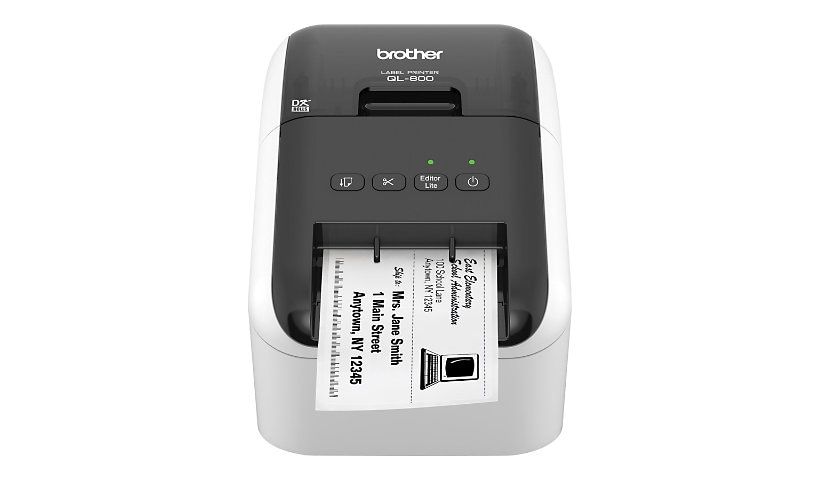
Brother QL-800 - label printer - B/W - direct thermal
$189.99
$136.99
Sign in for your price
Mfg # QL800
CDW # 4432478
| UNSPSC 43212113
Quick tech specs
- 800
- direct thermal
- 300 x 600 dpi
- USB 2.0
- black, white
- Label printer
- Roll (2.4 in)
- up to 93 labels/min
- cutter

Know your gear
Professional, high-speed label printer helps you quickly tackle labeling tasks in your busy office. Create amazing Black/Red labels using DK-2251 or cost-effective paper labels for packages, envelopes, file folders, name badges, postage and more. The super-fast, printing up to 93 standard address labels per minute with black text at 300dpi help save time on big projects. An auto cutter allows for printing or multiple labels at a time, eliminating wasted label sheets. The "Plug & Label" feature supports quick label printing of most basic labels - no software installation required for Windows PCs. P-touch Editor software for Windows and Mac lets you create labels as you desire. Print from Microsoft Word/Excel /Outlook. Uses convenient, Brother genuine DK drop in labeling supplies. Needs no ink or toner.
Add to Compare
Enhance your purchase
Brother QL-800 - label printer - B/W - direct thermal is rated
4.00 out of
5 by
36.
Rated 5 out of
5 by
Franko from
One thing I miss being able to do.
I can not move Contact files onto Brother setup. Other wise I love the printer
Date published: 2024-09-24T00:00:00-04:00
Rated 5 out of
5 by
Rob K from
Fix issues related to IOS 18
Since the IOS 18 software update, I am not longer able to access any of my previous labels or settings. I have used this machine for 4 years. I hope that this review will help resolve this as it is impossible to reach anyone regarding.
Date published: 2024-09-22T00:00:00-04:00
Rated 5 out of
5 by
BOB from Jacksonville Flo from
Unable to down load drivers and get it to work.
I bought the QL-800 Label maker 3 weeks ago but have not used it because i have not been able to download the drivers. I have a call (text) into the support team but because of the holiday they won't be able to get back with me for another 3-4 days. I'm on hold.
Date published: 2024-05-26T00:00:00-04:00
Rated 5 out of
5 by
MIH1 from
Does it's job.
It took me awhile to find the label with the zipcode bar on it. It should have been the first template instead of the last 2 The printer works well.
Date published: 2024-10-05T00:00:00-04:00
Rated 5 out of
5 by
Susan I from
Printer Driver Issue
The printer looks great but I have not been able to get it to work so right now, I have not used it.
Date published: 2024-11-06T00:00:00-05:00
Rated 5 out of
5 by
Cheris from
Perfect for a small business
I love my new brother printer! I have a small candy business and I used to have to use Avery labels to print to label all my products which was time-consuming and way more expensive. This is quick and easy and I love it.
Date published: 2024-11-06T00:00:00-05:00
Rated 5 out of
5 by
ALEX from
Easy to set up, perfect for labeling!
This is such a great product, love the quality of it, its fast, easy to work with, a must for labeling and very fast printing.
Date published: 2018-04-13T00:00:00-04:00
Rated 5 out of
5 by
MCBell from
Awesome little printer
So small, yet mighty powerful. Extremely fast and accurate.
Date published: 2023-07-22T00:00:00-04:00
Rated 5 out of
5 by
mark from
label maker
works great. Only problem is that you have to buy the whole assembly to change roles instead of just being able to replace a label roll on the spool. Very wasteful and poor design compared to your competitors.
Date published: 2023-08-06T00:00:00-04:00
Rated 5 out of
5 by
smrr from
The Perfect Label maker
Great. We needed a label printer for our clinic and tried the new Dymo, which sucked. This one is slightly bigger but great for our needs and even cuts the label for us! Simple set up and no software needed that opens every time the machine powers on.
Date published: 2023-06-13T00:00:00-04:00
Rated 5 out of
5 by
Ace006 from
Great printer. Horrible software.
I've finally managed to get the printer to do what I want to do but I still can't figure out how to turn a list of addresses in MS Word into a source of labels for all addresses. The software that runs the printer is HORRENDOUSLY complicated and not at all intuitive. Just want to print out 30 labels for your usual suspects in Word or Excel? Or a single-name label? Good luck.
If there's an ultra-simple demo or instruction sheet on how to do the simplest thing I've yet to find it. If you want to create your own custom label that may or may not link to your addressee list then enjoy the hours of fiddling around to make this happen.
Kludgy is the only word that adequately describes the software that comes with the printer.
Date published: 2023-02-03T00:00:00-05:00
Rated 5 out of
5 by
Art Plus Gallery from
Nice printer
Printer works great, the only problem is if a label gets stuck it is very difficult to get into the machine to pull it out. It is very tight and if you pull on something the soldered wires on the board disconnect and the printer is useless.
Date published: 2023-02-10T00:00:00-05:00
Rated 5 out of
5 by
Alex from
Works great, if you only ship via USPS
It's fine unless you want to print a label for UPS. The label is too small for use with UPS. For USPS, it's great. Small, but great. If you want a thermal label printer to use with Ebay shipping, for example, look somewhere else. This label maker is only good for shipping via USPS. No shipping flexibility.
Date published: 2023-04-23T00:00:00-04:00
Rated 5 out of
5 by
TONY from
GREAT
It is easy to make label programing and it is GREAT.
Date published: 2023-04-23T00:00:00-04:00
Rated 5 out of
5 by
m sudder from
Great Product
Great product the software takes some getting used to but onece set up it rocks
Date published: 2023-11-13T00:00:00-05:00
Rated 5 out of
5 by
Dawn K from
High quality label printer
Wonderful printer! Easy to install and very user friendly! Labels are crisp and clear. I highly recommend this product!
Date published: 2023-02-12T00:00:00-05:00
Rated 5 out of
5 by
Captcdoo from
Good product but can’t learn to use it
Barely car work it. Fumbling my way through poor directions I’m try to get it to do more but afraid to mess up what I got
Date published: 2024-12-09T00:00:00-05:00
Rated 5 out of
5 by
Adam Roof from
Drivers don’t work
Can’t make the drivers work with the printer so I can’t use it.
Date published: 2025-05-14T00:00:00-04:00
Rated 5 out of
5 by
The Bike Men of Flagler C from
Helping at our volunteer charity bike shop
Great product and software, easy to set up and use
Date published: 2025-05-14T00:00:00-04:00
Rated 5 out of
5 by
Dave from
Great little label printer, except...
This is a very good label printer. Unfortunately, it won't allow me to print in red anymore.
Date published: 2025-05-24T00:00:00-04:00
Rated 5 out of
5 by
Nanabanana from
Disappointing
Labels too small for my needs. Don’t print mailing labels correctly
Date published: 2023-02-03T00:00:00-05:00
Rated 5 out of
5 by
Dave from IRB from
Dependable, Fast
This label printer does a great job, FAST. It prints quickly, cuts cleanly and accurately. The PTouch software integrates well with it. We're very satisfied with this purchase and would highly recommend this printer.
Date published: 2023-05-25T00:00:00-04:00
Rated 5 out of
5 by
Normal Person from
Nice little label printer
I was looking for a label printer to create a more professional looking address on outgoing mail. I also wanted the ability to produce folder labels and box labels. This unit has all the basic features I require as well as additional features I might use in the future. It’s easy to use, does exactly what I require, and doesn’t require a lot of directions to get working properly. Great little addition to my office.
Date published: 2023-01-19T00:00:00-05:00
Rated 5 out of
5 by
Multiuse Man from
Perfect label maker for home office and workshop.
Easy to use, works great with little difficulty. Makes very nice labels at an economic cost.
Date published: 2023-01-02T00:00:00-05:00
Rated 5 out of
5 by
Feng cha from
Easy to use and amazing customer service
Easy to use and amazing customer service who goes above and beyond to solve your problem
Date published: 2023-11-03T00:00:00-04:00
Rated 5 out of
5 by
Rabbit from
Great little printer
Easy to set up and use. I printed out some labels within an hour.
Date published: 2025-02-04T00:00:00-05:00
Rated 5 out of
5 by
rjonesartist from
Great printer
Printer is fantastic, software is not the easiest to use. It is not as user friendly as other software especially when you are using multiple size labels to print. I use this to put price tags on all my products. You can only reduce a upc code to a limited size where I would prefer to be able to reduce it more to fit my .9x.9 labels. Using the database is a must and a bit of a learning curve. Thanks to youtube university for all the help. Brother customer service knows nothing when it comes to this printer.
Date published: 2024-08-27T00:00:00-04:00
Rated 5 out of
5 by
T19J from
AWSUM PRODUCT
SAVES ME TONS OF MONEY, CAN PRINT EVERYTHING ON MY OWN
Date published: 2020-03-13T00:00:00-04:00
Rated 5 out of
5 by
Mic from
Up & Printing in No Time
I received the product very quickly from Order. Easy set-up to a Mac and I was printing in no time at all. Next step is to find my various label needs and change the cartridge as required. I would recommend the printer to address your labelling needs.
Date published: 2020-09-07T00:00:00-04:00
Rated 5 out of
5 by
Melissa from
Waste of money
I bought my QL-800 for school. I would have loved to use it, unfortunately it didn't broke right after I got it. I try getting it warranty but that was no luck. I expect so much more from brothers.
Date published: 2023-07-10T00:00:00-04:00
Rated 5 out of
5 by
Amanda E from
Perfect for all our needs
Purchased for our office. Easy to set up and start blasting out labels! We are able to use our own logo's on the labels since they are monochrome color. The amount of options easily set our labels and visitor passes apart from the rest! Very quick to print and cut. I am glad we went with this machine over any others.
Date published: 2023-06-29T00:00:00-04:00
Rated 5 out of
5 by
PAEcologist from
Delighted with the Brother QL-800
The QL-800 is a major step up from my decades-old Dymo LabelWriter 330 Turbo. After a couple of months of use -- I am delighted that I made the decision to move from Dymo to Brother! The Brother software allows me to format labels in ways that were impossible with my Dymo. The software was easy to learn despite offering numerous custom options. The Brother labels themselves have a smoother, nicer finish than Dymo labels and the text on the Brother labels is sharper, easier to read. I have a variety of label needs so I frequently change label cartridges. Doing so is fast and easy with the Brother QL-800. Dymo labels yellowed considerably over time -- any label exposed to office lighting soon looked sufficiently poor that I reprinted and covered aged labels. It's too early to know how the Brother labels will age but I hope they will hold up longer over time.
Date published: 2025-03-01T00:00:00-05:00
Rated 5 out of
5 by
Tiger from
Works great
Easy to set up, works great. The brother GL-800 has saved us money.
Date published: 2025-03-08T00:00:00-05:00
Rated 5 out of
5 by
Wendy P from
Good Printer
Good printer. We use this to make barcode labels for our store. We've only been using it for a few months, but it seems to be a workhorse.
Date published: 2025-04-01T00:00:00-04:00
Rated 5 out of
5 by
The Bike Men of Flagler C from
Helping at our volunteer charity bike shop
Great product and software, easy to set up and use
Date published: 2025-04-15T00:00:00-04:00
Rated 5 out of
5 by
Roger S from
Love the QL800
Love the QL800, after using DYMO for years this is totally a breath of fresh. Never have I had any printer print so fast and acurrately. Is nice to be apply to print spreadsheets from Excel along with individual labels.
Date published: 2026-05-06T00:00:00-04:00