
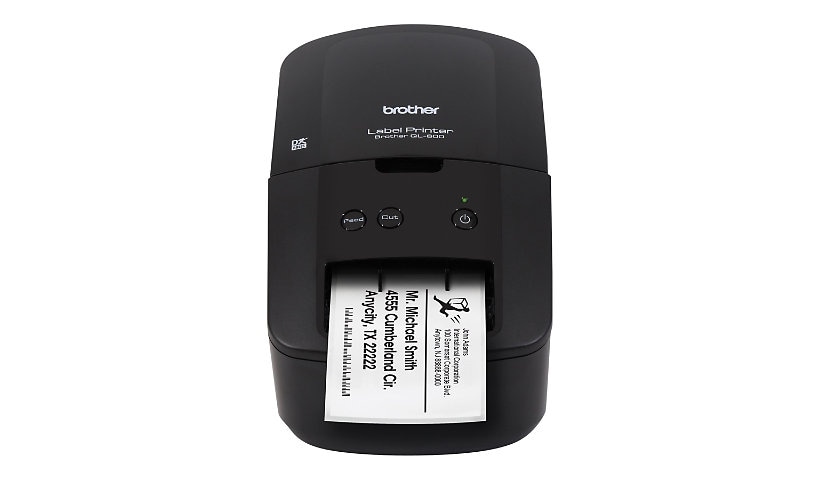
Brother QL-600 - label printer - B/W - direct thermal
$144.99
$109.99
Sign in for your price
Mfg # QL600
CDW # 6108202
| UNSPSC 43212113
Quick tech specs
- 600
- direct thermal
- 300 x 600 dpi
- USB
- Label printer
- Roll (2.44 in)
- up to 44 labels/min

Know your gear
Get an economic labeling solution to meet a variety of home, office and small office applications with the Brother QL-600 Label Printer. It has a built-in automatic cutter for a clean and accurate edge that allows you to quickly and easily create custom labels.
Add to Compare
Enhance your purchase
Brother QL-600 - label printer - B/W - direct thermal is rated
3.50 out of
5 by
22.
Rated 5 out of
5 by
Jim 2586 from
Great product
Easy to use and produces high quality labels very rapidly.
Date published: 2023-07-27T00:00:00-04:00
Rated 5 out of
5 by
TENCAP1 from
It Works...
Does what it's supposed to with no drama... Replacing an older Brother printer, so all data moved over just fine.
Date published: 2024-06-29T00:00:00-04:00
Rated 5 out of
5 by
Frustrated from
CAUTIOn - No Drivers avaible for new Apple.
Ths printer no longer works with Apple computers. Brother does not provied a Driver to use with newer Apple products. My QL-600 wioll now be used as a doorstop. I won't by anymore products from Brother.
Date published: 2025-12-19T00:00:00-05:00
Rated 5 out of
5 by
Merfner from
Versatile and Quick
I had to watch several videos to understand how to use the software. However, once I learned the functions, this has become a wonderful addition to my office. It is super simple to change label cartridges. It is easy to create the label, changing fonts, sizes, and placement. From shipping packages to organizing files, it's been quick and fun to have this printer spit out labels.
Date published: 2023-07-09T00:00:00-04:00
Rated 5 out of
5 by
Dr S from
Perfect label maker!
Works perfectly . Fast printing. Very clear. Set up needed help; customer service very professional.
Date published: 2023-01-15T00:00:00-05:00
Rated 5 out of
5 by
Robert B from
Great label orinter
Great label priter that is easy to use and provides handy labels for everything.
Date published: 2026-02-07T00:00:00-05:00
Rated 5 out of
5 by
Tina Reed from
LABEL MAKER
The label maker is ok, but I liked the Dymo label maker that automatically allowed barcodes for zipcodes+4
Date published: 2025-01-16T00:00:00-05:00
Rated 5 out of
5 by
dgar from
Not as advertised
Very disappointed in software for the QL600. It is difficult to use. Also, Brother says this printer is compatible with Microsoft Word via their "Add-In Utility". This is not entirely true. It is only compatible with the 32bit versions of Microsoft Office. They fail to mention this (conveniently) on their website. I asked support about this, and their solution was to convert to Microsoft Word 32bit. Of course they didn't say how to do this. [Incident: 240402-001684]
Date published: 2024-04-02T00:00:00-04:00
Rated 5 out of
5 by
Mark B from
Almost perfect replacement
Almost perfect replacement for Seiko Smart Label.Printer. It is fast, clear and somewhat easy to use. The biggest problem is it does not make a fold-over label for file folders.
Date published: 2024-10-24T00:00:00-04:00
Rated 5 out of
5 by
SoniCali from
Unfortunately, not easy to connect
Tried everything to connect to laptop. Very frustrating. Directions say download the app, however, that does not work. I’ve taken it to an I T person and they could not connect it as well.
Date published: 2026-02-14T00:00:00-05:00
Rated 5 out of
5 by
Goumadi from
Brother is the best
this is one fabulous littler machine, i am so glad i bought it
Date published: 2026-03-10T00:00:00-04:00
Rated 5 out of
5 by
Richard Drabek from
Not user friendly
Have not been able to use it yet. My computer can't even find it
Date published: 2025-04-10T00:00:00-04:00
Rated 5 out of
5 by
Duey from
Printer help
I cannot get the software to download properly. I cannot format the labels without the software. Need help. advise.
Date published: 2024-07-31T00:00:00-04:00
Rated 5 out of
5 by
Gavloz from
Great product
Fantastic shipping speed.
Date published: 2021-03-18T00:00:00-04:00
Rated 5 out of
5 by
Wes from
I would not buy this QL600 again.
I think the instructions are for one expert talking to another expert computer printer user. I am trying to find a manual written for beginners and there are none.I have been struggling with the ql600 2-10 of February and can not find any help.
Date published: 2022-02-10T00:00:00-05:00
Rated 5 out of
5 by
Harwinder from
Very reliable printer
I recently purchased this product and use it for my Amazon labels and mailing labels. This is very fast and setup is very easy.
Date published: 2021-01-25T00:00:00-05:00
Rated 5 out of
5 by
Premmal from
Good
It works good and smooth to handle, if the label printer gave more options to use different types of label that would be even better
Date published: 2023-04-16T00:00:00-04:00
Rated 5 out of
5 by
Nortem from
Very good printer! 100/100!
For the month of using it, there were no smudging or any other issues. I am very satisfied with speed and quality of printing and software.
Date published: 2023-06-05T00:00:00-04:00
Rated 5 out of
5 by
Tracy E from
Not simple to use
I ordered this for work to make professional labels. I need quick, easy, and simple. this was neither. i had to download an app just to use it. For me the instructions were not easy nor simple.
Date published: 2023-05-02T00:00:00-04:00
Rated 5 out of
5 by
George Nylan from
A little complicated to use and setup for me
Really nice label printer but a bit difficult to use.
I ordered an extra roll of tape as I use a lot of labels.
The problem I ran into was understanding print size and label size? I would type up a label, print, than start getting messages about wrong label size? I had to look up solutions by searching the web but could not really find anything? The instructions downloaded were just about loading the tape roll and really nothing about setting up and using? or anything about error messages and how to resolve. I did eventually get it figured out using the pre-set labels in the program. but still don't fully understand it? And how to setup and print smaller labels for a file folder, or small items? If you could send me more details on how to print small labels I would appreciate it.
Date published: 2023-09-12T00:00:00-04:00
Rated 5 out of
5 by
Jimie from
Nice
I love it! Much better than printing on the envelope. Easy to install.
Date published: 2023-09-06T00:00:00-04:00
Rated 5 out of
5 by
Stan in PA from
I hope I convey how great this printer is.
This little item is a breeze to plug in and set up. I use it directly through USB on my PC.
The main thing I wanted to mention here is I did not install the Brother editing software. Printer driver yes, software, no. The application I'm using lets you choose your printer (as is normal with all apps). I then create a custom paper size that fits the restrictions of this little label maker, and after a couple tests and edits, my template is saved. After that, click and print.
Oh, I'd like to mention. Its thermal. No ink. No toner. It's ready almost immediately after power up. It will shut off on its own, probably to conserve its' heater. Printed labels are quick.
To sum it up, this is one of Brothers best products.
One last thing. My understanding is, any Brother label products with model QL will fit this printer.
Date published: 2023-11-07T00:00:00-05:00