

Brother DSmobile DS-940DW - sheetfed scanner - portable - USB 3.0, Wi-Fi(n)
$287.99
$229.99
Sign in for your price
Mfg # DS940DW
CDW # 6023465
| UNSPSC 43211711
Quick tech specs
- 940DW
- Duplex
- 600 dpi x 600 dpi
- Sheetfed scanner
- 8.5 in x 72 in
- USB 3.0, Wi-Fi(n)

Know your gear
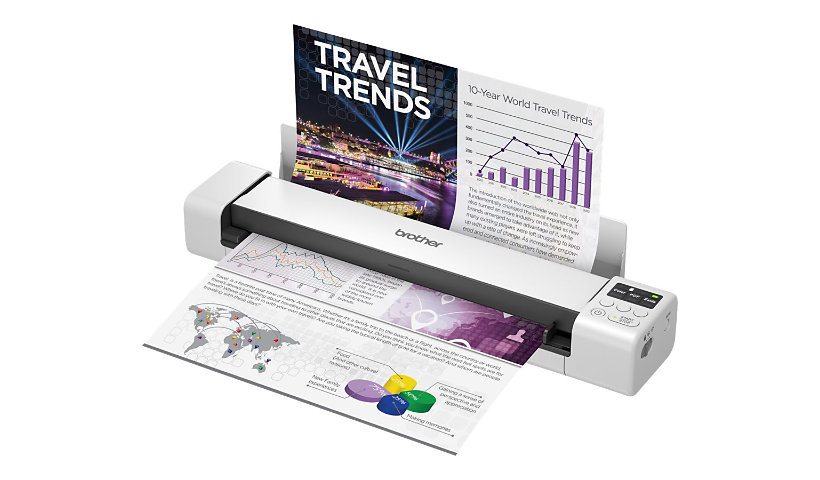
The Brother DS-940DW duplex and wireless compact mobile document scanner is ideally suited for on-the-go, small office/home office professionals featuring its compact, mobile design and simple workflow applications. The DS-940DW features single-pass duplex scanning and a color scan speed of up to 16ppm (Color and monochrome scan speed, letter size paper at 300dpi.) (a single page in as little as 4 seconds).This scanner can wirelessly scan to PC's, mobile devices, and with the Brother free iPrint&Scan app, scan to cloud services and network destinations.(Internet Connection and account with desired service required.) The DS-940DW is compatible with the way you work. Its compact size and mobility combined with fast scan speeds and image optimization features, make it a perfect fit for usage on the road, in the home or small office. Open the DSD (Desk Saving Design) scan lid on the Brother DS-940DW document scanner to reduce the space needed to operate the scanner. The Brother DSD saves up to 11 inches of desk space. (Based on Letter (8.5" x 11") size paper.)
The DS-940DW uses the Brother "iPrint&Scan for desktop" app. Not only does this app make setting scan settings and adjusting the output super easy but, it also eliminates the "lost document." Every scan initiated in the app goes directly to the app. The user then has the option of where to save the document, whether that be directly to their PC, to a network location or to the cloud. If a user often saves a certain type of document to the same location using the same scan settings, they can save it as a workflow and with one click the hardcopy document will be scanned and saved to the location and in the format the user wants. For added simplicity, the DS-940DW can scan directly to an installed micro SD card.(Additional purchase required.) With the DS-940DW also featuring scan to mass storage capabilities, a user can scan without installing any software on their PC. The scanned document goes to the SD card and the user's PC looks at the scanner itself as if it is the SD card. Simple.
The DS-940DW uses the Brother "iPrint&Scan for desktop" app. Not only does this app make setting scan settings and adjusting the output super easy but, it also eliminates the "lost document." Every scan initiated in the app goes directly to the app. The user then has the option of where to save the document, whether that be directly to their PC, to a network location or to the cloud. If a user often saves a certain type of document to the same location using the same scan settings, they can save it as a workflow and with one click the hardcopy document will be scanned and saved to the location and in the format the user wants. For added simplicity, the DS-940DW can scan directly to an installed micro SD card.(Additional purchase required.) With the DS-940DW also featuring scan to mass storage capabilities, a user can scan without installing any software on their PC. The scanned document goes to the SD card and the user's PC looks at the scanner itself as if it is the SD card. Simple.
Add to Compare
Enhance your purchase
Brother DSmobile DS-940DW - sheetfed scanner - portable - USB 3.0, Wi-Fi(n) is rated
3.70 out of
5 by
20.
Rated 5 out of
5 by
KWilson from
Great buy for a mobile scanner
Great mobile scanner. I purchased this scanner in addition to my larger multi-purpose scanner printer in order to better scan receipts and have a small scanner for travel. My only criticism is a lack of compatibility with the ARM64 version of Windows. In order to use it with my MS Surface, I need to scan to the microSD card than copy to my Surface.
Date published: 2023-02-13T00:00:00-05:00
Rated 5 out of
5 by
Pastmac from
The 940 has problems taking the paper to scan
We have used these portable scanners for years, here and in Italy. The model we used the most was theDS 620. Three of those are 8-10 years old and still working. But they are old enough they are no longer supported on the newer Mac OS systems. So we purchased this 940 model. For the most part it is very similar. The only problem with it is it tends to be very finicky grabbing the paper. It can often take several attempts to get the paper to grab and then be taken in a scan run. The kind of paper does not seem to matter. The 620’s never cared and took the paper the first try.
Date published: 2025-02-23T00:00:00-05:00
Rated 5 out of
5 by
Paul U from
get to know b4 you buy
Although I love the end result ,, the instructions on using the machine are lacking ,, no instructions , I read other reviews online to find out how to start this thing.. I guess I have to go online and get the instructions. I still done know how to turn the 2 sided scan on and off ,, and the software ? well ,, there's Brother Iprint ,, ok, but then there's this sep[erate way you can use it without that software ,,HUH !! and I'm not a novice tag this stuff,,, and what's with that flap ? it sticks up and doesn't go down so when you have a stiff piece you want to scan,, you can't ,,, the worst design I ever saw ,, at least make it go flat..as Isaid ,, once I get to know this machine .. I'll probably love it ,, but the learning curve is way to much Paul
Date published: 2025-01-07T00:00:00-05:00
Rated 5 out of
5 by
Mpdi from
The worst scanner
The worst scanner. It does not work with iPhone 14 or iPhone 15 pro max. The battery does not last at all and extremely expensive so that it does not work wirelessly. I spent my money
Date published: 2025-01-17T00:00:00-05:00
Rated 5 out of
5 by
Dee_H from
Best Scanner for Receipts
This machine has been the best investment we have made. We run a non-profit rescue, and must keep track of receipts. For the first several years, we kept the physical receipts in little containers, but the printing on thermal receipts (which 90% of the receipts are) degrades with time - especially in a hot environment. We wanted to digitize, so I'd looked at several "mobile" receipt scanners before deciding to purchase this one. I am SO GLAD that I did.
We use the standard software - Brother iPrint&Scan - which could be a *little* more intuitive or perhaps come with a tutorial on how to set up the scan settings and workflows, but once you learn how to use it, it's amazing.
As you can imagine, after over ten years, we have A LOT of paper receipts. For record-keeping (IRS, tranparency, traceability of our foods, etc.) we need things sorted by year. The OLD method of scanning with a regular scanner involved sorting the receipts into piles by year, and placing on the glass, trying to get the lid on the scanner closed with the receipts in a flat position, OR taping them to - and wasting - paper. It took time and took up a LOT of workspace that we don't have in a TINY office area. Plus - all the scans went to a single folder, where I had to MANUALLY sort them by year by looking at each file to find the date of purchase.
With this Brother DSmobile DS-940DW scanner, I set up workflows for each year of receipts, by making a folder for that year and assigning that as the "scan to" destination. I can simply grab a pile of receipts, look at the receipt ONCE for the date, click the "one touch" workflow for the correct year, and scan the receipt. With that one click, the receipt is scanned into the correct folder at my selected settings, providing digitized receipts, easily! Since it scans so quickly, and automatically files them to the correct year, scanning huge piles of receipts has become a breeze!
Setting up the workflows took an investment in time, but has been totally worth it in timed saved when scanning. It's light and small so easy to stow out of the way when not in use, very helpful in a cramped, small office space.
Date published: 2024-09-10T00:00:00-04:00
Rated 5 out of
5 by
KDA8189 from
Super hard to connect to anything
The battery is blinking orange and I've been trying and trying and trying to figure our what that means, but I cannot. Also, I cant find the printer anywhere on my Mac even though I have it plugged into USB... WHERE IS IT?? $200... There are so many numbers and letters on the back, so trying to connect to wifi is impossible.
Date published: 2024-05-28T00:00:00-04:00
Rated 5 out of
5 by
Robyn from
BEST SCANNER EVER
My son purchased this for me because of a genealogy project I am working on - he thought it would make my life easier - boy was he right!! Super simple to use, this is AMAZING! works great, scan to computer or to memory card - LOVE THIS
Date published: 2024-08-23T00:00:00-04:00
Rated 5 out of
5 by
Ed G from
Not worth it
I enjoy the small footprint but the power cord is touchy as well as the actual operation of this scanner. I found myself very frustrated with the paper port feeding mechanism also. If there is a true need for this you can make it work but you shouldn't have to work so hard at scanning anything.
Date published: 2025-04-15T00:00:00-04:00
Rated 5 out of
5 by
Mubashir from
Not recommend
I just bought it and it doesn't hold charge. No trouble shooting has worked.
Date published: 2026-03-01T00:00:00-05:00
Rated 5 out of
5 by
va3rne from
Operational Efficiency
Sometimes it works, sometimes it just freeze. Got feed up.
Date published: 2023-06-06T00:00:00-04:00
Rated 5 out of
5 by
A Reimer from
Great when working
The unit is great when it works. periodically it does not scan and you have to scan the page a number of times.
Date published: 2023-06-10T00:00:00-04:00
Rated 5 out of
5 by
Steve M from
DS940DW Mobile Document Scanner
A great little Scanner that works perfectly. Added a 16 GB memory card for direct to PC transfers. Download and install the Brother "iPrint and Scan" software for even more functionality. I am 100% satisfied with this scanner.
Date published: 2023-01-13T00:00:00-05:00
Rated 5 out of
5 by
Venango from
Great Product
Very Easy To Use. Once set up it is extremely helpful and does more than I expected.
Date published: 2023-03-26T00:00:00-04:00
Rated 5 out of
5 by
DLB1 from
Needs more than what is supplied.
You really need the clear plastic envelope to scan receipts and it doesn’t come with the scanner and is difficult to find even online!
Date published: 2023-03-28T00:00:00-04:00
Rated 5 out of
5 by
Small Business Owner from
Mobile DS-940DW scanner
Great versatile scanner. Need to find setting for scanning super long receipts saved to memory card w/o computer connected. Wish Brother would provide a hardshell case option. 3rd party cases appear not available.
Date published: 2023-01-26T00:00:00-05:00
Rated 5 out of
5 by
Jonny P from
This little scanner rocks!!!
I've had this scanner for 3 days now.. scanner well over 200 receipts today with no problems! I find its quite intuitive, love the scan to micro SD feature. Have setup the wifi and found it easy as well. All round great product .. well built! I'll probably grab a second one for the office.
Date published: 2024-03-15T00:00:00-04:00
Rated 5 out of
5 by
Lisa from
Nice basic scanner
I bought this as a backup portable scanner in case my larger scanner didn't work as expected. I tested it at home and it works great. It's also good if I need to scan just a page here and there and don't want to use the Adobe scan app on my phone.
Date published: 2025-05-27T00:00:00-04:00
Rated 5 out of
5 by
Venango from
Great Product
Very Easy To Use. Once set up it is extremely helpful and does more than I expected.
Date published: 2023-04-24T00:00:00-04:00
Rated 5 out of
5 by
Des63 from
Love
Awesome product! Love the print, setup was easy and so far I have no regrets.
Date published: 2023-09-20T00:00:00-04:00
Rated 5 out of
5 by
ryan from
always goes offline
when it decides it wants to be online it works great. However, after 2-3 scans it ALWAYS goes offline. Even when plugged into PC. The time ive wasted trying to update drivers, unplug/plug back in USB cable, restart PC is ridiculous, brother should be paying me to use this product.
Date published: 2023-08-03T00:00:00-04:00