

StarTech 7 Port USB 3.0 Hub (5 Gbps) - Metal Enclosure - Desktop or Wall Mountable - Rugged & industrial Powered
$94.99
Mfg # ST7300U3M
CDW # 3595201
| UNSPSC 43211609
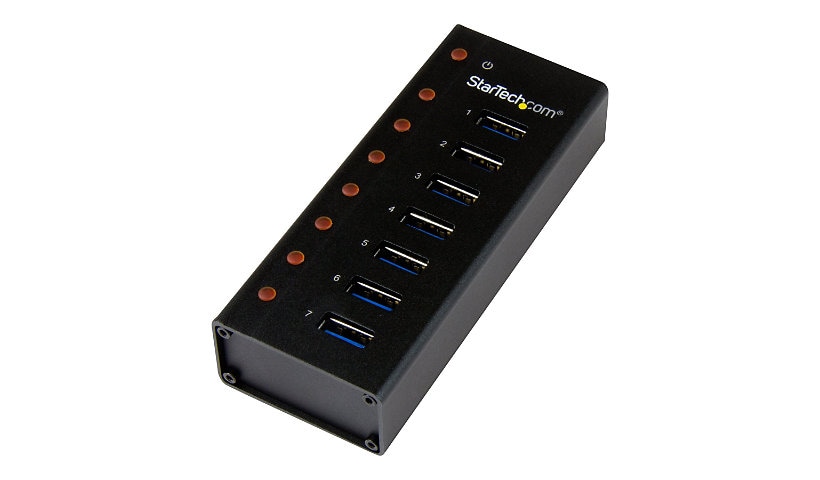
Quick tech specs
- Connect 7 high-performance devices to your computer or Mac with this compact and rugged hub
- Compact durable metal housing
- Transfer large files like movies and photos with up to 5 Gbps
- Backward compatible with 2.0 and 1.x devices
- 7-Port USB 3 Hub for desktop or travel
- Ideal for MacBook Ultrabook
- USB hub with upright ports makes plug-in easy

Know your gear
The StarTech.com 7-port USB 3.0 hub is your answer for a durable and compact hub that's ideal for desktop or travel usage. Enjoy desktop convenience or painless portability This hub is perfect for a permanent setup with a desktop computer, with a rugged metal housing that can withstand the wear and tear of daily use. Plus, you can attach it to a surface such as a desktop or wall using the included wall-mount bracket. The compact size and durability of the hubalso make it perfectly portable. When you're on the go, its robust design resists damage that can occur when travelling or from back-and-forth trips from home to office. Connect devices quickly and easily The ports on this hub are upright, which makes it perfect for IT professionals or anyone who needs to plug and unplug their USB devices regularly. You have lots of room to grip the connectors, without the worry of oversized plugs taking up too much space and reducing the number of available ports. With extra USB 3.0 ports, you can increase productivity and connect more devices to your computer, or simply avoid the hassle of swapping connected devices on your port-limited laptop. The hub makes your USB ports more accessible and can easily extend the range of your devices by acting as a mid-point repeater. Use with high-performance and older devices The ST7300U3M supports the latest USB 3.0 products including UASP-enabledstorage devices. With data transfer speeds of up to 5 Gb per second using SuperSpeed USB 3.0 technology, this high-performance hub is the perfect accessory for your desktop, laptop, MacBook®, or UltraBook™. You can also use the hub with older peripherals and computers, with support for USB 2.0 and 1.x devices and no additional drivers or software required for installation. Backed by a StarTech.com 2-year warranty and free lifetime technical support. More from the Manufacturer
Add to Compare
Enhance your purchase
StarTech 7 Port USB 3.0 Hub (5 Gbps) - Metal Enclosure - Desktop or Wall Mo is rated
1.40 out of
5 by
5.
Rated 5 out of
5 by
Springfield from
Never recognized by Windows 10 or 11
I really wanted this to work because I need multiple powered ports. But every Windows 10 and 11 computer I tried showed Generic USB hubs that were unrecognized and didn't work. StarTech says no drivers needed, and I'm computer savvy but could not get this hub to work.
Date published: 2025-07-11T00:00:00-04:00
Rated 5 out of
5 by
JVICR from
Worked great until it didn't
I bought this hub a little shy of a year ago. Worked great up until yesterday. Now only two ports work. Spent big money to avoid this but too bad.
Date published: 2023-04-14T00:00:00-04:00
Rated 5 out of
5 by
Chooch from
Worked until it didn't
At about its 8 month birthday this unit stopped working. Mac Mini M1 doesn't "see" any of the items plugged into the hub. The corresponding light comes on for each but is not recognized. Can't bring myself to give this product anything but a poor grade.
Date published: 2023-05-11T00:00:00-04:00
Rated 5 out of
5 by
VE3NRT from
Been a bit flaky from start and is now worse
I bought it last year, with a metal case for inclusion in my equipment rack. It is just unreliable. For no good reason, a USB to serial port adapter stopped operating. This happened to a earlier one as well. Then two other devices that have been working for months stopped. They work fine plugged directly into the computer. Providing 12V power doesn't help. It has been an exercise in frustration.
Date published: 2023-04-26T00:00:00-04:00
Rated 5 out of
5 by
Roget from
It doesn't like my Logitech K840 Keyboard
I bought this to extend my USB port for my mouse and keyboard. My keyboard went insane. No keystrokes. Delayed keystrokes. Repeated keystrokes. I ended up having to plug in my keyboard directly to my PC. Even though the mouse was fine, I bought a USB extender and plugged my mouse into the PC as well. Going to try gaming controllers and USB thumb drives so I can use this for 50% of intended usage. If I get a new keyboard, I'll try again, but the K840 is a killer keyboard, so it's going to be a while.
Date published: 2021-09-16T00:00:00-04:00