

Lenovo ThinkCentre Tiny-In-One 22 Gen5 21.5" Full HD Dual Port HDMI Monitor
Mfg # 12N8GAR1US
CDW # 7459978
| UNSPSC 43211902
Quick tech specs
- Screen Size: 21.5"
- Aspect Ratio: 16:9
- Brightness: 250nits
- Anti Glare Support
- Resolution: Full HD
- Pixel Pitch: 0.248mm x 0.248mm
- Refresh Rate: 60Hz

Know your gear
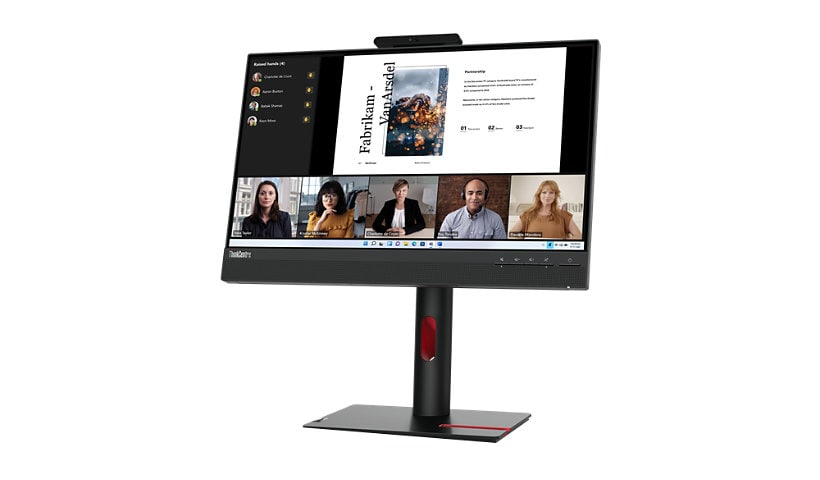
The ThinkCentre Tiny-In-One (TIO) 22 Gen 5 is an all-rounder with its 21.5-inch FHD In-Plane Switching panel which provides an immersive video calling experience. This Modular design of the monitor makes it compatible with Lenovo's range of high-performance ThinkCentre and ThinkStation Tiny Computers from 4th Gen, and gives a complete working experience when paired with its VoIP features. This can be installed on your monitor effortlessly and housed on the back of the monitor in a dedicated slot, making your desk cable-free. The classic installation mechanism ensures you have a consistent experience, allowing you to easily and quickly mount last-gen Tiny PCs on the monitor. Designed to be a powerful VoIP machine, this monitor is enhanced with features that make video conferencing a great experience. During online meetings, the 1080p RGB webcam and integrated noise-cancellation microphone produce exceptionally clear audio and video. TIO 22 Gen 5 also has a Smart Traffic Light indicator that alerts everyone in the vicinity to an ongoing meeting, letting you remain focused. If remaining focused and staying in the conversation is of importance to you, then the two built-in 3 W speakers ensure that the audio from meetings is always clear and crisp. Easily manage VoIP calls with one toggle to change the volume or mute the call using the dedicated VoIP buttons. Your privacy is in your hands with the ThinkShutter, which allows you to cover the camera when not in its use. Lenovo takes care of the environment with green packaging and CO2 offset service for zero to minimal carbon emission. In addition to Tiny PCs, this monitor can also be easily connected to other notebooks, towers using the HDMI and DP ports, and to other peripherals using the USB ports. With the ThinkColour software, customize the screen's attributes, create screen profiles, and easily switch between them as per your work preference. Protects your eyes from harmful blue light without any color distortion during long hours of screen time with the Natural Low Blue Light technology. The TIO 22 Gen 5 is the perfect option if you're looking for a clean and clutter-free setup to maximize productivity and enjoy an efficient, all-in-one experience.
Enhance your purchase
Lenovo ThinkCentre Tiny-In-One 22 Gen5 21.5" Full HD Dual Port HDMI Monitor is rated
4.80 out of
5 by
9.
Rated 5 out of
5 by
LenovoUserTIO from
Best for AIO form factor with flexibility
I bought this as my primary monitor for emails & meetings while I use another monitor for work. The camera is not as good as my Logitek usb camera but I like that it is always there and has good basic functionality. But the main reason I got this monitor was for the AIO like config with a Tiny PC. It meets all me requirements and more for now. And the built in speakers are not terrible either.
Date published: 2025-03-17T00:00:00-04:00
Rated 5 out of
5 by
Matt Lenovo from
Great Computer
Great small form factor computer. Can't beat Lenovo Quality
Date published: 2025-01-01T00:00:00-05:00
Rated 5 out of
5 by
estyzesty from
good monitor with all the features i need
happy with it, it has what I need with the camera and speakers and also frees up desktop space by containing my tinypc. appreciate the natural low blue light as well. the bottom part of the monitor is taken up by the speaker so the actual screen space is actually slightly shorter than my other monitor in spite of the width being about the same, but not a deal breaker. hookups were easy to figure out.
Date published: 2024-10-10T00:00:00-04:00
Rated 5 out of
5 by
jilma from
Amazing new tower and monitor
This review is for the monitor and M70t Gen 5 tower. I am thrilled with the entire experience. My previous tower was a Lenovo from 2013. It was still going strong, but cannot handle Windows 11, so I had to replace it. Custom ordering process was perfect for me. I am not a techie, but I work with them and was able to narrow down the features that were important to me. Hopefully I can keep this one as long as the previous one. I was able to spec it out exactly as I wanted and no unnecessary keyboard, mouse, etc. The tower arrived and I dreaded the transition and did not swap it right away. I was sure it would be a struggle. Boy was I wrong, literally plug and play. I am so very impressed by everything about this process, that I just helped my older brother order one for him. He is retired and even less savvy than me, but I am confident that I will be able to get him up and running as well as I did for mine.
Date published: 2025-06-01T00:00:00-04:00
Rated 5 out of
5 by
Kaiser Rol from
Monitor works except for the camera
Setup was easy after you purchase a Display Port cable to allow you to actually connect to your computer. The monitor works well except that my Lenovo desktop doesn't see the monitor's camera which seems to be a recurring problem with this monitor. Lenovo should fix this issue.
Date published: 2025-08-25T00:00:00-04:00
Rated 5 out of
5 by
Lowndes Technical Service from
Great for a smaller TIO monitor.
Perfect smaller TIO monitor. I prefer the 24 inch model but had a need for a smaller version.
Date published: 2025-03-11T00:00:00-04:00
Rated 5 out of
5 by
Jason KK from
powerful small computer
great powerful computer in small size that fit in tight work space
Date published: 2024-09-22T00:00:00-04:00
Rated 5 out of
5 by
JayK from
powerful small computer
great powerful computer in small size that fit in tight work space
Date published: 2024-09-22T00:00:00-04:00
Rated 5 out of
5 by
BennyChan from
Works for basic needs.
Works as expected. Paired it with a M80q Gen4 for TIO setup. One downside is that there doesn’t appear to be a way for Windows to control brightness, which is mapped to a key on some keyboards. Need to go to the Lenovo Monitor software to control brightness if not feeling like using the monitor buttons.
Date published: 2024-03-02T00:00:00-05:00