

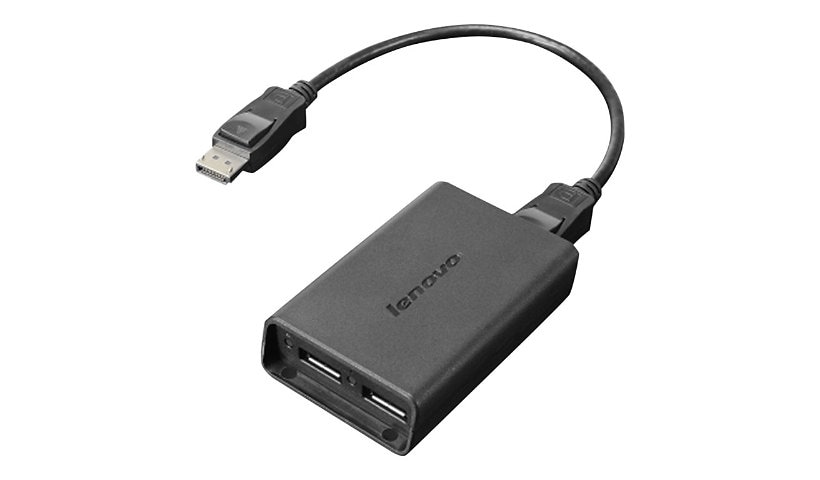
Lenovo DisplayPort adapter
Mfg # 0B47092
CDW # 2733469
| UNSPSC 26121600
Quick tech specs
- DisplayPort (M) to DisplayPort (F)
- for ThinkCentre M75s Gen 2; M75t Gen 2; ThinkEdge SE30; SE50; ThinkStation P330 Gen 2; P350

Know your gear
Lenovo DisplayPort to Dual DisplayPort Adapter provides multi-monitoring at its finest without the use of an expensive graphics card. The two modes supported are Expanded mode and Mosaic mode. In Expanded mode, one ThinkCentre DisplayPort can be connected to two identical monitors with one DisplayPort to Dual DisplayPort Adapter and two Options DisplayPort cables (0A36537). In Quad Mosaic mode, two ThinkCentre DisplayPorts can be connected to four identical monitors with two DisplayPort to Dual DisplayPort Adapters and four DisplayPort cables. Maximum resolution supported in Quad Mosaic mode is 3840 x 2160.
Enhance your purchase
Lenovo DisplayPort adapter is rated
3.30 out of
5 by
17.
Rated 5 out of
5 by
Gl888 from
Monitor split screen
Attached and works great, other o es had issues but OEM lenova did it
Date published: 2023-08-28T00:00:00-04:00
Rated 5 out of
5 by
Rickhaus from
Product defective
Product is defective. After a few minutes the two monitors start to flick and shut down
Date published: 2021-03-06T00:00:00-05:00
Rated 5 out of
5 by
Blindman2 from
Display Port
For what ever reason it's not doing what I needed it for. Not sure if something is wrong with the splitter or it how I have everything wired.
Date published: 2023-12-06T00:00:00-05:00
Rated 5 out of
5 by
D Blondell from
Easy to use
Works just as advertised. Plug and play, easy setup
Date published: 2021-01-09T00:00:00-05:00
Rated 5 out of
5 by
Rafael OA from
Lonovo Displayport is a life saver!
Great device to have dual monitors at home off iui ce while working away from actual work location.
Date published: 2020-12-16T00:00:00-05:00
Rated 5 out of
5 by
S1p1e1n1c1e1r from
Be prepared to shutdown or reboot regularly/daily
Works well 90% of the time. If computer is left on too long (over 24h) you will either see graphical artifacts (static) or complete gray screens on monitors connected to the splitter. These persist until you unplug and re-plug in the the splitter. Unplugging and re-plugging only fixes it for a short time forcing you to reboot for functionality. I am working with 2x 60hz 1080p monitors on the splitter and a 165hz 1440p monitor plugged directly into my RTX3070 graphics card. This is a modern card with far more power than is required to run these monitors but only 2 display ports where I needed 3.
Date published: 2022-02-28T00:00:00-05:00
Rated 5 out of
5 by
Tron from
Excellent choice
Product as advertised. Works perfectly out of the box.
Date published: 2021-07-07T00:00:00-04:00
Rated 5 out of
5 by
rywin from
Screen flickers on and off
Junk product. I have a high end new Alienware computer so it isn't my end. The monitor just flickers on and off over and over. Useless product. Seeing many reviewers saying the same thing. Should be taken off the market.
Date published: 2021-12-03T00:00:00-05:00
Rated 5 out of
5 by
Bdbd from
Not for 3 desktops
Does not work with Three Desktops. Bought this for extending my docks desktop capacity.
Date published: 2019-09-14T00:00:00-04:00
Rated 5 out of
5 by
Sargentdc from
Lenovo DisplayPort to Dual DisplayPort Cable
The DP to Dual DP adapter works great for a dual monitor work station. The cables fit into their slots snug and have bit gotten any less snug after plugging and unplugging on a daily basis. Great product.
Date published: 2020-04-04T00:00:00-04:00
Rated 5 out of
5 by
Sales Guy San Diego from
No go with CarbonX1
It does not work with the carbon X1... watch out. Return wasn’t an option
Date published: 2020-02-11T00:00:00-05:00
Rated 5 out of
5 by
Alacriry from
Worked like a charm
It turned 1 DP into 2. now my Tiny has two 32" screens
Date published: 2020-09-14T00:00:00-04:00
Rated 5 out of
5 by
hansangb from
You won't get an independent monitor
Just in case anyone is in the same boat as me. I needed my X220 to drive three monitors. Using the extended docking station, I got this to use two displayport monitors and one via VGA connection. When you hook it up, you have to make the resolution twice as large. So if your monitor is a 1920X1200 type, you have to set the resolution as 3840X1200. So in the end, you get twice the viewing real estate, but not as two independent monitors. It doesn't matter for me since I can effectively use three monitors (3840x1200, and 19200X1200 VGA).
Date published: 2014-02-28T00:00:00-05:00
Rated 5 out of
5 by
Acce from
Display Port to Dual Display Port
Works great and nice size, but pricey for what it is.
Date published: 2020-08-26T00:00:00-04:00
Rated 5 out of
5 by
Jrhea from
Display port not working
My dual displays show up for 30 seconds and then disappear. The only way to get them back is to undock my laptop and redock. The same things happens over and over again. What is the mini USB port for????
Date published: 2021-06-02T00:00:00-04:00
Rated 5 out of
5 by
Valerie Orr from
Fairly sufficient
The quality is not as good as connecting via HDMI or VGA. However, once I adjusted the screen resolution and view settings the DisplayPort worked sufficiently. The other issue is that it is a little difficult to disconnect cables.
Date published: 2021-01-16T00:00:00-05:00
Rated 5 out of
5 by
ReidC from
Unit does not work as described
Unit does not work as described. Documentation is poor.
Date published: 2023-08-09T00:00:00-04:00