

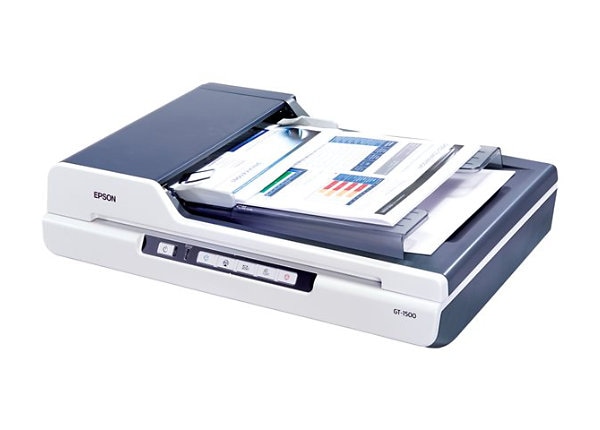
Epson WorkForce GT-1500 Scanner
Mfg # B11B190011
CDW # 1495435
| UNSPSC 43211711
Quick tech specs
- Epson WorkForce GT-1500 Color Document Scanner
- ADF 600 x 600 dpi
- Flatbed 1200 x 2400 dpi
- Hi-Speed USB 2.0

Know your gear
- Remarkable resolution (1200 x 2400 dpi)
- Greater productivity with scans up to 20 ppm
- Easy-to-use document management software
- High-capacity Automatic Document Feeder
- One-touch scanning
- Versatile scan sizes — 5.9x5.9 to 8.5x14
- ReadyScan™ LED technology – no warmup needed
- Earth-friendly LED technology — no mercury
The high-quality solution for affordable document scanning.
Get superior image quality and enhanced productivity from the WorkForce GT-1500 color document imaging scanner. This easy-to-use scanner offers the versatility you need to electronically archive important documents or share records with your workgroup. And, with 1200 x 2400 dpi resolution, it delivers truly amazing quality, so you can capture every detail all with easy, one-touch scanning.
This powerful performer makes it easy to scan stacks of records, applications and forms. Use the high-capacity Automatic Document Feeder to quickly scan a variety of sizes up to 8.5x14. The WorkForce GT-1500 speeds through scans up to 20 pages per minute, giving you more time to tackle other tasks. And, it not only offers greater productivity, it ensures more efficient operation. With innovative ReadyScan™ LED technology, there’s no warmup time required. Best of all, this earth-friendly LED technology does not include any mercury, and it reduces power consumption.
The smart choice for all your document imaging needs, the WorkForce GT-1500 includes a powerful software package. ABBYY® FineReader® Sprint Plus OCR allows you to create editable text from scans, while ScanSoft® PaperPort® makes it easy to organize all your documents. Use Epson Scan to create multi-page PDFs, or to copy or send scans as e-mail attachments. It’s all right at your fingertips with the WorkForce GT-1500, a powerful performer available at an amazing value.
Specifications
Scanner Type
Flatbed Color Document Imaging Scanner
Photoelectric Device
Color Epson MatrixCCD™ line sensor
Optical Resolution
Flatbed: 1200 x 2400 dpi
ADF: 600 x 600 dpi
Hardware Resolution
Flatbed: 1200 x 2400 dpi with Micro Step Drive technology
ADF: 600 x 600 dpi Micro Step Drive technology
Maximum Resolution
4800 dpi
Effective Pixels
10,200 x 14,040 (1200 dpi)
Color Hardware Bit Depth
48-bits per pixel internal/external
Grayscale Hardware Bit Depth
16-bits per pixel internal/external
Automatic Document Feeder
40-page Automatic Document Feeder; up to 20 ppm black and white, 12 ppm color (Letter-size, 200 dpi, Speed Priority Scanning mode); Thickness: 50-120 g/m2; Max. Size: 8.5” x 14”; Min. Size: 5.9” x 5.9”; Simplex scanning.
Optional Equipment
Buttons
6 buttons: Power, Start, Copy, E-Mail, PDF and Cancel
Maximum Read Area
Flatbed: 8.5" x 11.7"
ADF: 8.5" x 14"
Light Source
ReadyScan LED technology
Interface
Hi-Speed USB 2.0
Scanning Speed
Grayscale: 1.5 msec/line
(A4, Speed Priority Scanning mode, 300 dpi)
Reliability
Main Unit MCBF: 50,000 cycles
ADF MCBF: 50,000 cycles
Power Requirements
Voltage: AC 100 – 120V
Frequency: 50 – 60 Hz
Power Consumption: 12.5W
Ready: 5.5W
Sleep: 2.4W
Off: 0.4W
Physical Dimensions
Width: 18.5” (470 mm)
Depth: 12.5” (318 mm)
Height: 4.8” (121 mm)
Weight: 8.6 lbs. (3.9 kg)
Software
Epson Scan
ABBYY FineReader Sprint Plus OCR
Nuance ScanSoft PaperPort SE
- Greater productivity with scans up to 20 ppm
- Easy-to-use document management software
- High-capacity Automatic Document Feeder
- One-touch scanning
- Versatile scan sizes — 5.9x5.9 to 8.5x14
- ReadyScan™ LED technology – no warmup needed
- Earth-friendly LED technology — no mercury
The high-quality solution for affordable document scanning.
Get superior image quality and enhanced productivity from the WorkForce GT-1500 color document imaging scanner. This easy-to-use scanner offers the versatility you need to electronically archive important documents or share records with your workgroup. And, with 1200 x 2400 dpi resolution, it delivers truly amazing quality, so you can capture every detail all with easy, one-touch scanning.
This powerful performer makes it easy to scan stacks of records, applications and forms. Use the high-capacity Automatic Document Feeder to quickly scan a variety of sizes up to 8.5x14. The WorkForce GT-1500 speeds through scans up to 20 pages per minute, giving you more time to tackle other tasks. And, it not only offers greater productivity, it ensures more efficient operation. With innovative ReadyScan™ LED technology, there’s no warmup time required. Best of all, this earth-friendly LED technology does not include any mercury, and it reduces power consumption.
The smart choice for all your document imaging needs, the WorkForce GT-1500 includes a powerful software package. ABBYY® FineReader® Sprint Plus OCR allows you to create editable text from scans, while ScanSoft® PaperPort® makes it easy to organize all your documents. Use Epson Scan to create multi-page PDFs, or to copy or send scans as e-mail attachments. It’s all right at your fingertips with the WorkForce GT-1500, a powerful performer available at an amazing value.
Specifications
Scanner Type
Flatbed Color Document Imaging Scanner
Photoelectric Device
Color Epson MatrixCCD™ line sensor
Optical Resolution
Flatbed: 1200 x 2400 dpi
ADF: 600 x 600 dpi
Hardware Resolution
Flatbed: 1200 x 2400 dpi with Micro Step Drive technology
ADF: 600 x 600 dpi Micro Step Drive technology
Maximum Resolution
4800 dpi
Effective Pixels
10,200 x 14,040 (1200 dpi)
Color Hardware Bit Depth
48-bits per pixel internal/external
Grayscale Hardware Bit Depth
16-bits per pixel internal/external
Automatic Document Feeder
40-page Automatic Document Feeder; up to 20 ppm black and white, 12 ppm color (Letter-size, 200 dpi, Speed Priority Scanning mode); Thickness: 50-120 g/m2; Max. Size: 8.5” x 14”; Min. Size: 5.9” x 5.9”; Simplex scanning.
Optional Equipment
Buttons
6 buttons: Power, Start, Copy, E-Mail, PDF and Cancel
Maximum Read Area
Flatbed: 8.5" x 11.7"
ADF: 8.5" x 14"
Light Source
ReadyScan LED technology
Interface
Hi-Speed USB 2.0
Scanning Speed
Grayscale: 1.5 msec/line
(A4, Speed Priority Scanning mode, 300 dpi)
Reliability
Main Unit MCBF: 50,000 cycles
ADF MCBF: 50,000 cycles
Power Requirements
Voltage: AC 100 – 120V
Frequency: 50 – 60 Hz
Power Consumption: 12.5W
Ready: 5.5W
Sleep: 2.4W
Off: 0.4W
Physical Dimensions
Width: 18.5” (470 mm)
Depth: 12.5” (318 mm)
Height: 4.8” (121 mm)
Weight: 8.6 lbs. (3.9 kg)
Software
Epson Scan
ABBYY FineReader Sprint Plus OCR
Nuance ScanSoft PaperPort SE